
This content originally appeared on DEV Community and was authored by vasanthkumar
Do you ever want show data in table format to your App users in your mobile application.Now, it is easier with Flutter Widget DataTable().
DataTable will take DataColumn() list for table header and Datarow() list for table rows. And each DataRow will take the DataCell().
Example DataTable:
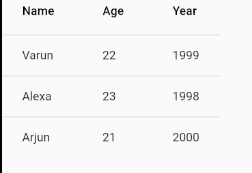
DataTable(columns: [
    DataColumn(
      label: Text("Name"),
    ),
    DataColumn(
      label: Text("Age"),
    ),
    DataColumn(
      label: Text("Year"),
    ),
  ], rows: [

    DataRow(cells: [
      DataCell(Text("Varun")),
      DataCell(Text("22")),
      DataCell(Text("1999")),
    ]),
    DataRow(cells: [
      DataCell(Text("Alexa")),
      DataCell(Text("23")),
      DataCell(Text("1998")),
    ]),
    DataRow(cells: [
      DataCell(Text("Arjun")),
      DataCell(Text("21")),
      DataCell(Text("2000")),
    ]),
  ]);
Anything that goes into a DataCell and DataColumn is a widget.Hence we can show anything in the table.
for eg: adding FlutterLogo() to DataColumn and all DataRows gives

 DataRow(cells: [
      DataCell(Text("Arjun")),
      DataCell(Text("21")),
      DataCell(Text("2000")),
      DataCell(FlutterLogo()),
    ]),
we can give option to edit the cell data to the user with onTap() function and we can indicate with showEditIcon:true
 DataCell(
        Text("21"),
        showEditIcon: true,
        onTap: () {},
      ),

we can also show data using map;
consider the data:
 var data = <Data>[
    Data("varun", "20", "2001"),
    Data("varun1", "21", "2000"),
    Data("varun2", "23", "1998"),
    Data("varun3", "26", "1995"),
  ];
then
DataTable(
    columns: [
      DataColumn(
        label: Text("Name"),
      ),
      DataColumn(
        label: Text("Age"),
      ),
      DataColumn(
        label: Text("Year"),
      ),
      DataColumn(label: FlutterLogo())
    ],
    rows: data.map((data) {
      return DataRow(cells: [
        DataCell(Text(data.name)),
        DataCell(Text(data.age)),
        DataCell(Text(data.year)),
        DataCell(FlutterLogo())
      ]);
    }).toList(),
  );
gives the output of

you can play with it codepen
This content originally appeared on DEV Community and was authored by vasanthkumar

vasanthkumar | Sciencx (2021-04-29T05:57:13+00:00) DataTable in Flutter. Retrieved from https://www.scien.cx/2021/04/29/datatable-in-flutter/
Please log in to upload a file.
There are no updates yet.
Click the Upload button above to add an update.