
This content originally appeared on HackerNoon and was authored by jude shaieb
Managing multiple Azure resources with custom domains can quickly become messy. Instead of creating separate CNAME records for each service, Azure Front Door offers a cleaner, more centralized approach. In this post, I’ll walk you through setting up Azure Front Door to manage multiple custom domains from a single endpoint.
What We’re Building
I recently set up a demo environment that showcases how Azure Front Door can streamline domain management. Here’s what I created:
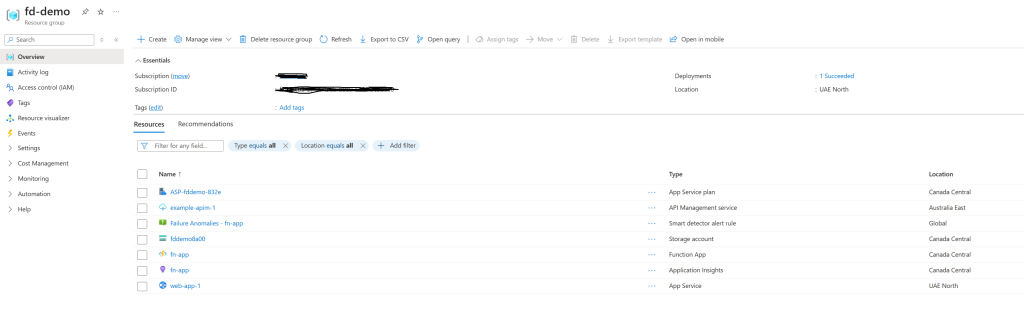
Azure Resources (Resource Group: “fd-demo”):
API Management:
example-apim-1Web App Service:
web-app-1Function App:
fn-appFront Door:
house-door
Custom Domains:
gateway.somedns.xyz→ API Managementweb.somedns.xyz→ Web App Servicefunction.somedns.xyz→ Function App
Step 1: Add Custom Domains to Front Door
First, I added all my custom domains in the Front Door’s Domains section:
gateway.somedns.xyzweb.somedns.xyzfunction.somedns.xyz
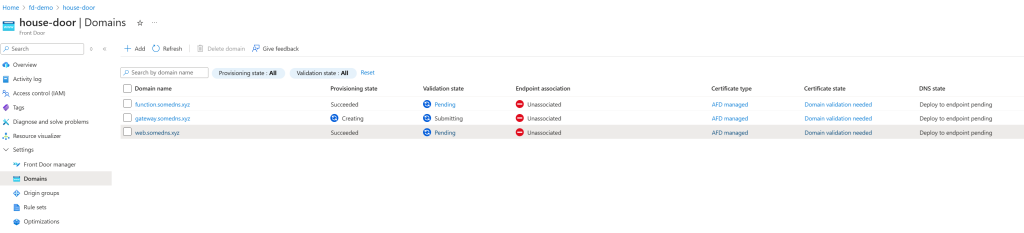
At this point, these domains are added but not yet validated or routed.
Step 2: Create Origin Groups
Next, I set up Origin Groups to define where traffic should go:
- “gateway-origin” → Added the API Management service (
example-apim-1) as the origin - “web-origin” → Added the Web App Service (
web-app-1) as the origin - “function-origin” → Added the Function App (
fn-app) as the origin
Think of origin groups as containers that hold your actual Azure resources.
Step 3: Configure Routes
In the Front Door Manager section, under my main Front Door endpoint (house-door-chfpb7buavcdaafp.a01.azurefd.net), I created routes to connect domains with their respective origin groups:
- “gateway-route” →
gateway.somedns.xyz→ gateway-origin - “web-route” →
web.somedns.xyz→ web-origin - “backend-route” →
function.somedns.xyz→ function-origin
Now Azure knows which domain should route to which service.Note: you can add more endpoints other than the default one and then add your routes.
Step 4: Update DNS Records
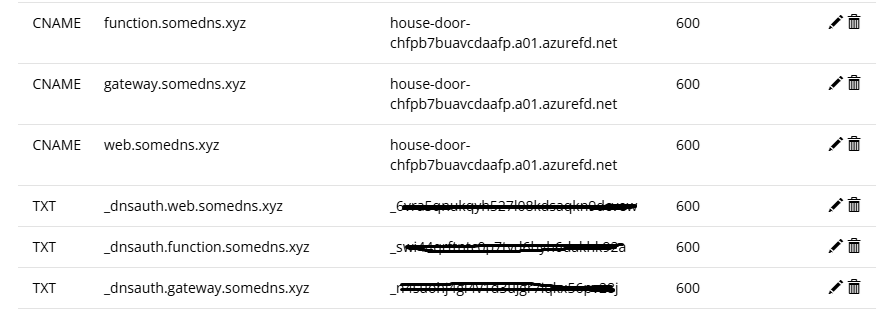
Here’s where the magic happens. Instead of creating separate CNAME records for each Azure service, I only needed to add one CNAME record in my domain registrar (Porkbun):
gateway.somedns.xyz    CNAME    house-door-chfpb7buavcdaafp.a01.azurefd.net
web.somedns.xyz        CNAME    house-door-chfpb7buavcdaafp.a01.azurefd.net
function.somedns.xyz   CNAME    house-door-chfpb7buavcdaafp.a01.azurefd.net
Pro tip: You can verify DNS propagation using dnschecker.org to make sure your records are live worldwide.
Step 5: Domain Validation with TXT Records
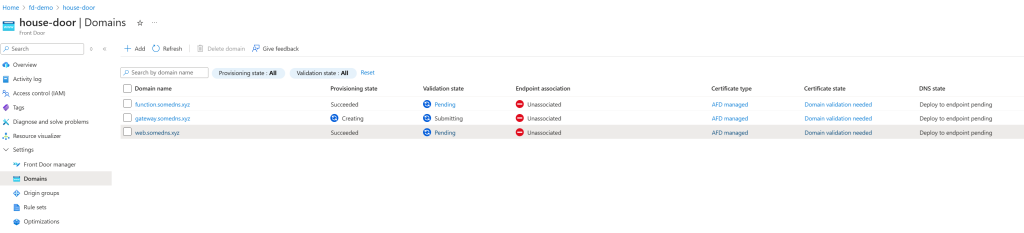
Back in Azure, each domain will show a “Pending” validation status. For each domain:
Click the validation link
Copy the Azure-generated TXT record
Add it to your domain registrar
Wait 5-60 minutes for validation to complete
The TXT records look something like:
_dnsauth.gateway.somedns.xyz TXT "generated-validation-string"
Here is an example of how the records should look like in your domain registrar:
Step 6: Test Your Setup
Once validation is complete, all pending domains should be approved

and all routes verified:
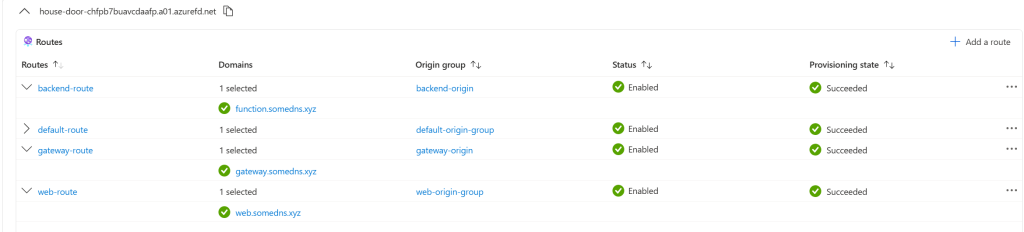
test each URL:
https://gateway.somedns.xyz→ Should hit your API Managementhttps://web.somedns.xyz→ Should hit your Web App Servicehttps://function.somedns.xyz→ Should hit your Function App

Why This Approach:
Before Front Door:
- Separate CNAME records for each Azure service
- Multiple SSL certificates to manage
- Limited traffic control and routing options
- Harder to implement global rules
With Front Door:
- Single CNAME endpoint for all domains
- Centralized SSL certificate management
- Advanced routing, caching, and security rules
- Better performance with global edge locations
- Cleaner DNS management
Conclusion
Azure Front Door transforms domain management from a scattered approach to a centralized one. Instead of juggling multiple DNS records and configurations, you get a single point of control for all your domains and traffic routing.
This setup gives you a solid foundation for adding more advanced features like custom routing rules, caching policies, and security configurations—all managed from one place.
\
This content originally appeared on HackerNoon and was authored by jude shaieb

jude shaieb | Sciencx (2025-10-17T05:46:13+00:00) Simplifying Domain Management with Azure Front Door: A Step-by-Step Guide. Retrieved from https://www.scien.cx/2025/10/17/simplifying-domain-management-with-azure-front-door-a-step-by-step-guide/
Please log in to upload a file.
There are no updates yet.
Click the Upload button above to add an update.