
This content originally appeared on DEV Community and was authored by Jones Zachariah Noel
Step-Functions has enabled endless serverless orchestrations with the 200+ SDK integrations.
In this blog-post we will look into a simple DynamoDB operations QUERY and PUTITEM.
Step Functions workflow
In this workflow, we will use states which integrates with DynamoDB SDK APIs.

{
  "Comment": "A description of my state machine",
  "StartAt": "CheckIfUserExists",
  "States": {
    "CheckIfUserExists": {
      "Type": "Task",
      "Parameters": {
        "TableName": "UsersDemo",
        "IndexName": "email_id-index",
        "KeyConditionExpression": "email_id = :email_id",
        "ExpressionAttributeValues": {
          ":email_id": {
            "S.$": "$.email"
          }
        }
      },
      "Resource": "arn:aws:states:::aws-sdk:dynamodb:query",
      "Next": "Choice",
      "ResultPath": "$.checkIfUserExists"
    },
    "Choice": {
      "Type": "Choice",
      "Choices": [
        {
          "Variable": "$.checkIfUserExists.Count",
          "NumericEquals": 0,
          "Next": "CreateUserOnDynamoDB"
        }
      ],
      "Default": "Pass"
    },
    "CreateUserOnDynamoDB": {
      "Type": "Task",
      "Resource": "arn:aws:states:::dynamodb:putItem",
      "Parameters": {
        "TableName": "UsersDemo",
        "Item": {
          "pk": {
            "S.$": "$.id"
          },
          "email_id": {
            "S.$": "$.email"
          }
        }
      },
      "ResultPath": "$.dynamodbPut",
      "End": true
    },
    "Pass": {
      "Type": "Pass",
      "End": true,
      "Result": {},
      "ResultPath": "$.response"
    }
  }
}
In the first step, we will do a DynamoDB query with an Index.

The JSON definition shows DynamoDB query API input JSON mapping to the email which is passed as an input. The SDK integration makes it simple in-terms of how the SDK API expects parameters -
{
  "TableName": "UsersDemo",
  "IndexName": "email_id-index",
  "KeyConditionExpression": "email_id = :email_id",
  "ExpressionAttributeValues": {
    ":email_id": {
      "S.$": "$.email"
    }
  }
}
In this you can see that API parameter is same as how you would use in your application code, just that the value of email_id in ExpressionAttributeValues is taken from StepFunctions invocation event.
On the query response, it returns the structure how it returns with SDK integration with application code, with a JSON object which has Count and Items.

With the response, you can check if Count is equal to 0 or not, if it is 0, that means there is no item on DynamoDB with the email_id which was sent as input. Based on this there is a StepFunction choice defined to transition into CreateUserOnDynamoDB step only if Count == 0 otherwise pass the state to end.
Whenever the Count==0, the state transitions into another DynamoDB action based step where PUT API of DynamoDB is integrated with StepFunctions and DynamoDB SDK integration.

In this step too, the SDK parameters for put is used with the JSON values of id and email_id taken from the StepFunctions event.
{
  "TableName": "UsersDemo",
  "Item": {
    "pk": {
      "S.$": "$.id"
    },
    "email_id": {
      "S.$": "$.email"
    }
  }
}
Once the DynamoDB put responds with success, the execution of StepFunctions is also successfully ended.
Note : Whenever in the SDK API parameters which are fetching the details from either previous step's response or the event JSON itself, the attribute should be suffixed with .$ and the variable name from the JSON prefixed with $.
Workflow executions
Scenario 1 : When user email doesn't exists.
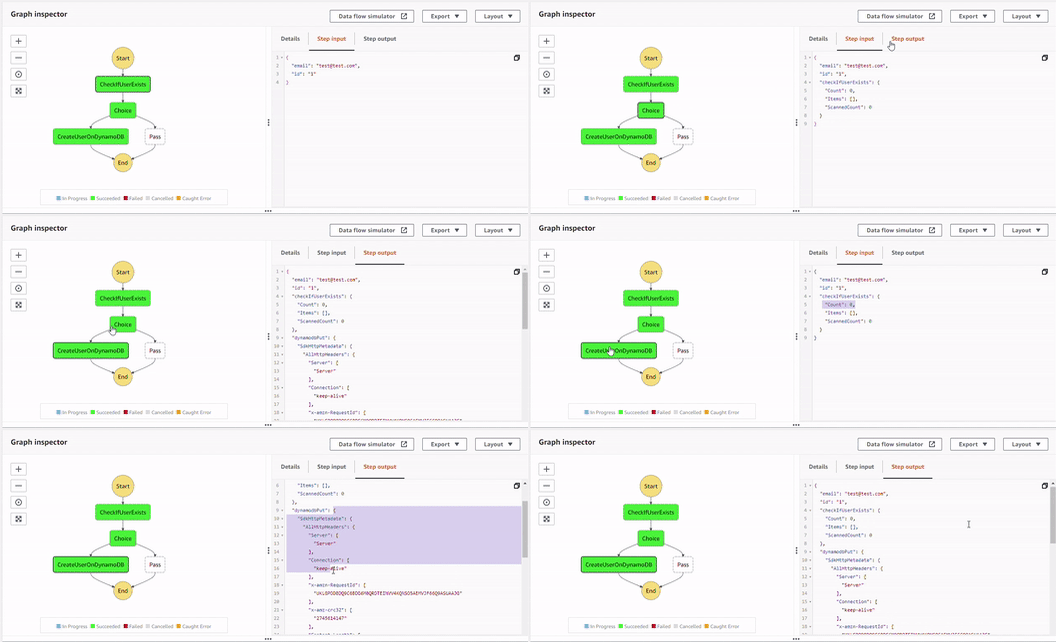
The CheckIfUserExists of DynamoDBqueryreturns the response withCount = 0and thus satisfying the choice condition and then DynamoDBputoperation inCreateUserOnDynamoDBthe step takes input from previous step and also the StepFunctions invocation event and with successfulputoperation returns the DynamoDB response too.Scenario 2 : When user email exists.

The CheckIfUserExists of DynamoDBqueryreturns the response withCount = 1and also the item inItems. With this input to the choice, it fails the choice condition and passes the flow to end.
Conclusion
With DynamoDB SDK integration that is supported by StepFunctions, it makes it easier for develops to construct their workflows and with minimal application coding, build your workflows and get the records created and queried from DynamoDB.
This content originally appeared on DEV Community and was authored by Jones Zachariah Noel

Jones Zachariah Noel | Sciencx (2022-02-06T14:22:56+00:00) Creating users on DynamoDB with Step Functions. Retrieved from https://www.scien.cx/2022/02/06/creating-users-on-dynamodb-with-step-functions/
Please log in to upload a file.
There are no updates yet.
Click the Upload button above to add an update.