
This content originally appeared on justmarkup and was authored by justmarkup
I attended a meeting this week where we talked about optimising the “web process” for an agency – Among other topics we also had a great discussion about browser support.
When working with clients you usually set up a contract, where you often define the browser support for the project. From my experience, this often reads as “We support the latest 2 versions of all popular desktop and mobile browsers” or “We support IE9 and above, Chrome 36 and above, iOS6 and above, etc.”
While this sounds reasonable at a first glance you will have a hard time if you find out that a special feature won’t work in some of the stated browsers and you have to explain that to your client. This can happen quite often, for example, some features/modules are not fully defined at the start of a project and may require a technology some of the browsers don’t support.
Browser support by feature #
Instead of stating browser support for the whole site I think it makes more sense to define browser support for every feature/module.
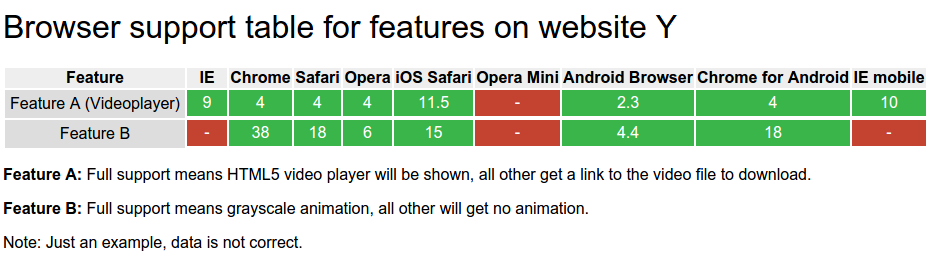
Here is an example I put on jsbin to show what this might look like:
Do find out the browser support for a module you can use caniuse.com. Search for all front-end technologies you need and collect the data in a table/spreadsheet.
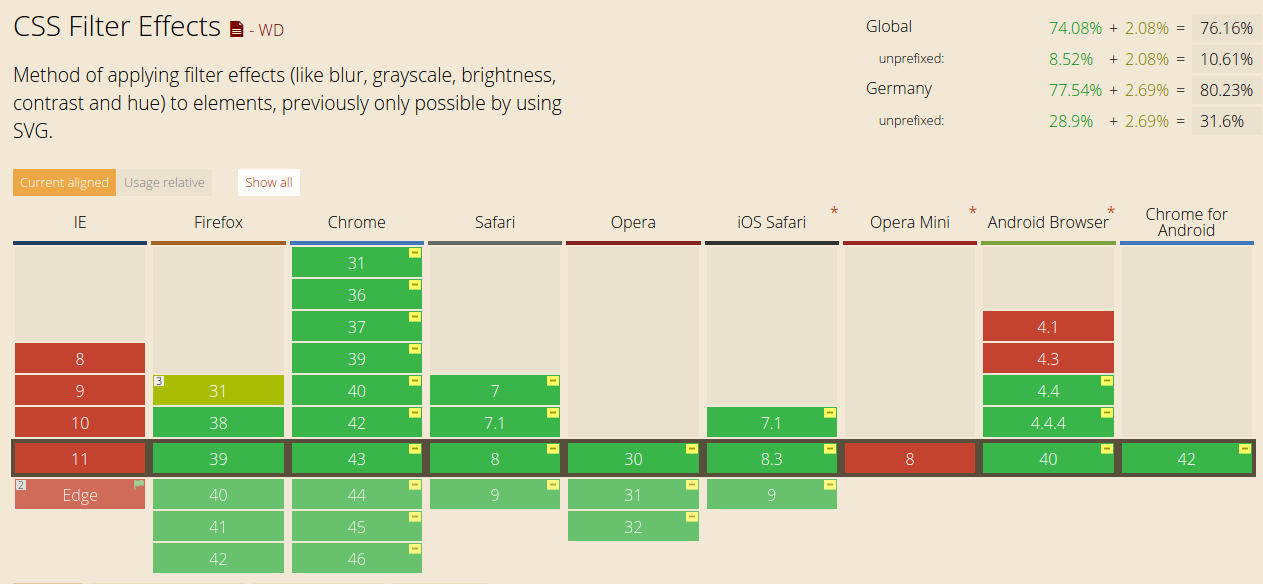
CSS filter effects support table from caniuse.com
This way, you have a good overview of browser support for all your modules and everybody involved with the project will have a handy reference. Furthermore, you can include notes describing what “full support” or “no support” means for a specific module. You can even go one step further and define multiple versions of a module and their support. If we take the video example, this could mean core function is a link to the video, enhanced version means HTML5 video player, enhanced enhanced version means full customized HTML5 player.
While I am fully aware that this may be hard to explain to clients I think it’s worth the time and will help everybody in the end.
Update: 13.07.2015
As Alexis Deveria points out it’s possible to search for multiple features at once on caniuse.com – If your module needs dom-range, mp3 and css zoom you can use this link and scroll down to summary to see support for all features.
What’s your approach of defining browser support for your projects? Let me know @justmarkup.
This content originally appeared on justmarkup and was authored by justmarkup

justmarkup | Sciencx (2015-07-09T13:03:14+00:00) Defining browser support. Retrieved from https://www.scien.cx/2015/07/09/defining-browser-support/
Please log in to upload a file.
There are no updates yet.
Click the Upload button above to add an update.