
This content originally appeared on DEV Community and was authored by Janos Vajda
If I want to answer concisely, then I can write only that: yes, we should.
But, of course, this topic is much more complicated because we are usually busy and cannot check out our dev tool's source code. Furthermore, developers are humans, so we can be lazy or think digging in a big codebase is useless and tiring.
I share a story that happened about 7-8 years ago, and it might be able to explain what I exactly mean.
I usually start to work very early (between 2 am and 5 am), so before the Covid era, I quite often was that person who opened the office.
Once, I sat in the office and watched a Linux kernel's source code as I tried to understand how its process scheduler works. I did not want to do with it anything. It just came to my mind, and I would have liked to know it a bit deeper. Also, looking at it was fun as that piece of code runs on a billion and billion different kinds of devices, which is amazing. I wanted to learn something from its code. So firstly, I investigated where it is in the kernel's code. When you try to find something in a huge codebase, this investigation is one of the useful things because, during this process, you can learn something new about the structure of the codebase, for instance.
When I found that file which seemed to be the scheduler's code, I went through it and tried to understand what it does. Of course, I did not understand it deeply enough, but It was a good adventure. The main thing for me was the learning. Learning something about that clever code, and also learning the history of that file. Who created its first version? When was created? How was changed? Why was changed? Is it still in the kernel or deprecated? And many more questions.
Once, after this, when one of my colleagues arrived at the office, we started to talk about totally other things, and suddenly I mentioned to him that the Linux source code is so beautiful, and I looked into it this one and that one. He smiled, but I saw on his face that he did not understand why I spent time on this weird thing. I presumed he thought it was wasting of time. He also might have thought I was crazy. Could be :)
Anyway, I enjoyed it, and I usually still do it. Yep, I am aware that we are different, so in my ex-colleague world, he was right. In that world, developers use their tools and do not care too much about how their tools, programming languages, frameworks work. We use them. But, I am in a different galaxy, and here knowing my tools is important to me. Not just because of the learning. I also want to give respect to those fantastic developers who created my tools. The source code created by them usually is fantastic, and digging these codebases a bit more deeply can improve my knowledge. But, also, we can find funny and surprising things in their source code. Anyway, I like to pull down my tools' source codes and try to understand them.
Ok, let's try to find some interesting examples.
I like the language-agnostic development paradigm, so I always try to use that programming language appropriate for a particular task. One of my favourite languages is JavaScript and TypeScript. I really love TypeScript, so if I have a new project, I usually try to use it. I know there are plenty of developers who do the same as TypeScript seems to be very popular. But the question here is: do we know TypeScript? I mean, yeah, of course, we know its syntax. We can keep telling all obvious facts about it: we can use interfaces in TypeScript so our core can be more generic and SOLID, we can encapsulate our classes properly and many more things. But do we know how TypeScript works? How does its codebase look like? How does it start when you type in your console: tsc --help, for example? Or what programming language is it written? Is its codebase fully tested? Do its developers follow the SOLID principle? I might be weird, but I want to know the answer to these questions, so this is why I cloned its code from GitHub, compiled it and investigated all answers I needed. It's not always easy but almost always fun. How can we do it? Honestly, there is no exact methodology for this because every single codebase is different. This is a learning mechanism and adventure. So, yep let's see TypeScript as an example.
I presume you have Node and NPM installed in your machine. If you have, then please, open your console and clone TypeScript's repository:
git clone https://github.com/microsoft/TypeScript.git
If you do not have Gulp, you should install it as they use Gulp for the building process. So, firstly change the directory:
cd TypeScript
and install Gulp (I installed it with -g parameter, which installs it globally.)
npm install -g gulp
and after this, you can run;
npm install
Okay, let's try to find which part of the code handles the --help parameter. This sounds very trivial, but it can be a good starting point for getting more familiar with the code.
Let's open the source code in your preferred editor and try to find it. We can do it in many ways. We can search the string "--help" (we can bet it won't work :)), we can search for a "help" word without dashes (it won't work either as it would provide too many search results). How can we do it? I would recommend another way. Firstly, I would build the application and try to run it, and after this, we should be able to do debugging. TypeScript is written in TypeScript, and we can build it by Gulp. So you can run this command:
gulp local
This builds the app into a built/local directory. So, if you run it and the building process is done, then you should be able to run this command:
node ./built/local/tsc.js --help
Okay, so now we can try to add some console.log to src/tsc/tsc.ts, and we will see what is happening. Of course, It does not work. We will get an error message during the building process.
error TS2584: Cannot find name 'console'. Do you need to change your target library? Try changing the
libcompiler option to include 'dom'.
I did not install @types/node (npm install @types/node), so I cannot find console definitions. Moreover, using console logs is not the most sophisticated way how can debug TypeScript code. Instead of using console logs, we should use a debugger in our source code editor.
Let's have a look at this debugging process now. So how can we debug the TypeScript source code?
I use VS Code for TypeScript code editing, and it has its own Run & Debug function. Please, open your editor, and open the TypeScript directory in it.
So, we want to debug the tsc command's --help parameter. Firstly, you need to create or edit the .vscode\launch.json file. I share that file I created for this example:
{
    "version": "0.1.0",
    "configurations": [
      {
        "type": "node",
        "protocol": "inspector",
        "request": "launch",
        "name": "Testing of debugging",
        "program": "${workspaceFolder}/built/local/tsc.js",
        "args": [
          "--help"
        ],
        "env": {
          "NODE_ENV": "develop"
        },
        "sourceMaps": true,
        "smartStep": true
      }
    ]
  }
Now you should open src\tsc\tsc.ts file and go to this line:
ts.executeCommandLine(ts.sys, ts.noop, ts.sys.args);
Ok, now you can add a breaking point to this line, and you can step into the next operation with the debug toolbar's "Step into" button. You can see this on the next two screenshots.
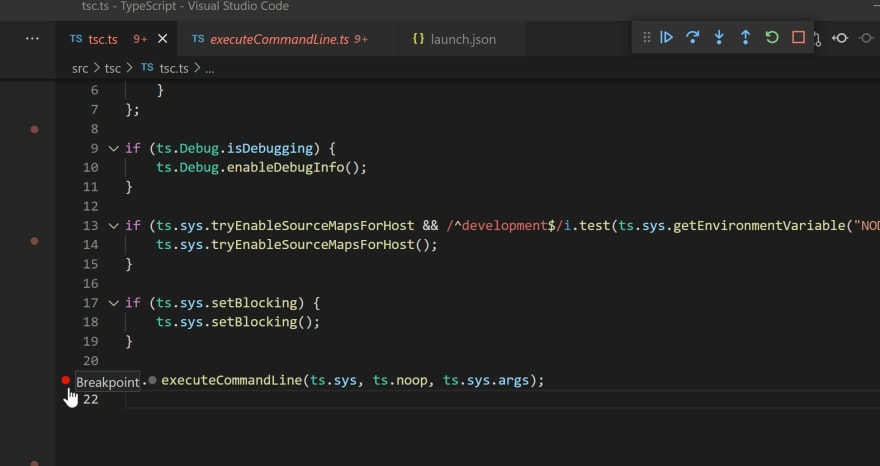

If you hover over your mouse pointer on any variable, it shows you the current value of the variable.

You can easily investigate what happens with the --help parameter or any other parameter when you run the tsc command. Is it easy and super useful, I think.
Anyway, at this point in the article, we can say that we learnt something new. I reckon this is a fun learning process. We just opened the TypeScript source code and have not even looked at any real code; despite this, you have learned something new: how can you debug TypeScript code. This is why I do the same thing. I can learn new things, and also I am getting more familiar with those developer tools I use every day.
Of course, this was just an example, as you might have already know how you can do TypeScript debugging, but this does not matter as I am sure you can find other things in TypeScript source code that can be a piece of new information for you. And this is why I like browsing my tools source codes. It is a big learning journey.
Let's take the other investigation. What happens in TypeScript if tsc runs a HelloWorld.ts?
I created a HelloWorld.ts out of the TypeScript directory:
cd ..
touch HelloWorld.ts
Open it in your editor, and its content should be something like this:
let message: string = 'Hello world!';
console.log(message);
I changed the .vscode/launch.json
{
    "version": "0.1.0",
    "configurations": [
      {
        "type": "node",
        "protocol": "inspector",
        "request": "launch",
        "name": "Testing of debugging",
        "program": "${workspaceFolder}/built/local/tsc.js",
        "args": [
          "../HelloWorld.ts"
        ],
        "env": {
          "NODE_ENV": "develop"
        },
        "sourceMaps": true,
        "smartStep": true
      }
    ]
  }
So, now you can see what is happening in TypeScript source code if you Start debugging and step into code.
If you click on the Run And Debug icon on VS Code, you can see the whole call stack, all used variables, and those scripts loaded.

Setup of debugging can always be a starting point if we want to be more familiar with any codebase; if it works, then we can check everything: structure, coding style, name conventions - everything. The other meaningful thing is looking at the project's unit tests and running them as they can tell us a lot of new information.
Browsing our tools/programming languages/frameworks source codes is useful, I think. These examples were minor things, but anyway, this is just for learning.
Thanks for reading this. Have a great day. :)
This content originally appeared on DEV Community and was authored by Janos Vajda

Janos Vajda | Sciencx (2021-05-08T01:41:23+00:00) Should we dig deeper into the development tools we use?. Retrieved from https://www.scien.cx/2021/05/08/should-we-dig-deeper-into-the-development-tools-we-use/
Please log in to upload a file.
There are no updates yet.
Click the Upload button above to add an update.