
This content originally appeared on Level Up Coding - Medium and was authored by Radhakishan Surwase
Unix signals are software interrupts that are sent to a program to indicate that some important event has occurred. The events can vary from user requests to illegal memory access errors. Some signals, such as the interrupt signal, indicate that a user has asked the program to do something, not in the usual control flow.

Dealing with the operating system signals is important for various use cases in applications. For example, we might want a server to gracefully shut down when it receives a SIGTERM, or a command-line tool to stop processing input if it receives a SIGINT. Here’s how to handle signals in Go with channels.
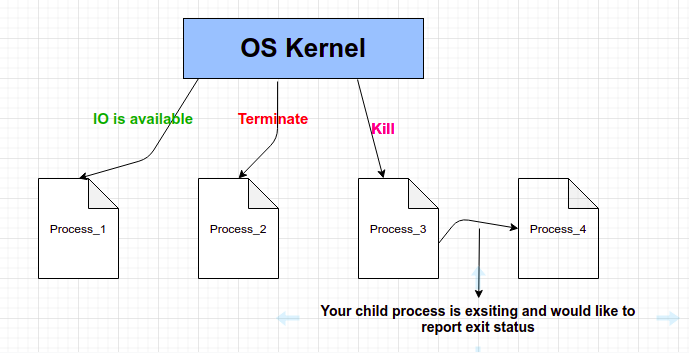
In this article, we will go through how Unix signals are handled using Golang’s os/signalpackage.
os/signal package
Golang’s os/signal the package allows you to configure the behavior of your Golang program upon receiving certain types of UNIX signals. Most Linux/Unix-based programs will gladly die upon receiving a kill signal, but in case you want your program to intercept the signal first, perform some backup, flush data to disk, etc before dying, then you should use the os/signal package.
Types of signals
We are going to focus on asynchronous signals. They are not triggered by program errors but are instead sent from the kernel or from some other program.
- SIGHUP the signal is sent when a program loses its controlling terminal
- SIGINT the signal is sent when the user at the controlling terminal presses the interrupt character, which by default is ^C (Control-C)
- SIGQUIT the signal is sent when the user at the controlling terminal presses the quit character, which by default is ^\ (Control-Backslash)
- SIGTERM the signal is a generic signal used to cause program termination
Here is a simple Golang example on how to intercept the most common UNIX kill/terminate signals.
Note: Please read code comments for better understanding.
Run the above program by copying it on your local machine. I run my program with the name signal-controller. go. Following are the steps and my observations when I execute this on my Ubuntu machine.
- Terminal 1 — go build signal-controller.go
- Terminal 1 — ./signal-controller
On my machine, the PID of running binary was 451575.
- Terminal 2 — kill -SIGINT 451575
Terminal 1 - Output - "Signal interrupt triggered."
- Terminal 2 — kill -SIGHUP 451575
Terminal 1 - Output - "Signal hang up triggered."
- Terminal 2 — kill -SIGTERM 451575
Terminal 1 - Output - "Signal terminte triggered."
- Terminal 2 — kill -SIGQUIT 451575
Terminal 1 - Output - "Signal quit triggered."
Conclusion
Unix signal can be easily handled in Golang by using the os/signalpackage. We need to use a channel of type os.Signalto read signals. You can implement code to handle every type of Unix signal received by the program.
That’s all for now… Happy Learning ?
Handling Unix Signals In Golang was originally published in Level Up Coding on Medium, where people are continuing the conversation by highlighting and responding to this story.
This content originally appeared on Level Up Coding - Medium and was authored by Radhakishan Surwase

Radhakishan Surwase | Sciencx (2021-06-29T15:23:01+00:00) Handling Unix Signals In Golang. Retrieved from https://www.scien.cx/2021/06/29/handling-unix-signals-in-golang/
Please log in to upload a file.
There are no updates yet.
Click the Upload button above to add an update.