
This content originally appeared on DEV Community and was authored by Tien Nguyen
In this tutorial, I will show you way to build (Multiple) Image upload and Preview example with Web API/Rest API using Angular Material 12, FormData and Progress Bar.
Full Article: https://bezkoder.com/angular-material-12-image-upload-preview/
Overview
We will create an Angular Material 12 (Multiple) Image upload with Preview application in that user can:
- see the preview of images that will be uploaded
- see the upload process (percentage) of all uploading images
- view all uploaded images
- download image by clicking on the file name
Here are screenshots of our React App:
- Before upload:

- When Upload is done:
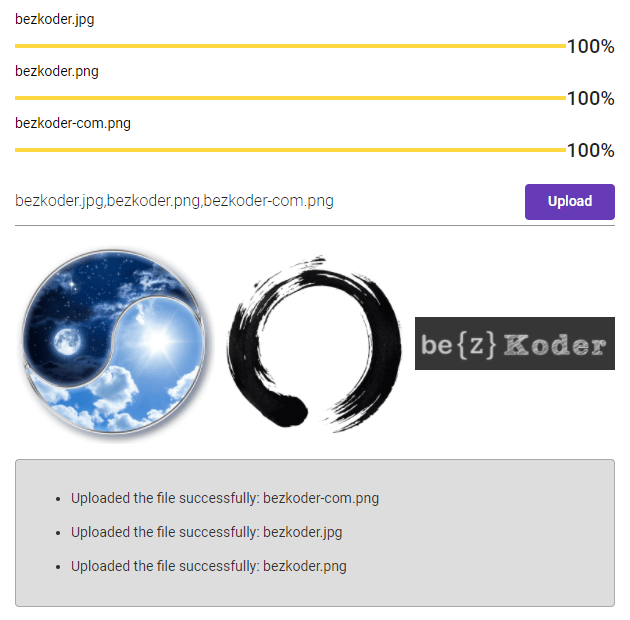
- List of Images Display with download Urls:

- Show status for each image upload:

Technology
- Angular 12
- RxJS 6
- Angular Material 12
Web API for Image Upload & Storage
Here are Rest APIs that we will use Axios to make HTTP requests:
| Methods | Urls | Actions |
|---|---|---|
| POST | /upload | upload a File |
| GET | /files | get List of Files (name & url) |
| GET | /files/[filename] | download a File |
You can find how to implement the Rest APIs Server at one of following posts:
- Node.js Express File Upload Rest API example
- Node.js Express File Upload to Google Cloud Storage example
- Spring Boot Multipart File upload (to static folder) example
Angular Material 12 App for Image upload with Preview

Let me explain it briefly.
- We import necessary library, components in app.module.ts.
- file-upload.service provides methods to save File and get Files from Rest Apis Server.
- upload-images.component contains upload multiple images form, preview, some progress bars, display list of images.
- app.component is the container that we embed all components.
- index.html for importing the Font and Icons.
For more steps and source code, please visit:
https://bezkoder.com/angular-material-12-image-upload-preview/
Further Reading
More Practice:
- Angular 12 + Spring Boot: File upload example
- Angular 12 + Node.js: File Upload example
- Angular 12 Login and Registration example with JWT & Web Api
- Angular 12 CRUD Application example with Web API
- Angular 12 Form Validation example (Reactive Forms)
- Using Bootstrap: Angular 12 Multiple Images Upload with Preview example
Serverless with Firebase:
Angular 12 Upload File to Firebase Storage example
This content originally appeared on DEV Community and was authored by Tien Nguyen

Tien Nguyen | Sciencx (2021-06-30T03:47:16+00:00) Angular Material 12 Image upload with Preview example. Retrieved from https://www.scien.cx/2021/06/30/angular-material-12-image-upload-with-preview-example/
Please log in to upload a file.
There are no updates yet.
Click the Upload button above to add an update.