
This content originally appeared on DEV Community and was authored by Hamsa H N
Say, you have a non-modal component like dropdown or the menu and I'm sure one thing you'd definitely need is to close/hide the content of the component when user clicks outside the component too, not just on the dropdown or menu button.
It is one of the common requirements and here's how its achieved:
- Add click eventListener to the parent div.
- Exclude the child div.
- Remove the click eventListner on component unmount.
1. Add click eventListener to the parent div
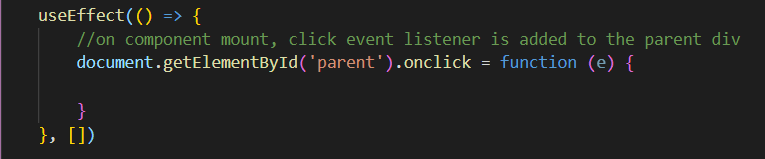
Assign a id to the parent and top-level child div element, if not already. On componentDidMount() of the child element, add a click event listener as shown in the below code.
2. Exclude the child div
Exclude the child component, otherwise we end up closing the dropdown/menuitems even when these items are clicked.
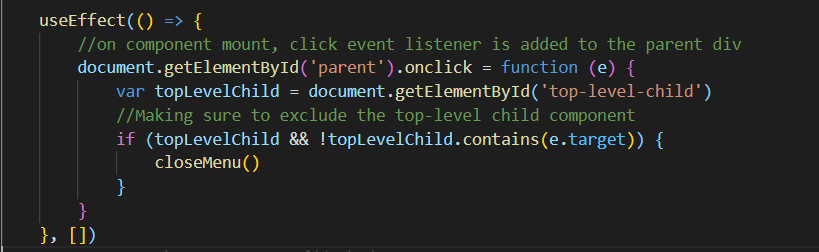
Make sure we use !topLevelChild.contains(e.target) and not topLevelChild !== e.target because all the nested child elements are also supposed to be excluded. Choosing the later works fine if there is only one child div element.
3. Remove the click eventListner on component unmount
An important step not to leave behind is removing the event listener when the child unmounts from the DOM, to avoid unnecessary addition of the event listners every time its expanded.

Happy coding:)
This content originally appeared on DEV Community and was authored by Hamsa H N

Hamsa H N | Sciencx (2021-09-07T18:08:48+00:00) Trigger an onClick event outside the child element, works for nested child components too.. Retrieved from https://www.scien.cx/2021/09/07/trigger-an-onclick-event-outside-the-child-element-works-for-nested-child-components-too/
Please log in to upload a file.
There are no updates yet.
Click the Upload button above to add an update.