
This content originally appeared on DEV Community and was authored by Shivam
Git vs GitHub is one of the things that beginners find tough to understand. So in order to understand their differences let's first look at them individually.
-
What is Git?
Git is a version control system for tracking changes in computer files. It is used to coordinate work among several people on a project and track progress over time. It is used for Source Code Management in software development.
A version control system is a system that records all the changes made to a file or set of files, so a specific version may be called later if needed. This helps in collaboration with all team members.
Advantages of using git:
- Git favors both programmer and non-technical users by keeping track of their project files.
- It allows multiple users to work together.
- Large projects can be handled effectively.
-
What is GitHub?
GitHub is a Git repository hosting service, which provides a web-based graphical interface.
GitHub helps every team member to work together on the project from anywhere and makes it easy for them to collaborate.
GIT VS GITHUB
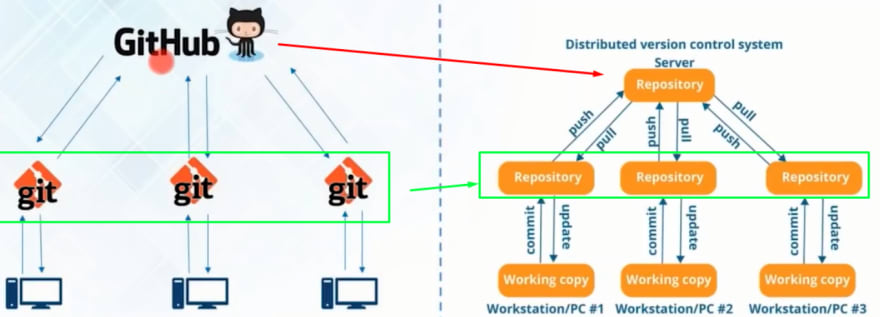
| Git | GitHub |
|---|---|
| Installed locally on the system. | Hosted on the cloud. |
| Git can be used offline and does not need an internet connection for use. | GitHub cannot be used offline and needs an internet connection. |
| Git can be used without GitHub. | GitHub cannot be used without Git. |
| Used for version control system and works as source code management in software development. | Used for centralized source code hosting. |
| Git has no GUI. | GitHub has GUI. |
| Code changes like commit, merge, etc. are done using commands from the command line. | Everything is done through a web-based interface. |
| Open source licensed. | Includes free and pay-for-use tiers. |
This content originally appeared on DEV Community and was authored by Shivam

Shivam | Sciencx (2022-06-14T07:20:15+00:00) Git VS GitHub. Retrieved from https://www.scien.cx/2022/06/14/git-vs-github/
Please log in to upload a file.
There are no updates yet.
Click the Upload button above to add an update.