
This content originally appeared on DEV Community 👩💻👨💻 and was authored by Enea Jahollari
“You should never use function calls on Angular templates!” — That’s what you will see all over the internet! And I’m here to prove to you that that’s not always the case!
The issue
Every time Angular change detection runs (from events, setTimeout, manual or anything else), everything on the template will run again with it, that’s also the case for function calls. Why does Angular do this? Because it needs to check what’s changed on the template in order to update it.
If the function does something heavy, it will impact the performance of the application, because the way Angular updates the view is synchronous, and it will have to wait for the function to finish and then update the view.
The “Use a pipe” solution
The solution we’ll mostly see is “Use a pipe”. This is recommended because the pipes in Angular templates are more performant. How so? Because Angular will re-run the transform method of the pipe only if the parameters we pass to it have changed.
Let’s prove it!
Let’s dig in the source code
In the new Angular compiler (Ivy), templates are compiled into instructions. Let’s take an example and see what it generates.
Here’s a component with a simple pipe.
And here’s the cleaned up generated code:
As we can see, in line 29, that’s where we see what Angular generates for the template code.
So, there are instructions for creating a div, adding text, adding a pipe, closing the div, creating a button and adding a listener to it … (Ivy’s cool stuff 🌿). We can also see the if/else statement. What it does is, it separates the view creation from view updating, the first if does the view creation and the second one is for the updating part. You can read more on that here.
We are interested for the line 33 and 43, because that’s where the pipe does the magic 🪄. In line 33 it registers the pipe in the template and the binding of the data happens in *line 43 *(in the update phase). We see that it interpolates some text and that text comes from **ɵɵpipeBind1() **function. Let’s see what that function does underneath 🕵️♂️.
](https://res.cloudinary.com/practicaldev/image/fetch/s--0P1D5DH5--/c_limit%2Cf_auto%2Cfl_progressive%2Cq_auto%2Cw_880/https://dev-to-uploads.s3.amazonaws.com/uploads/articles/m3etyxuefioddjavmjgc.png)
As we can see, the first three lines get the information for the pipe instance and then we have a return statement. In the return we have a check for isPure(), and it just checks if we have set pure field true or false in the pipe decorator.
If we have set the pure field to false it will directly return the pipeInstance.transform(v1) value, meaning Angular won’t do anything special with the pipe but just run the transform method again. It would be the same as using a method from the component class.
If the pipe is pure (as in our case), it will call the pureFunction1Internal helper function** and will pass some fields to it. Let’s see what pureFunction1Internal does underneath.
](https://res.cloudinary.com/practicaldev/image/fetch/s--NUUZSt1Z--/c_limit%2Cf_auto%2Cfl_progressive%2Cq_auto%2Cw_880/https://dev-to-uploads.s3.amazonaws.com/uploads/articles/wqr90pgf0lj0y6vsezu9.png)
We can see that it checks if the binding is updated in the bindingUpdated function, and if that’s true it will update the binding otherwise it will return the value of the pure function (the current value). Let’s see what check it does underneath 🕵️♂️.
](https://res.cloudinary.com/practicaldev/image/fetch/s--cO09daRG--/c_limit%2Cf_auto%2Cfl_progressive%2Cq_auto%2Cw_880/https://dev-to-uploads.s3.amazonaws.com/uploads/articles/2lfodpmbx07qd1tbflgr.png)
So, what it really checks is if the old value is the same as the new value (using Object.is()). You will ask: what value is this? Nothing else than the parameter that we have passed to the pipe transform method.
It means that if none of the parameters of that method has changed, we’re good to go, we can return false and we won’t have to run the function again, we can just use the old value of the binding.
And that’s what we wanted to prove in the first place 🥳.
What does this mean for us?
It means that we can create a helper function that does the magic Angular does for us, without needing to use a pipe at all 😎.
Here’s the helper function, we’ll explain how it works below.
So, memo is a function that accepts a function as parameter and returns a result.
In line 6 we check if the function parameters have changed, that’s what hasDifferentArgs function helps with. It first checks if the length of the args has changed, if yes returns true, and then does an equality check (just like Angular does with pipes) of the parameters.
If the parameters have changed we call the function again with the new parameters and save its result, and if not, we return the old value.
How to use it?
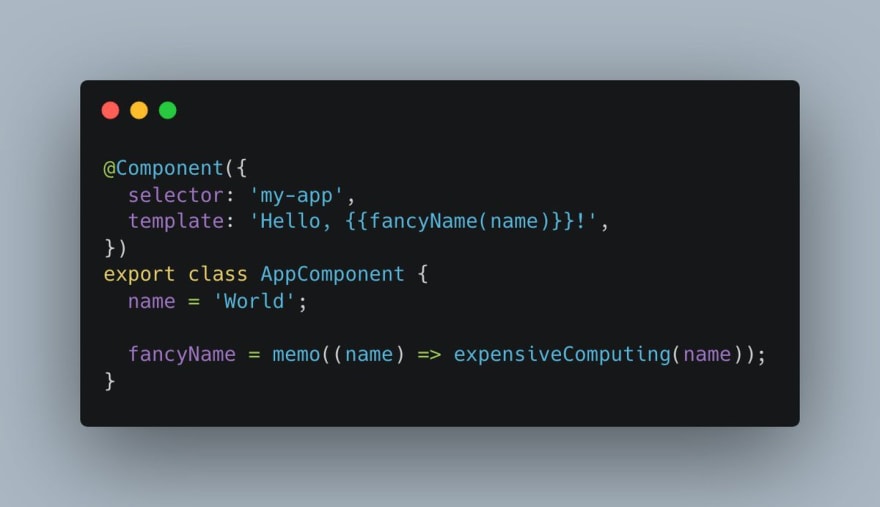
Here’s the example above converted to use the memo function.
Just like that! And yes, we are using a function in the template! And yes, it’s not a problem doing so! 😄
The idea and the inspiration for the blog post?
All thanks to a tweet from Pawel Kozlowski, an Angular team member. I just thought to dig more on the source code and explain it further.
 Pawel Kozlowski@pkozlowski_os
 I can often see Angular's pure pipes being used as a memoized function. While this works, it is _really_ easy to have a "memo" utility and use it like below (stackblitz: stackblitz.com/edit/angular-i…).
This is what a pure pipe does behind the scenes, really.17:29 PM - 30 May 2022


You’re interested in reactivity, signals, performance, change detection an other cool stuff like that? Go give Pawel a follow on Twitter, he is exploring the space and tweeting cool stuff about it!
While you’re on Twitter, give me a follow too at @Enea_Jahollari if want the** latest Angular news*, **videos, **podcasts, **updates, **RFCs, **pull requests* and so much more. Give me a follow on dev.to if you liked this article and want to see more like this!
Thank you for reading!
This content originally appeared on DEV Community 👩💻👨💻 and was authored by Enea Jahollari

Enea Jahollari | Sciencx (2022-09-28T15:39:15+00:00) It’s ok to use function calls in Angular templates!. Retrieved from https://www.scien.cx/2022/09/28/its-ok-to-use-function-calls-in-angular-templates/
Please log in to upload a file.
There are no updates yet.
Click the Upload button above to add an update.