
This content originally appeared on Bits and Pieces - Medium and was authored by Gulsah
As build system tools such as Nx and Turborepo are getting more recognition, more companies are switching their project structures to consist of monorepos. Depending on the technology stack, several factors may have driven this approach. Our main motivations were to manage direct relationships between projects and to standardise dependency versions.
If you want to learn more about monorepos, check the Journey of a Frontend Monorepo article.
In this brief story, we’ll give you some insights into our journey of moving a project repository inside a monorepo.

1. Importing the project to Monorepo with Lerna and Git
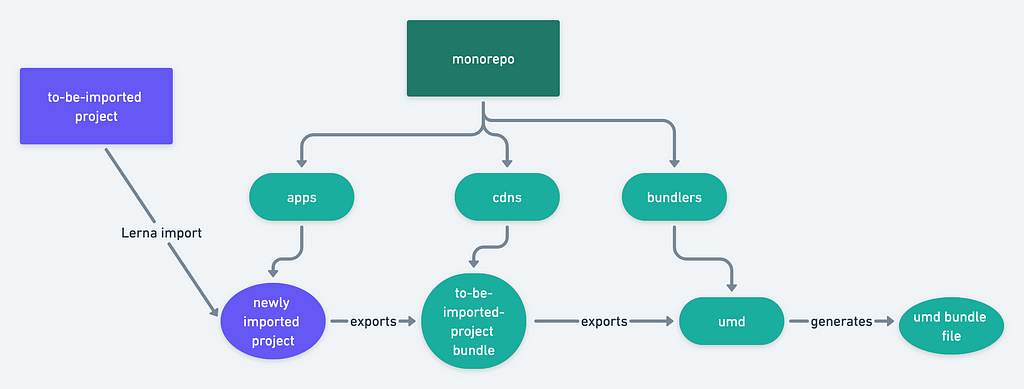
One of the most essential challenges we’ve focused on while moving a project repository inside a monorepo was to preserve the commit history. The easiest way to do this is to make use of the import command that Lerna, another popular build system tool, has.
Before actually starting the import process with Lerna, we wanted to make sure the migrated project would work properly on our monorepo system. This is because we didn’t want to put the current developments on hold and lose any time in the migration process. Or simply put, we didn’t want to get in the way of the developers who were still working on the project. To test it, we created a branch and simply hard copied the project folder from its own repo to the monorepo and manually fixed the problems that we encountered. (dependency versions etc.) After we made sure everything was working properly, we decided that it was time to migrate with Lerna. First, we created another branch and made sure it was up to date with the master branch.
pnpx lerna import {rootPath} -flatten -preserve-commit -dest={destinationPath}
After that, we ran the above Lerna import command and moved the project to the monorepo. There were still some issues that we had to fix as I mentioned before. In order to overcome these issues we used git’s cherry-pick to move the migration commits from the hard-copied branch, and this is where our failures began.
2. Losing a part of the commit history due to a simple mistake
After we created a new branch for the Lerna import process, we made sure it is up to date but we didn’t do anything about our hard-copied branch and after using cherry-pick, we lost 20 commits because that branch was 20 commits behind. (thank god there were only 20!) We had to manually transfer those commits. During this migration process, we had to learn to double check every single detail, especially when the time is past 5 pm. It cost us blood, sweat and tears; and a cold shoulder from the authors of those 20 commits.

3. Using Rollup to configure the new project’s bundle
It is usual for monorepo projects to include libraries or umd bundles. Importing these files from bundled modules is required to reduce total bundle size or increase performance. There are other tools for accomplishing this, however Rollup makes it quite simple in a JavaScript environment. As previously said, our monorepo already had a CDN infrastructure, however our newly migrated project was not compatible with it. Fortunately, this issue did not block our development process, and we jumped right into it. However, we ran into some issues along the way. It’s because our transferred project’s to-be-umd bundle was far too dependent on the project’s library. That’s why we ROLLED IT UP and created common functions and utilities for use in our umd bundle. With this arrangement, we’ve seen a great decrease in our bundle size followed by a better performance score.
4. The advantages of Nx and how we make use of them
There are a lot of advantages that come with the Nx build system while working with monorepos. The most important one is how the build times are optimized with its caching system. That is the main reason we have Nx in our technology stack. When working in a monorepo, it is quite likely that a single project has many dependent other projects. This is where Nx comes to play. You don’t have to wait for all of the dependent projects to build from scratch while making an update on a single project unless they also have incoming changes. If the dependent projects have not received any updates, it retrieves the last computation hash and uses it.
💡 As an aside, it’s worth bearing in mind that while monorepos are great for creating a more maintainable, scalable, and efficient version of your app, they come with the caveat of messy dependency management. If you use Bit though, the process becomes infinitely more streamlined as within a Bit Workspace, you don’t need to tell npm, pnpm, or yarn which component dependencies need to be installed to, nor if its a dev or prod dependency. Bit dynamically generates package.json files for each, and can handle this for you painlessly. Find out more about this here.
As developers that have recently joined the Frontend Architecture Team, here at Jotform, these were our insights into what we’ve learned on our first task. If you want to learn more about our company’s developer stories, stay tuned.
Co-author: Eray Aydın
From monolithic to composable software with Bit
Bit’s open-source tool help 250,000+ devs to build apps with components.
Turn any UI, feature, or page into a reusable component — and share it across your applications. It’s easier to collaborate and build faster.
Split apps into components to make app development easier, and enjoy the best experience for the workflows you want:
→ Micro-Frontends
→ Design System
→ Code-Sharing and reuse
→ Monorepo
Learn more
- How We Build Micro Frontends
- How we Build a Component Design System
- How to reuse React components across your projects
- 5 Ways to Build a React Monorepo
- How to Create a Composable React App with Bit
4 Things We’ve Learned While Migrating a Project Inside a Monorepo was originally published in Bits and Pieces on Medium, where people are continuing the conversation by highlighting and responding to this story.
This content originally appeared on Bits and Pieces - Medium and was authored by Gulsah

Gulsah | Sciencx (2023-02-16T12:22:57+00:00) 4 Things We’ve Learned While Migrating a Project Inside a Monorepo. Retrieved from https://www.scien.cx/2023/02/16/4-things-weve-learned-while-migrating-a-project-inside-a-monorepo/
Please log in to upload a file.
There are no updates yet.
Click the Upload button above to add an update.