
This content originally appeared on Level Up Coding - Medium and was authored by Ali Usmani
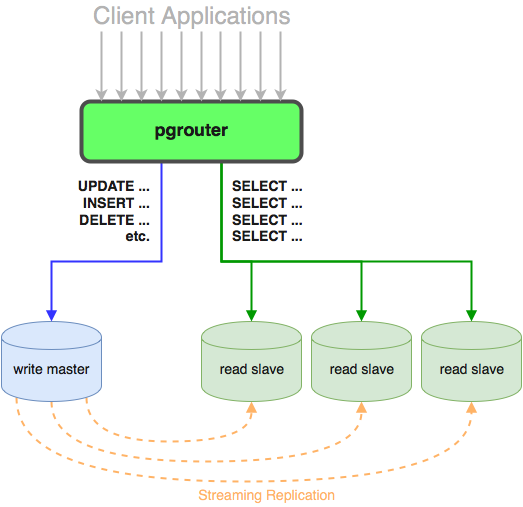
Why do we need master-slave relations in PostgreSQL?
The master-slave replication in PostgreSQL is used to improve the reliability and scalability of database systems. The main purposes are:
- High Availability: By having a slave database, it can take over in case the master database fails.
- Load Balancing: The read requests can be sent to the slave database to reduce the load on the master database.
- Data Backup: The slave database can be used as a backup in case the master database is lost or corrupted.
- Data Analysis: The slave database can be used to run analytics or reports without affecting the performance of the master database.
Overall, the master-slave replication in PostgreSQL helps to ensure that the data is available, reliable, and scalable for a variety of use cases.
Networking of Machine
To reduce latency, I connect all of my devices to the same network.
Application Server        -  172.16.10.191
Master PostgreSQL Server  -  172.16.10.220
Slave  PostgreSQL Server  -  172.16.10.119
PostgreSQL Installation Follow
We will install PostgreSQL on both the master and slave servers. For this, I’m using PostgreSQL 12. Follow the same installation methods as listed below for both systems (master and slave).
sudo apt -y update
sudo apt -y install nano wget
We must import the GPG key and install the PostgreSQL 12 repository on our Ubuntu machine. To accomplish this, use the commands listed below;
wget --quiet -O - https://www.postgresql.org/media/keys/ACCC4CF8.asc | sudo apt-key add -
Add the repository contents to your Ubuntu 18.04 or 16.04 system after importing the GPG key.
echo "deb http://apt.postgresql.org/pub/repos/apt/ `lsb_release -cs`-pgdg main" |sudo tee /etc/apt/sources.list.d/pgdg.list
After successfully adding the repository, update the package list and install PostgreSQL 12 server and client packages on your Ubuntu 18.04 / Ubuntu 16.04 Linux system.
sudo apt update
sudo apt -y install postgresql-12 postgresql-client-12
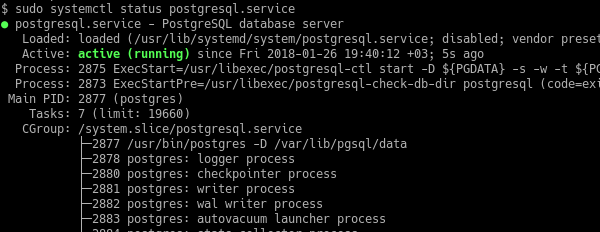
It will set up the PostgreSQL server and client on the machine. Following the start of service. We’ll see if the service is up and operating. After each system reboot, the PostgreSQL service should start.
sudo /etc/init.d/postgresql start
sudo /etc/init.d/postgresql status
sudo systemctl is-enabled postgresql
               OR
sudo service postgresql start
sudo service postgresql status
sudo systemctl is-enabled postgresql
Configuring Master Database (172.16.10.220)
We will establish a database user called “replication” who will perform the replication task.
sudo -i -u postgres
      OR
su postgres
psql
This will launch the psql software, from which you can create a new user.
postgres=# CREATE USER replication REPLICATION LOGIN CONNECTION LIMIT 1 ENCRYPTED PASSWORD 'replicationpa55word';
Please take a look at how I used to check the list of roles after creating the user.
\du

By performing the following command on the psql client, we can change the maximum number of connections allowed to the replication user.
postgres=# ALTER ROLE replication CONNECTION LIMIT -1;
This is now a stand-alone database. We need to update a certain configuration to make it the master of a database cluster. Add the following lines to the file ‘/etc/postgresql/12/main/postgresql.conf’.
listen_addresses = 'localhost,172.16.10.220'
wal_level = replica
max_wal_senders = 10
wal_keep_segments = 64
Note: Please replace "172.16.10.220" with the IP address of your master database.
For replication, the slave server requires authentication. Now add the following line to the file ‘/etc/postgresql/12/main/pg_hba.conf’
host replication replication 172.16.10.119/0 md5
Restart the PostgreSQL service and verify that it has started.
sudo /etc/init.d/postgresql restart
sudo /etc/init.d/postgresql status
                 OR
sudo service postgresql restart
sudo service postgresql status
We have completed the master server configuration, and our master server is now ready for replication.
Configuring Slave Database (172.16.10.119)
First, we must stop the PostgreSQL service on the slave server.
sudo /etc/init.d/postgresql stop
sudo /etc/init.d/postgresql status
                 OR
sudo service postgresql stop
sudo service postgresql status

Append the following lines to the file of “/etc/postgresql/12/main/postgresql.conf”
listen_addresses = 'localhost,172.16.10.119'
wal_level = replica
max_wal_senders = 10
wal_keep_segments = 64
hot_standby = on
Please replace “172.16.10.119" with the IP address of your slave database.
Now append the following line to the file “/etc/postgresql/12/main/pg_hba.conf”
host replication replication 172.16.10.220/0 md5
We should delete all PostgreSQL data directory files and directories.
cd /var/lib/postgresql/12/main/
sudo rm -rfv *
            OR
sudo rm -rfv * cd /var/lib/postgresql/12/main/
Now, run the following command to copy all data from the master database to the slave database.
sudo su postgres
pg_basebackup -h 172.16.10.220 -U replication -p 5432 -D /var/lib/postgresql/12/main/  -Fp -Xs -P -R
While running the command, replace “172.16.10.220” with your master’s IP address.
It will prompt for a password for the “replication” PostgreSQL user, which is in our case “replicationpa55word”.
After it finishes the fetching, start the PostgreSQL service.
sudo /etc/init.d/postgresql start
               OR
sudo service postgresql start
sudo service postgresql status
Congratulations on the successful replication of your database.
What happens next after a successful master-slave relationship?
- Using PgBouncer for connection pooling.
- PostgreSQL failover implementation.
PostgreSQL Master-Slave Database Replication was originally published in Level Up Coding on Medium, where people are continuing the conversation by highlighting and responding to this story.
This content originally appeared on Level Up Coding - Medium and was authored by Ali Usmani

Ali Usmani | Sciencx (2025-01-07T17:30:38+00:00) PostgreSQL Master-Slave Database Replication. Retrieved from https://www.scien.cx/2025/01/07/postgresql-master-slave-database-replication/
Please log in to upload a file.
There are no updates yet.
Click the Upload button above to add an update.