
This content originally appeared on Level Up Coding - Medium and was authored by Jarek Orzel
Rate limiting controls the flow of requests to prevent system overloads. To draw an analogy, it’s like traffic lights managing the flow of vehicles to avoid congestion. The concept might seem straightforward, but implementing an effective rate-limiting strategy takes careful thought. Let’s explore what rate limiting is, why we need it, which algorithms work best for different scenarios, and what the architecture might look like.
Why do We Need a Rate Limiter?
Rate limiting is a strategy used to control traffic to or from a network, server, or service. It restricts how many requests a user or client can make within a specific time frame. When someone reaches the defined threshold, their subsequent requests are either delayed, dropped, or handled differently until the next time window begins.
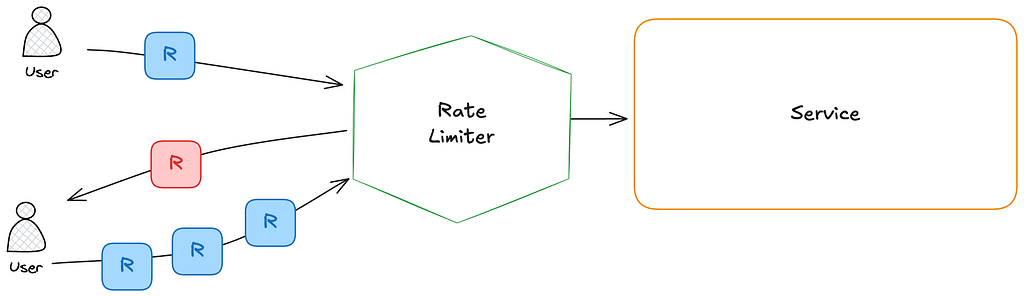
These are the most common reasons rate limiting is implemented:
- Prevent DDoS Attacks: Rate limiting helps protect against distributed denial-of-service attacks that could otherwise overwhelm your system.
- Reduce Costs: For services that rely on third-party APIs with usage-based pricing models, rate limiting can prevent unexpected costs by controlling the frequency of external calls.
- Prevent Service Overload: Even legitimate traffic can overwhelm your service during peak times. Rate limiting ensures your system remains responsive for all users by distributing resources evenly.
- Enforce Fair Usage: Rate limiting prevents any single user or client from monopolizing resources, ensuring fair distribution among all users.
Rate Limiting Algorithms
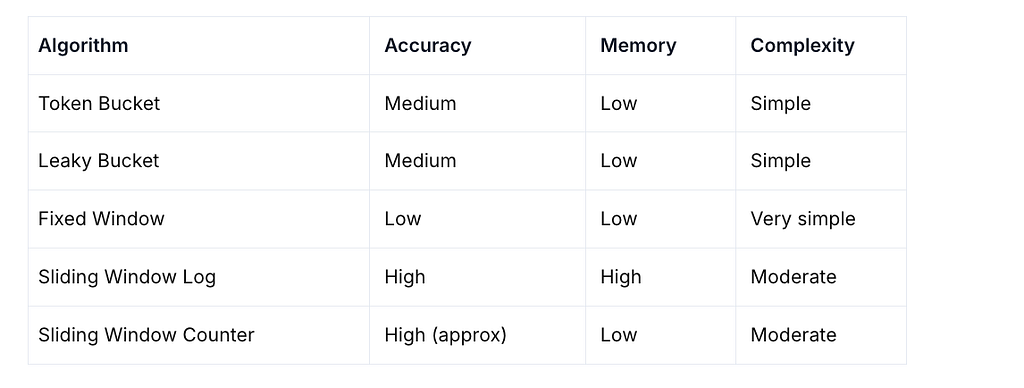
Depending on our requirements, we can choose different implementations of rate-limiting. The main aspects to consider are accuracy, resource consumption, and how easy it is to implement. Based on that, here are the five most popular algorithms.
Token Bucket
The token bucket is a container with a predefined capacity. Tokens are added to the bucket at a fixed rate over time. Once the bucket is full, additional tokens are discarded. Each incoming request consumes one token. If there are enough tokens in the bucket, a token is taken and the request is allowed. If there are no tokens available, the request is dropped.
import time
from threading import Lock

class TokenBucket:
    """
    A simple implementation of the Token Bucket algorithm for rate limiting.
    This class allows you to control the rate of requests or actions by
    limiting the number of tokens that can be consumed over time.
    The bucket fills at a specified rate, and tokens can be consumed
    when needed. If there are not enough tokens available, the request
    will be denied until more tokens are added to the bucket.
    """
    def __init__(self, rate: float, capacity: int):
        """
        :param rate: Tokens added per second
        :param capacity: Maximum number of tokens in the bucket
        """
        self.rate = rate
        self.capacity = capacity
        self.tokens = capacity
        self.timestamp = time.time()
        self.lock = Lock()

    def _add_tokens(self):
        """
        Add tokens to the bucket based on the elapsed time since the last update.
        This method is called internally and should not be called directly.
        We do not need periodic loop, and update bucket only when it is needed.
        """
        now = time.time()
        elapsed = now - self.timestamp
        new_tokens = elapsed * self.rate
        self.tokens = min(self.capacity, self.tokens + new_tokens)
        self.timestamp = now

    def consume(self, tokens: int = 1) -> bool:
        """
        Attempt to consume tokens from the bucket.
        :param tokens: Number of tokens to consume
        :return: True if tokens were consumed, False otherwise
        """
        with self.lock:
            self._add_tokens()
            if self.tokens >= tokens:
                self.tokens -= tokens
                return True
            return False
Leaky Bucket
The leaky bucket algorithm is similar to the token bucket but with a key difference: requests are processed at a fixed rate, regardless of the incoming request rate. It’s typically implemented using a first-in-first-out (FIFO) queue. Incoming requests are added to the queue, and they “leak” out at a steady pace. If the queue is full, additional requests are dropped.
Unlike the token bucket, which allows for short bursts of traffic as long as there are tokens available, the leaky bucket enforces a constant output rate, making it better suited for smoothing out traffic over time.
import time
import threading

class LeakyBucket:
    """
    Leaky bucket rate limiter: allows requests at a fixed leak rate.
    If the bucket is full, incoming requests are rejected.
    """
    def __init__(self, rate: float, capacity: int):
        """
        :param rate: Leak rate (requests per second)
        :param capacity: Max number of requests the bucket can hold
        """
        self.rate = rate  # leak rate in requests per second
        self.capacity = capacity
        self.queue = 0
        self.last_check = time.monotonic()
        self.lock = threading.Lock()

    def _leak(self):
        now = time.monotonic()
        elapsed = now - self.last_check
        leaked = elapsed * self.rate
        self.queue = max(0, self.queue - leaked)
        self.last_check = now

    def consume(self, tokens: int = 1) -> bool:
        """
        Try to add tokens to the bucket.
        :param tokens: Number of tokens to add (default: 1)
        :return: True if allowed, False if rejected
        """
        with self.lock:
            self._leak()
            if self.queue + tokens <= self.capacity:
                self.queue += tokens
                return True
            else:
                return False
Fixed Window Counter
This approach divides the timeline into fixed periods (or windows), each with an associated counter. You allow a certain number of requests within each window, and once the limit is reached, additional requests are rejected until the next period begins.
While simple to implement, this method can lead to traffic spikes at the edges of windows — for example, if many requests come in at the end of one window and more arrive immediately at the start of the next. This can momentarily exceed the intended rate limit.
import time
from threading import Lock

class FixedWindow:
    """
    A simple implementation of the Fixed Window algorithm for rate limiting.
    This class allows you to control the rate of requests or actions by
    limiting the number of requests that can be made in a fixed time window.
    The window resets after the specified time period, allowing a new set
    of requests to be made.
    This algorithms allows burst traffic at the edge of the window.
    """
    def __init__(self, limit: int, window_size_seconds: int):
        """
        :param limit: Max number of allowed requests per window
        :param window_size_seconds: Time window in seconds
        """
        self.limit = limit
        self.window_size = window_size_seconds
        self.window_start = int(time.time() // self.window_size)
        self.counter = 0
        self.lock = Lock()

    def _get_current_window(self):
        return int(time.time() // self.window_size)

    def consume(self, tokens: int = 1) -> bool:
        """
        Attempt to consume 'tokens' from the bucket.
        Returns True if allowed, False otherwise.
        """
        with self.lock:
            current_window = self._get_current_window()
            if current_window != self.window_start:
                # New window: reset
                self.window_start = current_window
                self.counter = 0
            if self.counter + tokens <= self.limit:
                self.counter += tokens
                return True
            return False
Sliding Window Log
This method stores timestamps of each incoming request. Before processing a new request, it removes all outdated timestamps — those older than now - window_size. If the number of remaining timestamps exceeds the allowed limit, the request is dropped.
This approach offers high accuracy but comes with higher memory usage, as it needs to store and manage a log of request timestamps.
import time
from collections import deque
from threading import Lock

class SlidingWindowLog:
    """
    A simple implementation of the Sliding Window Log algorithm for rate limiting.
    The algorithm allows a request if the number of requests within
    the last `window_size_seconds` is below the `limit`.
    Provides finer-grained control than Fixed Window (no burst at edges).
    """
    def __init__(self, limit: int, window_size_seconds: int):
        """
        :param limit: Max allowed requests per window
        :param window_size_seconds: Time window in seconds
        """
        self.limit = limit
        self.window_size = window_size_seconds
        self.timestamps = deque()
        self.lock = Lock()

    def _cleanup(self):
        """
        Remove timestamps that are outside the current sliding window.
        This method is called internally and should not be called directly.
        """
        now = time.time()
        while self.timestamps and (now - self.timestamps[0] > self.window_size):
            self.timestamps.popleft()

    def consume(self) -> bool:
        """
        Attempt to consume 1 item from the sliding window.
        Returns True if allowed, False otherwise.
        """
        now = time.time()
        with self.lock:
            self._cleanup()
            if len(self.timestamps) < self.limit:
                self.timestamps.append(now)
                return True
            return False
Sliding Window Counter
This algorithm is a hybrid between the fixed window and sliding window log methods. It provides a more memory-efficient approximation of the sliding window log.
Instead of tracking individual request timestamps, it keeps counters for the current window and the previous one. To determine the rate, it calculates: current count + (previous count * overlap percentage)
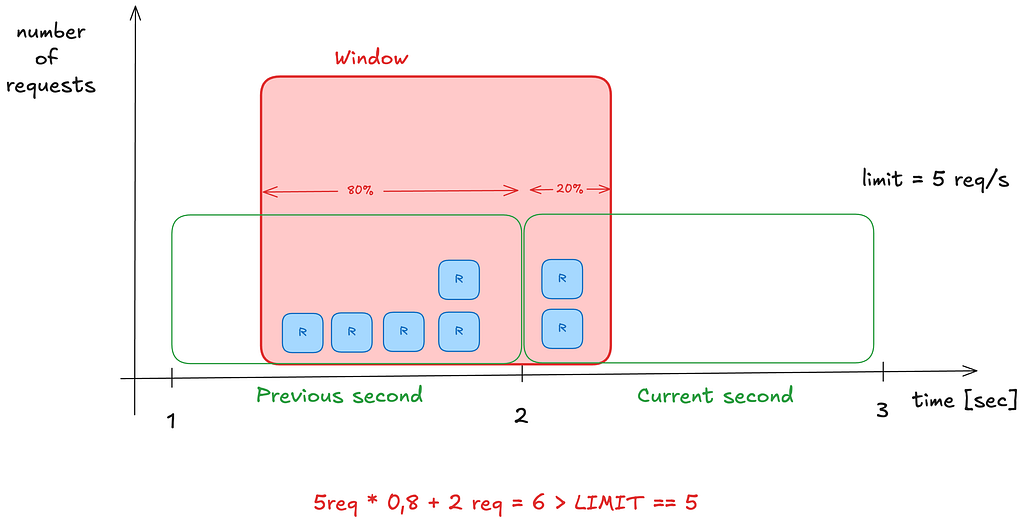
This strikes a balance between accuracy and efficiency, reducing memory usage while still smoothing over the hard edges of fixed windows.
import time
from threading import Lock

class SlidingWindowCounter:
    """
    This algorithm smooths request rate enforcement by approximating a true sliding window
    using two adjacent fixed-size windows (current and previous). It allows up to `limit`
    requests per `window_size_seconds`, calculated using a weighted average of the two windows.
    Compared to the Sliding Window Log, this uses significantly less memory while offering
    nearly the same accuracy — at the cost of being an approximation.
    """
    def __init__(self, limit: int, window_size_seconds: int):
        """
        :param limit: Max allowed requests per sliding window
        :param window_size_seconds: Length of each window in seconds
        """
        self.limit = limit
        self.window_size = window_size_seconds
        self.lock = Lock()
        self._curr_window = 0
        self._prev_window = 0
        self._curr_count = 0
        self._prev_count = 0

    def consume(self) -> bool:
        now = time.time()
        window_key = self._get_window_key(now)
        weight = self._get_weight(now)
        with self.lock:
            self._rotate_windows_if_needed(window_key)
            estimated_count = self._estimate_total(weight)
            if estimated_count + 1 <= self.limit:
                self._curr_count += 1
                return True
            return False

    def _get_window_key(self, timestamp: float) -> int:
        return int(timestamp // self.window_size)

    def _get_weight(self, timestamp: float) -> float:
        return (timestamp % self.window_size) / self.window_size

    def _rotate_windows_if_needed(self, window_key: int):
        if window_key != self._curr_window:
            if window_key == self._curr_window + 1:
                # Shift current to previous
                self._prev_window = self._curr_window
                self._prev_count = self._curr_count
            else:
                # Skipped one or more windows: reset both
                self._prev_window = window_key - 1
                self._prev_count = 0
            self._curr_window = window_key
            self._curr_count = 0

    def _estimate_total(self, weight: float) -> float:
        return self._prev_count * (1 - weight) + self._curr_count
As mentioned earlier, the right algorithm depends on your specific requirements, such as memory consumption, the need for accuracy (whether you require hard or soft limiting), and implementation complexity. Based on these factors, you can choose the most suitable approach.
Architecture of a Rate Limiter
Where to Put a Rate Limiter
Rate limiting can be implemented on the client side, server side, or within middleware such as an API gateway:
Client-Side
- Reduces server load by preventing excessive requests at the source
- Requires implementation for each client type
- Not secure or reliable — clients can be modified or spoofed
Server-Side
- Ensures enforcement regardless of client behavior
- Choose a method that’s efficient in your current tech stack
- Can be tailored to your application’s specific needs
- Keeps everything within your infrastructure
Middleware (e.g., API Gateway)
- Central place for handling rate limiting, authentication, and IP whitelisting
- Cleanly separates rate limiting from core application logic
- Adds a component to maintain and scale
Questions to consider:
- Do we already have an API gateway?
- Can we extend it to support rate limiting?
- Do we have the resources to build one from scratch?
- Should we consider a third-party solution like AWS API Gateway, which includes built-in rate-limiting features?
Rate Limiting Scope
Depending on the requirements, we can implement a global rate limiter that limits access to our services for all users uniformly. This is simpler but less flexible. Alternatively, we can introduce partitioning by user ID, IP address, or other identifiers. This allows for fine-grained control, enabling us to apply different rate limits to different users or groups, giving more tailored access to our system based on behavior, tier, or trust level.
Here is a simple RateLimiter implementation using TokenBucket algorithm with user_id as a partition key.
from threading import Lock

from .token_bucket import TokenBucket

class RateLimiter:
    """
    Rate limiter for multiple users using algorithm.
    Each user gets their own token bucket.
    """
    def __init__(self, rate: int, capacity: int):
        self.rate = rate
        self.capacity = capacity
        self.buckets = {}
        self.locks = {}
        self.global_lock = Lock()

    def _get_bucket(self, user_id: int):
        if user_id not in self.buckets:
            with self.global_lock:
                if user_id not in self.buckets:
                    self.buckets[user_id] = TokenBucket(self.rate, self.capacity)
                    self.locks[user_id] = Lock()
        return self.buckets[user_id], self.locks[user_id]

    def consume(self, user_id: int, tokens:int = 1) -> bool:
        bucket, lock = self._get_bucket(user_id)
        with lock:
            return bucket.consume(tokens)
Scaling Rate Limiters
When scaling across multiple instances, rate limiting becomes more complex. Here are a few strategies to keep things consistent:
- Sticky sessions work by routing each client to the same server instance. This approach simplifies the rate-limiting logic since all requests from a client are handled by one server. However, it limits scalability and fault tolerance, making it less ideal for large-scale or highly dynamic environments.

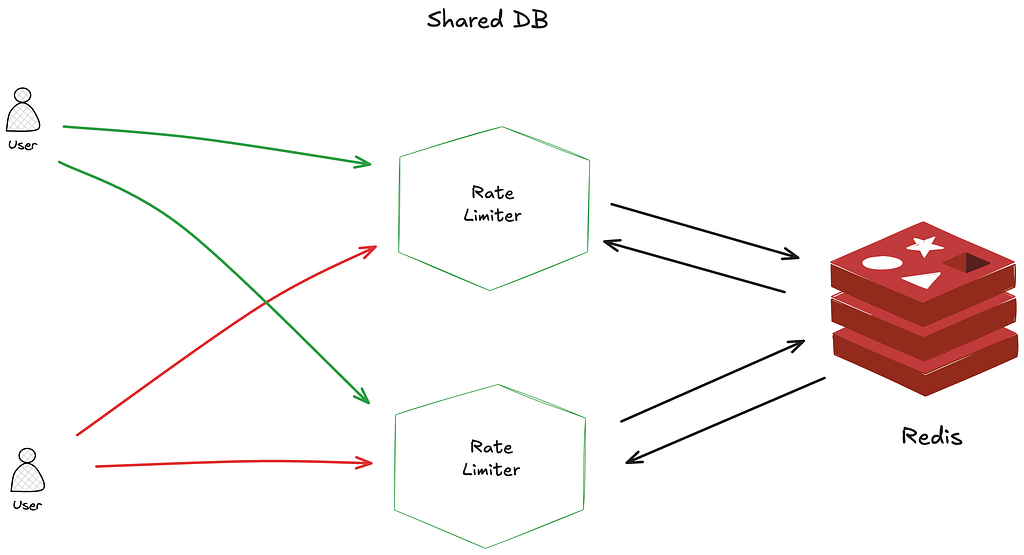
- Using a shared database like Redis allows multiple rate limiter instances to track request counts consistently across servers. Redis is popular because of its speed and support for expiration times (TTLs). To ensure atomicity and prevent race conditions during request counting, Lua scripts can be used within Redis. These scripts execute the rate-limiting logic as a single, indivisible operation, making the process efficient and reliable even under high concurrency.
Toward a Better User Experience
Depending on your requirements and the chosen algorithm, you don’t have to simply say “no” (by returning 429 Too many requests HTTP response status) to your clients when they hit a rate limit. Instead, you can enhance the user experience by providing helpful feedback in the response headers. For example:
- X-RateLimit-Remaining: The number of requests the client can still make within the current window.
- X-RateLimit-Limit: The total number of allowed requests per time window.
- X-RateLimit-Retry-After: How many seconds the client should wait before making a request again without being throttled.
This kind of transparency helps clients adjust their behavior and reduces frustration when limits are hit.
Conclusion
Rate limiting is a critical component of modern system design that helps ensure service reliability, cost control, and protection against malicious attacks. By carefully selecting the appropriate algorithm and implementation strategy based on your specific requirements, you can create a rate-limiting system that effectively balances resource protection with user experience.
Remember that rate limiting isn’t just about saying “no” to requests — it’s about creating a fair and predictable system that provides the best possible service to all users within the constraints of your infrastructure. A well-designed rate-limiting strategy serves both defensive and quality-of-service purposes, ultimately contributing to a more robust and sustainable system architecture.
As with many architectural decisions, there’s no one-size-fits-all solution. The best approach depends on your specific requirements, infrastructure, and the nature of your traffic patterns. Start with a simple implementation, measure its effectiveness, and refine as needed.
The source code for all algorithm implementations with tests can be found here.
References:
What is Rate Limiting and How to Implement It? From Algorithms to System Architecture was originally published in Level Up Coding on Medium, where people are continuing the conversation by highlighting and responding to this story.
This content originally appeared on Level Up Coding - Medium and was authored by Jarek Orzel

Jarek Orzel | Sciencx (2025-05-20T12:04:25+00:00) What is Rate Limiting and How to Implement It? From Algorithms to System Architecture. Retrieved from https://www.scien.cx/2025/05/20/what-is-rate-limiting-and-how-to-implement-it-from-algorithms-to-system-architecture/
Please log in to upload a file.
There are no updates yet.
Click the Upload button above to add an update.