
This content originally appeared on Level Up Coding - Medium and was authored by Matt Wiater

How Side-by-Side Testing Revealed What Small LLMs Can (and Can’t) Actually Do
Public Repository: https://github.com/mwiater/agon
Introduction
aka “The beginning of wisdom is the definition of terms.” — Socrates
Small language models promise something compelling: local, cost-effective AI that runs on hardware you already own. No cloud dependencies, no usage meters ticking away, just models sitting on your network doing work. It’s an appealing vision, especially for personal projects and home labs where you want control without complexity.
But there’s a gap between promise and practice. Running small LLMs on non-GPU hardware — modest single-board computers, older workstations, anything without dedicated acceleration — requires careful optimization. These models are sensitive. Temperature settings, system prompts, and context handling all dramatically affect output quality and usefulness. A configuration that works beautifully for creative writing might produce garbage for structured data extraction. A model that’s perfect at one temperature becomes incoherent at another.
The real challenge isn’t running these models. Ollama makes that trivial. The challenge is finding configurations that actually work for your specific use cases. And the traditional approach — testing one configuration at a time, trying to remember what worked, mentally comparing outputs across sessions — doesn’t scale. You end up with a notebook full of scattered observations and a vague sense that “something with temperature 0.7 worked better,” but no real data to back it up.
This is where systematic experimentation becomes necessary. You need tooling that enables rapid comparison and iteration, that lets you isolate variables and see results side-by-side. But more than that — and this is what I discovered while building agon — you need a framework that reveals how these models actually behave. Not how the documentation says they behave, not how benchmarks suggest they should behave, but how they respond to your prompts on your hardware with your specific workloads.
Systematic experimentation with small LLMs requires purpose-built tooling that enables rapid comparison and iteration — and building such a tool reveals deep insights into how these models actually behave.
NOTE: Keep in mind that this article and application is focused on running small LLMs on multiple GPU-starved hardware nodes. It is an exploration and an experiment. Yes, larger models are better. Yes, GPUs are definitively better. But deconstructing small LLMs, comparing models, running different scenarios, and collecting metrics has vastly improved my insights on LLMs of all sizes.
The Problem: Manual Iteration is Untenable
aka “Memory is the scribe of the soul.” — Aristotle
Before I built agon, my workflow for testing small LLMs was straightforward but frustrating. I’d modify a configuration file, restart Ollama, run a prompt, and evaluate the output. Then I’d modify the config again — maybe adjust the temperature, or try a different system prompt — restart, and test again. I’d scribble notes about which configuration seemed better, trying to hold multiple outputs in my head for comparison.
This approach works fine for one or two comparisons. But when you’re trying to optimize a model for a specific task, you might need to test dozens of configurations. Different models, different prompts, different parameter combinations. The cognitive load becomes overwhelming. Did the model with temperature 0.7 produce better structured output than 0.5, or was that with a different system prompt? Was llama3.2 actually more accurate than gemma3, or did it just feel that way because I tested it last?
The difficulty compounds when you’re trying to isolate variables. If I wanted to test whether a system prompt change improved output, I’d need to keep everything else constant — the model, the parameters, the user prompt. That means careful documentation and discipline. One slip and you’re comparing apples to oranges without realizing it.
Manual switching between Ollama configurations amplifies these problems. You can only test one configuration at a time. You can’t see how different models respond to the same prompt simultaneously. You’re limited by human memory and the inability to perceive patterns that only emerge through systematic, parallel comparison.
For personal projects where these models run slowly on CPU-only hardware, the problem gets worse. A single inference might take 30 seconds or more. Testing ten configurations sequentially means five minutes of watching terminals, trying to remember what the first output said by the time you see the tenth.
There had to be a better way.
What is Agon?
aka “We shape our tools and afterwards our tools shape us.” — Marshall McLuhan
Agon is a terminal-first companion for interacting with large language models through the Ollama API. It’s not a web interface, not a GUI wrapper, not a cloud service. It’s a focused, modular tool that runs in your terminal and does one thing well: lets you systematically experiment with multiple LLM configurations simultaneously.
I’m comfortable in the console and wanted to keep the project focused. Adding a web UI or Electron wrapper would have introduced dependencies and complexity that worked against the core goal: making iterative testing practical and revealing. The terminal keeps things simple. No browser overhead, no rendering quirks, just text streaming to your screen exactly as the models produce it.
The philosophy behind agon is composability. Rather than building one monolithic “do everything” interface, agon provides distinct modes that can be combined: Single-Model for traditional chat, Multimodel for parallel comparison, Pipeline for sequential processing, and MCP for tool-calling experiments. You can layer JSON mode on top of any of these to enforce structured output. You can enable MCP mode with Multimodel to test tool-calling reliability across four models at once.
This composability emerged from necessity. I initially built just the multimodel comparison feature. But as I worked with small LLMs on my home cluster — four Udoo x86 Ultra single-board computers running Ollama — I kept encountering workflows that needed different approaches. Some tasks benefited from comparing models side-by-side. Others needed sequential processing where one model’s output fed into the next. Tool-calling experiments needed their own infrastructure. Rather than cramming everything into one interface, I kept the modes separate but combinable.
The model management commands (list, pull, delete, sync, unload) exist because keeping four hosts synchronized manually was tedious. When I discovered an optimal model for a specific task, I wanted to deploy it across all nodes without SSHing into each one individually. The sync command handles this: it ensures each host has exactly the models specified in its configuration, pulling missing ones and removing extras.
Here’s what the basic command structure looks like:
agon — terminal-first companion for multi-host Ollama workflows

Usage:
  agon [command]

Available Commands:
  analyze     Analyze collected metrics
  benchmark   Run benchmarks for models defined in the config file
  chat        Start a chat session
  delete      Group commands for deleting resources
  help        Help about any command
  list        Group commands for listing resources
  pull        Group commands for pulling resources
  show        Group commands for displaying resources
  sync        Group commands for syncing resources
  unload      Group commands for unloading resources

Flags:
  -c, --config string           config file (e.g., config/config.json) (default "config/config.json")
      --debug                   enable debug logging
      --export string           write pipeline runs to this JSON file
      --exportMarkdown string   write pipeline runs to this Markdown file
  -h, --help                    help for agon
      --jsonMode                enable JSON output mode
      --logFile string          path to the log file
      --mcpBinary string        path to the MCP server binary (defaults per OS)
      --mcpInitTimeout int      seconds to wait for MCP startup (0 = default)
      --mcpMode                 proxy LLM traffic through the MCP server
      --multimodelMode          enable multi-model mode
      --pipelineMode            enable pipeline mode
  -v, --version                 version for agon

Use "agon [command] --help" for more information about a command.
Agon isn’t trying to replace Ollama or compete with web-based LLM interfaces. It’s a focused tool for a specific problem: making systematic experimentation with small LLMs practical on modest hardware.
The Modes: A Framework for Experimentation
aka “For every complex problem there is an answer that is clear, simple, and wrong.” — H.L. Mencken
There’s no single “right way” to work with small LLMs. Different tasks need different approaches, and the temptation with tool design is to pick one approach and declare it the solution. Agon resists this. Instead, it provides multiple modes, each optimized for different experimental workflows.
Single-Model Mode
This is the baseline: traditional one-on-one chat with a single language model. You select a host, choose a model, and have a conversation. It’s the simplest mode, deliberately. Sometimes you just need to talk to one model without the complexity of comparisons or pipelines.
Single-Model mode is most useful for focused tasks where you’ve already identified the right configuration and just need to use it. Creative writing sessions, exploring a model’s capabilities, or quick ad-hoc queries. It’s also the mode I use when teaching someone how agon works — no need to explain parallel execution or sequential processing when you’re just getting started.
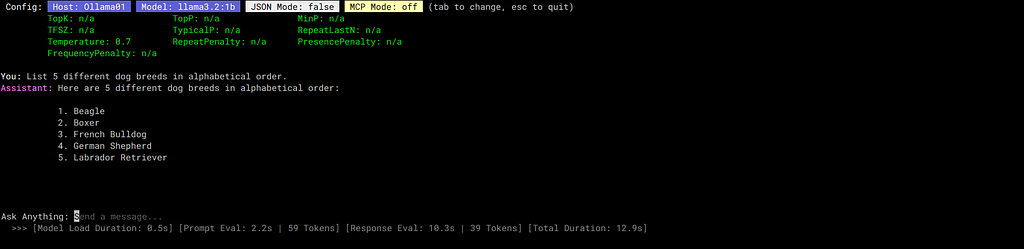
This mode supports both JSON mode (for structured output) and MCP mode (for tool-calling), making it more capable than it appears. But the core value is simplicity and focus.
Multimodel Mode
Multimodel mode is where agon’s value proposition becomes obvious. It lets you chat with up to four different models simultaneously in a side-by-side interface. When you send a prompt, it’s dispatched to all configured models at once, and their responses stream back in real-time to their respective columns.
This parallel execution is the key differentiator. You’re not testing configurations sequentially and trying to remember what each produced. You’re seeing them respond to identical input at the same time, making patterns immediately visible.

The use cases for this mode map directly to the variables you want to isolate:
- Testing system prompts: Run the same model four times with different system prompts. Which prompt produces better structured output? Which one stays on-topic more consistently?
- Comparing parameter settings: Same model, same prompt, different temperature or top_p values. How does temperature 0.3 differ from 0.9 for your specific task?
- Model comparison: Different models, identical configuration. Which one handles your domain better?
- Mixed testing: Any combination of the above. Maybe you want to compare two different models, each with two different temperature settings.
Agon displays inference speed metrics for each model during generation. This isn’t just interesting data — it’s essential for making practical decisions. A model that produces slightly lower quality output but runs 3x faster might be the better choice for your use case. Without seeing these metrics side-by-side, you’re making decisions blind.
The insight that emerges from multimodel mode is that small LLM behavior is highly context-dependent. A model that excels in one configuration might perform poorly in another, and these differences only become clear when you see them simultaneously.
Pipeline Mode
Pipeline mode takes a different approach: instead of parallel execution, it chains up to four models together in sequence. The output from one stage becomes the input for the next, allowing you to build multi-step workflows where each model specializes in one part of the process.
I built this mode specifically to address a limitation of small models: they struggle with complex, multi-faceted tasks. But they can often handle those same tasks if you break them down into discrete steps. Pipeline mode makes this decomposition explicit and automated.

A concrete example from my own use: generating and validating factual statements. Small models are prone to hallucination, but they’re also capable of basic fact-checking. So I set up a three-stage pipeline:
This workflow lets smaller, cheaper models handle a task that would normally require a much larger model. Each stage has a focused responsibility. The first model doesn’t need to worry about accuracy — it just generates. The second model doesn’t need to generate — it just validates. The third model only engages if correction is needed.
The key insight from pipeline mode is that smaller models in sequence can approximate what larger models do in a single pass. Not always, and not for every task. But for structured, decomposable workflows, it’s a viable strategy. And on CPU-only hardware where large models are impractically slow, it might be your only option.
Pipeline mode can be combined with JSON mode to enforce structured data passing between stages, which becomes important when you’re building more complex workflows. Each stage can output JSON that the next stage parses and processes.
MCP Mode
MCP mode enables tool-calling capabilities by proxying requests through a local agon-mcp server that manages external tool access. When enabled, agon starts this server in the background and manages its lifecycle.
Agon provides a very limited, but built-in MCP server. The tools are meant to illustrate and test the full MCP pattern:
- Accurately trigger the correct tool
- Respond to the LLM with the tool output in JSON
- Have the LLM transform the tool JSON into accurate human-friendly text
To that end, there are 3 tools available:
- “What is the current weather in Denver, CO?”: tests the ability for the LLM to parse the user prompt into a valid location, as well as delivering an accurate response based on the JSON data the tool returns.
- “What is the current time?” is completely useless. It just returns the current server time. The only reason it’s in there is to test if the LLM can differentiate between multiple tools properly.
The idea is compelling: let small LLMs break out of their static knowledge base and interact with external tools. Need current weather? Call a weather API. Need to perform calculations? Use a calculator tool. The model determines when to use tools, what arguments to pass, and how to incorporate the results into its response.
By combining MCP mode with Multimodel mode, you can test four different models’ tool-calling capabilities simultaneously and gather statistical data on success rates.

Above you can see that the first three models called the correct tool, and then used the JSON tool output to synthesize a nice response. The last model reported that it didn’t have tool capabilities. But i can easily re-run the chat and select a different model.
Model Management Commands
Managing models across multiple hosts manually is tedious. The model management commands exist to automate this coordination:

The sync command is particularly useful. When I discover an optimal model configuration through testing, I add it to my config file and run agon sync models. Every host gets updated to match the configuration — pulling missing models and removing ones that aren’t specified. No manual intervention needed.
The unload command addresses a practical issue with running models on limited hardware: models stay loaded in RAM until explicitly unloaded. On systems with 8GB or less, this matters. Unloading models you’re not currently using frees up memory for active work.
These commands aren’t glamorous, but they’re the kind of practical utility that makes distributed small LLM experimentation manageable rather than frustrating.
Real-World Usage: A Home Cluster in Action
aka “In theory, theory and practice are the same. In practice, they are not.” — Attributed to Yogi Berra/Einstein
My home setup consists of four Udoo x86 Ultra single-board computers, each running Ollama. These aren’t powerful machines — they’re CPU-only, no GPU acceleration. This is deliberate. I wanted to work with hardware that’s accessible and inexpensive, the kind of setup someone could actually build without investing in expensive graphics cards.
The primary use case is generating test data for application development. When I’m building a web application that needs sample user profiles, product descriptions, or synthetic transaction logs, I use small LLMs to generate them. These models run in the background — inference is slow on CPU-only hardware, taking 30 seconds to a few minutes per request — but that’s fine. I’m not waiting for responses. The models churn through prompts while I work on other things.
The config directory captures working configurations for different tasks. Rather than recreating configurations from memory, I maintain example configs that document what works:
config/
├── config.example.JSONMode.json # Structured data generation
├── config.example.MCPMode.json # Tool-calling experiments
├── config.example.ModelParameters.json # Parameter comparison testing
└── config.example.PipelineMode.json # Multi-stage processing workflows
Each config file represents a solved problem — a set of models, prompts, and parameters that work well for a specific task. When I need to generate facts, I load the Facts config. When I need JSON output, I load the JSONMode config. No guessing, no reconstruction.
The process of discovering these optimal configurations is iterative. I’ll run multimodel mode with four different parameter combinations, testing the same prompt across all of them. After a dozen tests, patterns emerge. Temperature 0.7 produces more varied but occasionally off-topic output. Temperature 0.3 is consistent but sometimes mechanical. Temperature 0.5 hits a sweet spot for most tasks.
Once I’ve identified a working configuration, I save it to the config directory and sync it across hosts. Now that knowledge is captured and reusable.
Lessons Learned: What Systematic Testing Reveals
aka “If the only tool you have is a hammer, every problem looks like a nail.” — Abraham Maslow
Performance Profiles Are Multi-Dimensional
Testing models one at a time, I focused on tokens per second as the primary performance metric. Faster is better, right? Running them side-by-side in multimodel mode revealed that performance has multiple dimensions, and optimizing for one metric often means compromising on others.
Here’s actual performance data from my home cluster, collected over weeks of testing.
Model Performance Comparison (CPU-only, Udoo x86 Ultra):
Generation Speed (tokens/second):
- granite3.1-moe:1b : 8.73 tok/sec [FASTEST]
- granite3.1-moe:3b : 4.26 tok/sec
- llama3.2:1b : 4.15 tok/sec
- granite4:350m : 3.00 tok/sec
- smollm2:1.7b : 2.66 tok/sec
- smollm2:360m : 2.20 tok/sec
- qwen3:1.7b : 1.78 tok/sec
- phi4-mini:3.8b : 1.49 tok/sec
- llama3.2:3b : 1.28 tok/sec
- granite4:micro : 1.20 tok/sec
- granite4:1b : 0.71 tok/sec [SLOWEST]
Time-to-First-Token (smaller contexts, 0–256 tokens):
- smollm2:360m : 6.9–39.5 seconds [BEST]
- llama3.2:1b : 16.8–37.4 seconds
- granite4:350m : 20.3 seconds
- phi4-mini:3.8b : 11.8–47.4 seconds
- llama3.2:3b : 65.4 seconds
- smollm2:1.7b : 80.6 seconds
- granite4:1b : 89.6 seconds
- granite4:micro : 120.8 seconds
- granite3.1-moe:1b : 138.7 seconds
- llama3.2:3b (large) : 398.9 seconds [WORST]
- qwen3:1.7b : 520.9 seconds
The surprise: granite3.1-moe:1b generates tokens 2x faster than models 3x its size, but you’ll wait over 2 minutes for the first token to appear. In interactive use, this feels broken. The model seems frozen, then suddenly streams output at impressive speed.
Compare to smollm2:360m, which starts responding in under 7 seconds but generates tokens at 2.2/sec. For interactive chat, smollm2 feels dramatically more responsive despite being “slower” by the tokens-per-second metric.
This is the kind of insight that only emerges from side-by-side testing. Without seeing both models respond to the same prompt simultaneously, I would have picked granite3.1-moe:1b based on its superior generation speed and been frustrated by its real-world behavior.
Context Size Creates Non-Linear Performance Degradation
Models handle longer context windows differently, and these differences aren’t predictable from specifications:
Context Scaling Impact:
granite4:1b:
- 0–256 tokens: 89,624ms total (baseline)
- 257–1024 tokens: 429,846ms total (4.8x slower!)
llama3.2:1b:
- 0–256 tokens: 4.15 tok/sec
- 257–1024 tokens: 3.58 tok/sec (14% slower) ✓
granite3.1-moe:1b:
- 0–256 tokens: 8.73 tok/sec
- 257–1024 tokens: 8.06 tok/sec (8% slower) ✓
Granite4:1b collapses with longer contexts — nearly 5x slower. Llama3.2:1b and Granite3.1-moe handle context growth gracefully, degrading by less than 15%. You can’t predict this from model cards or parameter counts. You discover it through testing.
The Granite Family Punches Above Its Weight
I mentioned earlier that I found Granite models faster than comparable alternatives. The data backs this up, but with nuance:
- granite3.1-moe:1b achieves 8.73 tok/sec — the fastest in my entire test suite
- granite4:350m gets 3.0 tok/sec despite being only 350MB
- llama3.2:3b manages only 1.28 tok/sec — a 3B model nearly 3x slower than a 1B Granite MoE
The MoE (Mixture of Experts) architecture in Granite models delivers a dramatically better performance-to-size ratio on CPU. Not on every metric — the TTFT numbers show the trade-off — but for sustained generation, Granite models are hard to beat on modest hardware.
This wasn’t obvious until I ran systematic comparisons. Marketing materials claim every model is “efficient” and “optimized.” Agon showed me which ones actually deliver on CPU-only hardware.
Small Output Differences Add Up
Models have different “personalities” for response length that aren’t documented anywhere:
Average Output Tokens (identical prompts):
- smollm2:1.7b : 158 tokens (verbose)
- granite4:micro : 97 tokens
- granite3.1-moe:3b : 61 tokens
- smollm2:360m : 26 tokens
- llama3.2:1b : 23 tokens
- granite4:350m : 22 tokens (concise)
This matters more than it seems. If you’re generating test data and need concise output, a verbose model wastes tokens and time. If you’re doing creative writing and need detailed responses, a terse model requires more prompting. Multimodel mode makes these differences visible immediately — you see that one model consistently produces 7x more output than another for the same input.
The Value of the Framework
Building agon taught me more about small LLM behavior than reading papers or documentation ever could. Documentation tells you what models are supposed to do. Benchmarks tell you how they perform on curated test sets. Systematic testing with your own prompts on your own hardware reveals how they actually behave.
The patterns that emerge from side-by-side comparison are subtle but significant:
- Models with identical parameter counts can have wildly different performance profiles
- Architecture matters more than size for CPU inference speed
- Context handling varies dramatically and unpredictably
- Temperature effects are model-specific, not universal
- Tool-calling capabilities in small models can require some extra guidance.
These insights only surface through repeated, systematic observation. Testing one configuration at a time, you might notice some of these patterns eventually. But you’ll also waste weeks on dead ends, chasing configurations that seemed promising in isolation but fall apart under comparison.
The tool became both solution and investigation instrument. I built agon to make my testing workflow more efficient. It did that. But the deeper value was in what systematic testing revealed about the models themselves — insights I wouldn’t have gained any other way.
Future Direction
aka “Perfection is achieved not when there is nothing more to add, but when there is nothing left to take away.” — Antoine de Saint-Exupéry
The project has grown larger than I initially expected. What started as a simple side-by-side comparison tool evolved into a framework with multiple modes, model management, MCP integration, and distributed cluster support. Each feature solved a specific problem I encountered while using agon, but the cumulative effect is a codebase that requires maintenance and discipline.
I’ve reached a decision point that’s common in personal projects: do I keep adding features, or do I focus on refinement? The temptation is always to add one more thing. Another mode, another integration, another convenience feature. But feature creep has a cost — not just in complexity, but in maintainability. Each new feature is code I need to understand, debug, and keep working as dependencies evolve.
So I’m choosing refinement over expansion. Agon does what I need it to do. The modes work, the model management is reliable, the configurations are stable. What it needs now isn’t more features — it’s better documentation, more robust error handling, cleaner code, and thorough testing of what already exists.
This doesn’t mean agon is “finished.” Software is never finished. But it means I’m being deliberate about scope. New features need to clear a high bar: solving a problem I actually have, fitting naturally into the existing architecture, and being maintainable long-term. Most ideas don’t clear that bar, and that’s fine.
The goal is to have a tool I can rely on for years, not a sprawling project that becomes burdensome to maintain. Sometimes the most valuable work is saying no to expansion and focusing on making what exists better.
Conclusion
aka “The only true wisdom is in knowing you know nothing.” — Socrates
Systematic experimentation with small LLMs requires purpose-built tooling that enables rapid comparison and iteration — and building such a tool reveals deep insights into how these models actually behave. This is the thesis I started with, and the evidence from using agon supports it completely.
The gap between promise and reality in small LLMs is substantial. They’re marketed as capable, efficient alternatives to large models. And in some contexts, with careful configuration and realistic expectations, they are. But they’re also fragile, sensitive to prompts and parameters in ways that aren’t well-documented, and prone to failure modes that only become apparent through systematic testing.
The importance of having tools that reveal model behavior honestly can’t be overstated. Marketing materials and benchmarks paint optimistic pictures. Real-world usage on modest hardware tells a different story. Agon doesn’t try to make models look better than they are. It shows you exactly how they perform on your prompts with your configuration on your hardware. Sometimes the results are encouraging. Sometimes they’re disappointing. But they’re always informative.
Small LLMs on modest hardware are viable for specific use cases. Generating test data, creative writing assistance, simple classification tasks, structured data extraction — these all work well with the right model and configuration. But “the right model and configuration” is specific to your use case and your hardware. You can’t copy someone else’s setup and expect identical results. You need to test systematically, isolate variables, and gather data.
This is where personal projects become invaluable. Agon solves a real problem — making iterative testing practical. But it also exists as an investigation tool, a way to understand how these models actually work rather than how I wish they worked. The lessons I’ve learned from building and using agon — about model performance, parameter sensitivity, architecture trade-offs, and tool-calling limitations — are lessons I couldn’t have learned any other way.
The value isn’t just in having a tool that works. It’s in the process of building something that forces you to confront reality systematically. You can’t ignore patterns when they appear in parallel across four models. You can’t rationalize failures when the data contradicts you. You have to adjust your understanding to match what you observe.
Small LLMs will improve. Models will get better at tool-calling, more efficient at context handling, faster at inference on CPU. But the need for systematic experimentation won’t disappear. As models evolve, the questions change: which new model is worth trying? What configurations work best? How do different architectures compare?
Agon gives me a framework for answering those questions as they arise. Not by providing definitive answers — there are no universal answers — but by making systematic comparison practical and revealing. That’s the best you can hope for with tools like this: not certainty, but clarity about what’s actually happening.
And sometimes, knowing what you don’t know — knowing that small models can’t reliably select tools, knowing that context scaling is non-linear and model-specific, knowing that performance profiles are multi-dimensional — is more valuable than confident ignorance.
The project is available on GitHub at https://github.com/mwiater/agon. If you’re working with small LLMs and struggling with the same iterative testing challenges, maybe it’ll be useful. And if you discover insights I haven’t, I’d be interested to hear about them. Systematic experimentation works best when you can compare notes.
Agon: A Terminal-First Framework for Small LLM Experimentation was originally published in Level Up Coding on Medium, where people are continuing the conversation by highlighting and responding to this story.
This content originally appeared on Level Up Coding - Medium and was authored by Matt Wiater

Matt Wiater | Sciencx (2025-11-14T19:09:30+00:00) Agon: A Terminal-First Framework for Small LLM Experimentation. Retrieved from https://www.scien.cx/2025/11/14/agon-a-terminal-first-framework-for-small-llm-experimentation/
Please log in to upload a file.
There are no updates yet.
Click the Upload button above to add an update.