
This content originally appeared on Bram.us and was authored by Bramus!
If you kinda understand Anchor Positioning, but it still surprises you from time to time, then most likely this is the missing piece of information: the Inset-Modified Containing Block (or IMCB for short).
~
Yesterday, Wes Bos asked:
(Why)? does CSS anchor not have a position-area for the inside corners?
You need to switch to a totally different approach using inset values if you need that.
As far as I understand position-area is a helper for common uses. Must have a reason?

It is perfectly possible, so I replied:
Use the
align-self/justify-selfproperties to adjust the anchored element’s position inside the IMCB. For example, to have an element in the top right corner, use this:position-area: center span-left; align-self: start;
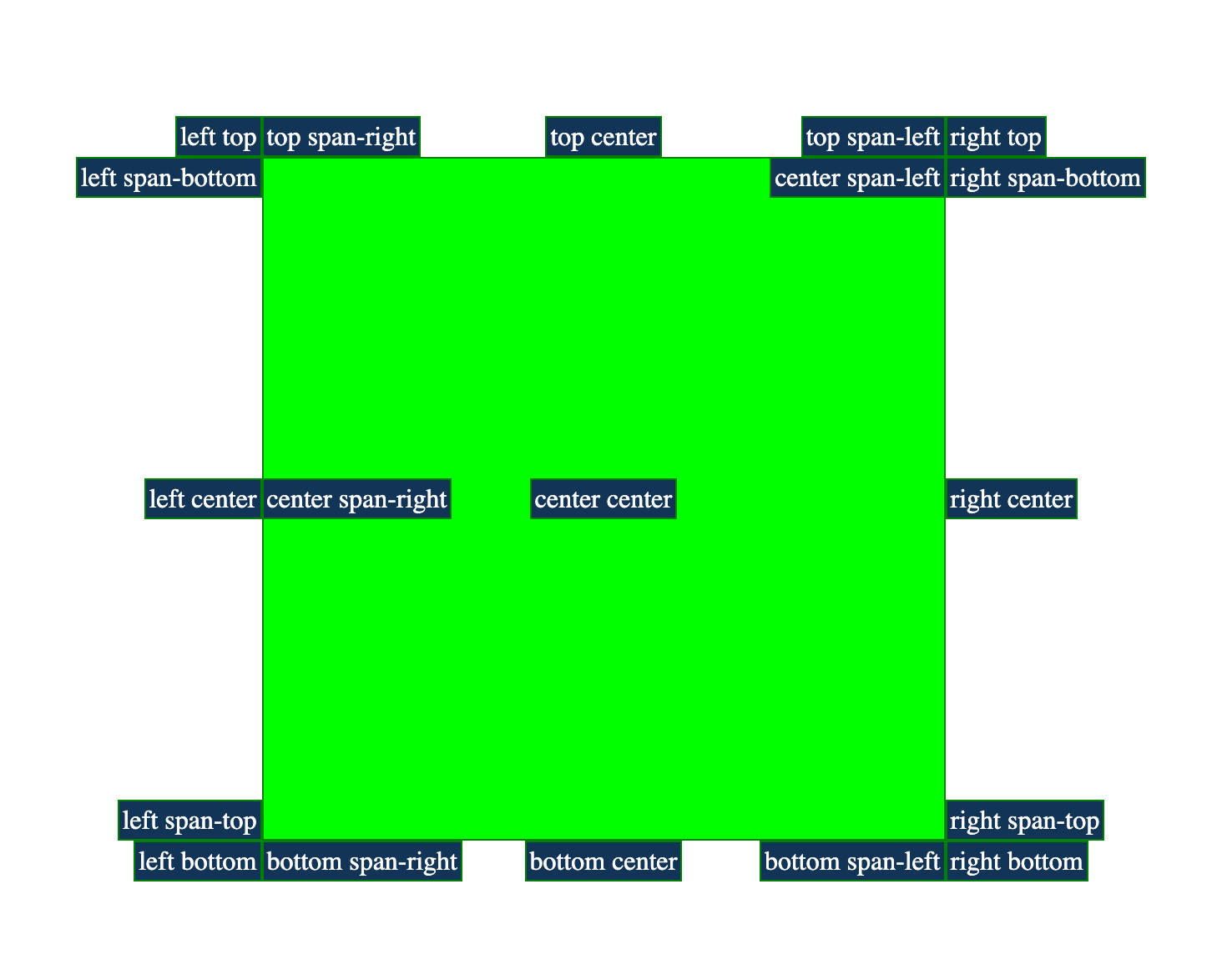
The IMCB I mention there is short for the Inset-Modified Containing Block. As per css-position-3:
For an absolutely positioned box, the inset properties effectively reduce the containing block into which it is sized and positioned by the specified amounts. The resulting rectangle is called the inset-modified containing block.
The anchored box gets positioned within that IMCB. I built a recreation of Wes’s screenshot that shows the “Inset-Modified Containing Block” (IMCB) when hovering an anchored item.
“But wait, there is no inset at play here?” you might think. Well, I kinda cut a corner there (because: social media).
The full explanation for what effectively happens is:
position-areaselects a region of the “position area grid” to use as the Containing Block for the anchored element.- That Containing Block then can get adjusted by an inset, resulting in an Inset-Modified Containing Block.
- The anchored element then gets positioned within that IMCB.
Because the inset is 0 by default, the CB and IMCB are also the same by default.
~
Today I further adjusted the demo I quickly throw together to allow you to change the values for inset, align-self and justify-self per anchored element. The demo also shows both the CB (as selected by the position-area) and the IMCB. When changing the inset, it should become apparent of how the anchor positioning areas work.
Play with it yourself here:
This visualizer/tool mixes Una’s approach (of visualizing the IMCB) with Wes’s approach (of showing multiple anchored elements) and with Temani’s approach (of allowing you to change the align-self/justify-self), while also adding the option to change the inset 🙂
~
🔥 Like what you see? Want to stay in the loop? Here's how:
I can also be found on 𝕏 Twitter and 🐘 Mastodon but only post there sporadically.
This content originally appeared on Bram.us and was authored by Bramus!

Bramus! | Sciencx (2025-12-02T10:53:07+00:00) Anchor Positioning and the Inset-Modified Containing Block (IMCB). Retrieved from https://www.scien.cx/2025/12/02/anchor-positioning-and-the-inset-modified-containing-block-imcb/
Please log in to upload a file.
There are no updates yet.
Click the Upload button above to add an update.