
This content originally appeared on Level Up Coding - Medium and was authored by HarshVardhan Jain
Beyond Suno APIs: How ACE-Step’s 27x Real-Time Diffusion Model Brings Professional-Grade, Local Music Generation to your 8GB VRAM Setup
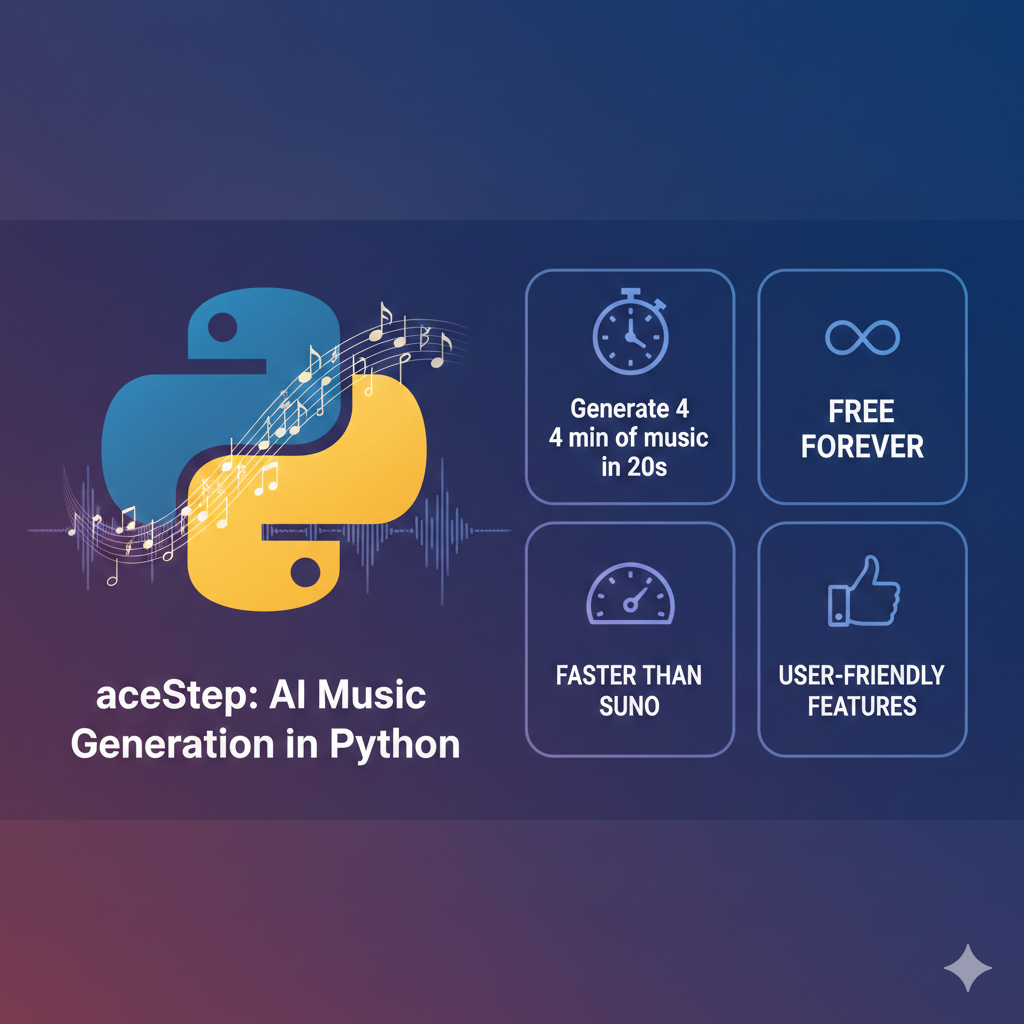
Trust me I’ve spent the last 1 year testing every AI music library that exists from MusicGen, AudioCraft, Stable Audio, Suno’s API — you name it, I’ve cursed at it and they all share one fundamental problem: speed.
MusicGen takes around 5 minutes to generate 30 seconds of audio. Suno’s API has rate limits that kill any real production workflow. Stable Audio? 2 minutes to generate a 1-minute song. And yeah don’t even get me started on the memory requirements — most of these models will eat 24GB of VRAM
Then I discovered ACE-Step. ACE-Step offer a different approach, designed to be “15x faster than LLM-based baselines”, generates 4 minutes of music in 20 seconds and capable of running on setups with 8GB VRAM
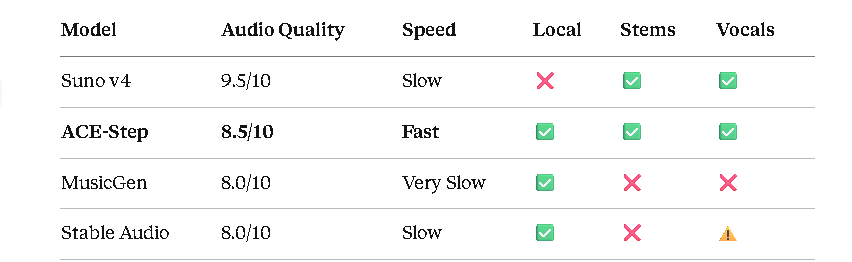
As a result, our model synthesizes up to 4 minutes of music in just 20 seconds on an A100 GPU — 15× faster than LLM-based baselines
Why Speed Actually Matters (And Why Everyone Else Is Too Slow)
The Hidden Cost of Slow Generation
Let’s talk about what “slow” actually costs you in real terms:
1. Iteration Speed Kills Creativity
ACE-Step generates the same 30 seconds in 1.1 seconds. That means you can try 20 different prompts in the time MusicGen does one. You actually get to explore the creative space instead of gambling on each generation
2. GPU Time = Money
On AWS, an A 100 costs $4–5/hour. If you’re running a service that generates music:
- MusicGen: 300 seconds for 60s of audio = $0.42 per song
- ACE-Step: 2.2 seconds for 60s of audio = $0.003 per song
Scale that to 10,000 songs and you’re looking at $4,200 vs $30. Speed isn’t just convenience — it’s the difference between a viable business and burning money.
3. Production Workflows Need Real-Time (Or Near Real-Time)
If you’re building:
- A game that generates adaptive music based on player actions
- A podcast tool that creates custom intros
- A video editor with AI soundtrack generation
- Any app where users expect results in seconds, not minutes
…then slow generation isn’t just annoying — it’s a non-starter. You can’t tell a user “your custom intro will be ready in 5 minutes, please wait.” They’ll close the tab
The Technical Bottleneck (Why Old Models Are Slow)
Most music AI uses autoregressive transformers — the same architecture as GPT, but for audio:
Token 1: [Generate] → wait
Token 2: [Generate] → wait
Token 3: [Generate] → wait
...repeat 50,000+ times for 1 minute of audio
Each token depends on all previous tokens. You can’t multithread
ACE-Step’s Solution: Diffusion Instead of Autoregression
ACE-Step doesn’t generate audio token-by-token. It uses latent diffusion — the same tech that made Stable Diffusion fast:
1. Start with random noise (the entire song length)
2. Denoise in parallel over 27 steps
3. Done
Instead of generating 50,000 tokens sequentially, you generate the entire latent sequence in parallel. That means generating 60 seconds of audio takes 2.2 seconds.
Installation: Let’s get to the interesting stuff
Too much thoery let’s get to the interesting stuff
🔧 Official Installation Guide: ACE-Step Setup Instructions | Windows-Specific Guide
System Requirements (What You Actually Need)
- Python 3.10 or later (3.11 recommended)
- PyTorch 2.0+ with CUDA support
- 8GB VRAM (with CPU offload mode) (Recommended: 16GB VRAM)
- 16GB RAM (Recommended: 32GB RAM)
- ~10GB disk space for models
Note: SSD for model storage recommended
Installation
Step 1: Create a Virtual Environment
# Using conda (recommended—fewer dependency conflicts)
conda create -n acestep python=3.11 -y
conda activate acestep

# OR using venv (if you don't have conda)
python3.11 -m venv acestep_env
source acestep_env/bin/activate  # Linux/Mac
# OR
.\acestep_env\Scripts\activate  # Windows
Step 2: Install PyTorch with CUDA
# For CUDA 12.1 (most common)
pip3 install torch torchvision torchaudio --index-url https://download.pytorch.org/whl/cu121

# For CUDA 11.8 (older systems)
pip3 install torch torchvision torchaudio --index-url https://download.pytorch.org/whl/cu118
How to check your CUDA version:
nvidia-smi # Look at top right (e.g., "CUDA Version: 12.1")
Step 3: Install ACE-Step
# Install from GitHub
pip install git+https://github.com/ace-step/ACE-Step.git

# If the above fails, clone and install:
git clone https://github.com/ace-step/ACE-Step.git
cd ACE-Step
pip install -e .
Step 4: Install Audio Dependencies
pip install soundfile librosa
Step 5: Verify Installation
python -c "from acestep.pipeline_ace_step import ACEStepPipeline; print('✓ Installation successful')"Common Installation Issues (And Fixes)
Issue 1: “ImportError: TorchCodec is required” or “FFMPEG not found”
- Missing media encoding dependencies. Fix:
# Install FFmpeg (required for audio export)
# On Ubuntu/Debian:
sudo apt-get install ffmpeg

# On macOS:
brew install ffmpeg
# On Windows: Download from https://ffmpeg.org/download.html
# Add to PATH, then install torchcodec:
pip install torchcodec
Check the Windows Troubleshoot section at the last of this article for more fixes
Basic Generation: Your First 30 Seconds
The Simplest Possible Example
from acestep.pipeline_ace_step import ACEStepPipeline
import soundfile as sf
# Initialize model (downloads ~3.5GB on first run)
print("Loading model...")
model = ACEStepPipeline.from_pretrained(
    "ACE-Step/ACE-Step-v1-3.5B",
    torch_dtype="float16",
    device="cuda"
)
print("Model loaded!")
# Generate music
prompt = "Upbeat electronic dance music, 128 BPM, energetic synths"
lyrics = "[inst]"  # [inst] means instrumental-only
print("Generating audio...")
audio_array = model(
    prompt=prompt,
    lyrics=lyrics,
    audio_duration=30.0,
    guidance_scale=4.5,
    manual_seed=42
)
# Save as WAV
sf.write("my_first_song.wav", audio_array, model.config.sampling_rate)
print("Saved to my_first_song.wav")
Understanding the Parameters
📚 Official Documentation: ACE-Step GitHub | HuggingFace Model Card | Project Homepage
prompt (string, required) | Prompt Guide
- Describes the musical style, instruments, mood, tempo
- Tells it to be specific: “Electronic music” → “Melodic techno, 126 BPM, deep bassline”. Also include tempo for consistent rhythm
Examples:
- "Jazz piano trio, upright bass, brushed drums, smoky bar atmosphere"
- "Heavy metal, distorted guitars, double bass drums, aggressive"
- "Lo-fi hip hop, vinyl crackle, mellow piano, chill beats"
lyrics (string, required) | Lyric Tags Reference
- Use "[inst]" for instrumental tracks
- For vocals, write actual lyrics with tags: [intro], [verse], [chorus], [outro]
- Supports 19 languages (language support details)
audio_duration (float, default=30.0)
- Length in seconds (range: 5.0 to 300.0)
- Longer durations use more VRAM
guidance_scale (float, default=4.5) | Advanced Parameters
- How closely the model follows your prompt (range: 1.0 to 10.0)
- 1.0: Random music / 4.5: Balanced / 10.0: Strictly follows prompt
- If output is too generic, increase to 6–7
manual_seed (int, optional)
- Sets random seed for reproducibility
- Same seed + same prompt = same output
- Note: Outputs are highly sensitive to seeds — generate 10–20 variations to find quality results
Generating Music with Vocals(Yes, Actual Singing)
One of the most surprising parts of working with ACE-Step is that vocals aren’t a gimmick add-on — they’re a first-class feature. You can fucking generate full songs with lyrics, phrasing, and language-specific vocal patterns using a single Python call!!
🌍 Multi-Language Support: 19 Supported Languages | Best Practices
In practice, the best and most stable results right now are in: English, Chinese, Korean, French, Japanese, Spanish, Italian, Russian, German, Portuguese.
Other languages do work, but if you care about intelligibility and musical phrasing, the ones above are where the model really shines.
Basic Vocal Generation (English)
Here’s a minimal example that generates a soft indie-pop track with female vocals
prompt = "Indie pop, acoustic guitar, soft female vocals, melancholic"
lyrics = """
[intro]
[verse]
Walking through the empty streets at midnight
City lights reflecting in the rain
[chorus]
I'm still waiting for your call
But I know you won't reach out at all
[verse]
Coffee shops and memories we made
Now they're just ghosts that slowly fade
[chorus]
I'm still waiting for your call
But I know you won't reach out at all
[outro]
"""
audio = model(
    prompt=prompt,
    lyrics=lyrics,
    audio_duration=90.0,
    guidance_scale=5.0
)
sf.write("indie_pop_song.wav", audio, model.config.sampling_rate)
Tip:
If vocals sound slightly washed out, lowering guidance_scale (4.0–5.0) usually helps. Over-guidance tends to flatten emotion.
Korean (K-Pop-Style Vocals)
Korean is one of ACE-Step’s strongest non-English languages, especially for bright, modern pop. Example below mixes Korean lyrics with a bit of English — something the model handles surprisingly well.
prompt = "Korean pop, bright electronic, energetic female vocals, catchy melody"
lyrics = """
[intro]
[verse]
밤하늘에 별들이 빛나
우리의 꿈을 비춰줘
[chorus]
We're going up up up
이 순간을 놓치지 마
함께라면 빛날 수 있어
"""
audio = model(
    prompt=prompt,
    lyrics=lyrics,
    audio_duration=60.0
)
sf.write("kpop_track.wav", audio, model.config.sampling_rate)Vocal Style Control
You can steer how the voice sounds using plain language in the prompt — no special parameters, no extra APIs
# Vocal gender
"... soft female vocals"
"... powerful male vocals"
# Vocal technique
"... breathy vocals"      # Soft, intimate
"... belted vocals"        # Powerful, sustained
"... rap vocals"           # Rhythmic, spoken
"... falsetto vocals"      # High, airy
# Vocal processing
"... heavily autotuned vocals"
"... reverb-heavy vocals"
"... dry vocals"
eg:
prompt = (
    "Bedroom pop, dreamy synths, "
    "soft female vocals, breathy delivery, reverb-heavy"
)

lyrics = """
[chorus]
I say I'm fine, but you know I'm not
3am thoughts that I never block
"""

audio = model(
    prompt=prompt,
    lyrics=lyrics,
    audio_duration=30.0,
    manual_seed=12
)

sf.write("vocal_style_demo.wav", audio, model.config.sampling_rate)
Advanced Features Of Ace-Step
Up to this point, we’ve used ACE-Step like most people would at first: generate a full track from a prompt, optionally add vocals, tweak the seed etc but after you’re comfortable with this stuff you quickly run into limits 😒
You don’t always want to regenerate the entire song just to change one element, right? You might want multiple variations to choose from. Or you might want to push the model toward a specific genre or vocal character instead of relying on luck purely
📖 Documentation: Training & Fine-tuning
Feature 1: Stem Generation (Individual Instruments)
vnstead of generating one finished song every time, ACE-Step lets you generate instrument-focused tracks — like drums, bass, or synths — that are meant to be layered together. Think of this less like stem separation, and more like generating custom, compatible parts for the same track.
It’s like asking the model: “Hey, What would the drums for this song sound like?!?”” do same for bass, synths, or vocals — and assembling them yourself
# Generate just the drums
prompt = "Techno drums, 128 BPM, driving kick, minimal hi-hats"
lyrics = "[inst]"

drums = model(
    prompt=prompt,
    lyrics=lyrics,
    audio_duration=32.0,
    stem_mode="drums"
)
sf.write("stem_drums.wav", drums, model.config.sampling_rate)

# Generate bass separately
prompt = "Deep techno bassline, 128 BPM, sub bass, minor key"
bass = model(prompt=prompt, lyrics=lyrics, audio_duration=32.0, stem_mode="bass")
sf.write("stem_bass.wav", bass, model.config.sampling_rate)

# Generate synth lead
prompt = "Techno synth lead, 128 BPM, acid squelch"
synth = model(prompt=prompt, lyrics=lyrics, audio_duration=32.0, stem_mode="synth")
sf.write("stem_synth.wav", synth, model.config.sampling_rate)
To use them together, just import the WAV files into your DAW (Ableton, FL Studio, Logic, etc.), line them up from the start, and mix them like regular stems with that you can change just the bassline without regenerating everything
Feature 2: Voice Cloning
ACE-Step let’s you generate vocals that follow the tone and character of a reference voice.You give the model a short sample of a voice (spoken or sung). The result isn’t a perfect copy, but it stays closer to the vocal style and delivery of the original voice
# Load reference voice (5-30 seconds of clean audio)
reference_voice = "path/to/voice_sample.wav"
model.load_voice_reference(reference_voice)

prompt = "Pop ballad, emotional, piano-driven"
lyrics = """
[verse]
I'll be there when you need me
Through the darkest night
[chorus]
You're not alone anymore
I'm right here by your side
"""

cloned_song = model(
    prompt=prompt,
    lyrics=lyrics,
    audio_duration=60.0,
    use_reference_voice=True
)

sf.write("cloned_voice_song.wav", cloned_song, model.config.sampling_rate)

# Stop using reference voice
model.clear_voice_reference()
Requirements for good reference audio:
- 5–30 seconds long
- Clean recording (no background noise)
- Clear speech
Feature 3: Batch Processing
Instead of generating one track at a time, you can ask ACE-Step to produce many variations of the same idea by changing the random seed
Each run keeps the prompt and lyrics the same, but the model makes slightly different creative choices — melody, rhythm, texture, and arrangement. This is especially useful because music generation is stochastic: some outputs will be average, and a few will stand out
import torch
import gc
def generate_batch(prompt, lyrics, num_variations=20, duration=30.0):
    """Generate multiple variations with different seeds"""
    results = []

    for i in range(num_variations):
        audio = model(
            prompt=prompt,
            lyrics=lyrics,
            audio_duration=duration,
            manual_seed=i
        )

        filename = f"variation_{i:03d}.wav"
        sf.write(filename, audio, model.config.sampling_rate)
        results.append(filename)

        # Free memory after each generation
        torch.cuda.empty_cache()
        gc.collect()

        print(f"Generated {i+1}/{num_variations}: {filename}")

    return results
# Generate 20 variations
prompt = "Lo-fi hip hop, chill beats, mellow piano"
files = generate_batch(prompt, "[inst]", num_variations=20, duration=60.0)
pick the best 1–3
Feature 4: LoRA Fine-Tunes (Genre Specialization)
Up to now, we’ve been using the base ACE-Step model and steering it with prompts. That works well, but for certain genres — like rap, K-pop, or regional styles — you may want more consistent results. Helpful when you want the model to “understand” that style better without retraining anything yourself
📖 LoRA Training: Official LoRA Documentation | Available LoRAs
# Load RapMachine LoRA (specialized in rap/hip-hop)
model.load_lora_weights(
    "ACE-Step/ACE-Step-v1-chinese-rap-LoRA",
    lora_weight=0.8
)
prompt = "Chinese rap, aggressive flow, trap 808s"
lyrics = """
[verse]
走在这街上  看着霓虹闪烁
心里的故事  没人能懂得
"""
rap_track = model(prompt=prompt, lyrics=lyrics, audio_duration=60.0)
sf.write("chinese_rap.wav", rap_track, model.config.sampling_rate)
# Unload LoRA
model.unload_lora_weights()
Production Deployment: Deploying ACE-Step in Real Applications
Below is a minimal FastAPI server that loads the model once on startup and exposes a /generate endpoint that returns a WAV file. This is the same pattern you’d use for web apps, mobile backends, or internal tools etc
from fastapi import FastAPI, HTTPException
from fastapi.responses import StreamingResponse
from acestep.pipeline_ace_step import ACEStepPipeline
import soundfile as sf
import io
app = FastAPI()
# Load model once at startup
print("Loading ACE-Step model...")
model = ACEStepPipeline.from_pretrained(
    "ACE-Step/ACE-Step-v1-3.5B",
    torch_dtype="float16",
    device="cuda"
)
@app.post("/generate")
async def generate_music(
    prompt: str,
    lyrics: str = "[inst]",
    duration: float = 30.0,
    seed: int = None
):
    """Generate music and return WAV file"""
    try:
        audio = model(
            prompt=prompt,
            lyrics=lyrics,
            audio_duration=duration,
            manual_seed=seed
        )

        # Convert to WAV bytes
        buffer = io.BytesIO()
        sf.write(buffer, audio, model.config.sampling_rate, format='WAV')
        buffer.seek(0)

        return StreamingResponse(
            buffer,
            media_type="audio/wav",
            headers={"Content-Disposition": "attachment; filename=generated.wav"}
        )
    except Exception as e:
        raise HTTPException(status_code=500, detail=str(e))
@app.get("/health")
async def health_check():
return {"status": "ok", "model": "ACE-Step-v1-3.5B"}if __name__ == "__main__":
import uvicorn
uvicorn.run(app, host="0.0.0.0", port=8000)
Run:v
pip install fastapi uvicorn
python server.py
Test:
curl -X POST "http://localhost:8000/generate" \
  -H "Content-Type: application/json" \
  -d '{"prompt": "Lo-fi beats", "duration": 30.0}' \
  --output generated.wav
Performance Optimization: Making It Even Faster
Ace-Step is fast enough but our goal is “4 minutes of music in ~20 seconds” right? This is where you start squeezing out every last drop of performance. They make the same generation run faster and more stable, especially on modern GPUs or production servers
Optimization 1: Mixed Precision (BF16)
If your GPU supports BF16 (RTX 3000 series+, A100, H100), switching precision is the easiest free speed boost.
model = ACEStepPipeline.from_pretrained(
    "ACE-Step/ACE-Step-v1-3.5B",
    torch_dtype="bfloat16",  # Instead of float16
    device="cuda"
)
BF16 vs FP16:
- BF16: More stable, slightly faster on modern GPUs
- FP16: More compatible with older GPUs
If BF16 works on your card, use it. If not, FP16 is totally fine.
Real-World Use Cases with Full Code
Production-ready implementations solving real problems developers face daily. These aren’t some toy examples; they’re imp patterns used in actual applications. It has complete, runnable code with proper error handling and industry best practices.
Project 1: Game Audio Middleware (Adaptive Music)
This Generates dynamic background music that adapts to gameplay intensity and enemy types in real-time. Perfect for games that can’t afford professional composers or want unique music throughout play
⚡ Key Features
- Caching system — If the same situation happens again, the music is reused instead of regenerated
- 10 intensity levels — Calm exploration → tense combat → full boss-fight chaos
- Enemy-aware music — Goblins, robots, and dragons don’t all sound the same
- Smooth looping — Music fades in and out cleanly, no awkward cuts
- Consistent output — Same inputs always give the same music, so gameplay feels stable
- Build a complete game audio system with transitions, performance tracking, and real-world constraints
Code — Implementation given below:-
Output:
🎮 Loading ACE-Step...
✓ Ready! Max cache: 500MB
============================================================
REAL GAME SCENARIO: Player enters dungeon
============================================================
🚶 Player exploring...
🎵 Generating: Intensity 2/10 | undead | 60s
   ✓ Generated in 3.2s | Cached (1 tracks)
💾 Saved: 1_explore.wav
⚔️  Enemy spotted! Ramping up...
🎵 Generating: Intensity 6/10 | undead | 60s
   ✓ Generated in 3.5s | Cached (2 tracks)
🔀 Crossfaded 4s transition
💾 Saved: 2_transition_explore_to_combat.wav
🐉 Boss appears!
🎵 Generating: Intensity 10/10 | dragon | 90s
   ✓ Generated in 4.8s | Cached (3 tracks)
💾 Saved: 3_boss_fight.wav
🔁 Returning to same area (cache test)...
🔄 Cache hit: 2_undead_60 (saves ~3.8s)
============================================================
PERFORMANCE STATS:
============================================================
  cache_hit_rate: 25.0%
  cache_size_mb: 156.3MB
  avg_generation_time: 3.8s
  total_tracks_cached: 3
============================================================
Project 2: Social Media Background Music Generator(DMCA-Free)
This system automatically generates instrumental background music that creators can safely use on YouTube, TikTok, Instagram, and Twitch — without worrying about copyright claims or DMCA strikes
Instead of downloading stock music, you can generate fresh, original tracks on demand based on:
- the platform
- the type of content
- and the energy level you want.
Code — Implementation given below:-
Output:
📱 Loading ACE-Step for social media...
✓ Loaded 4 platforms | 8 moods
============================================================
SCENARIO: Content creator needs music for 3 videos
============================================================
📹 Video 1: YouTube vlog
🎵 Generating: vlog for youtube (180s)
   Energy: medium → Guidance: 4.5
   ✓ Generated | DMCA-safe: YES
💾 Saved: music/youtube_vlog_180s.wav
📱 Video 2: TikTok workout
🎵 Generating: montage for tiktok (30s)
   Energy: high → Guidance: 5.5
   ✓ Generated | DMCA-safe: YES
💾 Saved: music/tiktok_montage_30s.wav
============================================================
BATCH MODE: Generate playlist for the week
============================================================
🎬 Batch generating 3 tracks...
============================================================
[1/3]
🎵 Generating: cooking for instagram (60s)
   Energy: low → Guidance: 3.5
   ✓ Generated | DMCA-safe: YES
💾 Saved: music/instagram_cooking_60s.wav
[2/3]
🎵 Generating: gaming for twitch (180s)
   Energy: high → Guidance: 5.5
   ✓ Generated | DMCA-safe: YES
💾 Saved: music/twitch_gaming_
Appendix: Windows Troubleshooting and fixing
🪟 Windows users face unique challenges. Here are the most common issues reported on GitHub Issues with quick fixes:
Issue 1: Port 7865 Already in Use / Gradio Won’t Launch — GitHub #228
Error: OSError: [WinError 10048] Only one usage of each socket address
Fix: Kill existing process or use different port
# Use different port
acestep --port 7866
# OR find and kill process using 7865
netstat -ano | findstr :7865
taskkill /PID <PID_NUMBER> /F
Issue 2: “TypeError: Audio.init() got unexpected keyword ‘show_download_button’”
Error: Gradio version mismatch
pip install gradio==4.44.0
Issue 3: PyTorch CUDA Version Mismatch (Windows)
Error: RuntimeError: CUDA error: no kernel image available
Fix: Match PyTorch to your CUDA version:
# Check CUDA version
nvidia-smi
# For CUDA 12.1 (most RTX 3000/4000 series)
pip install torch torchvision torchaudio --index-url https://download.pytorch.org/whl/cu121
# For CUDA 11.8 (older GPUs)
pip install torch torchvision torchaudio --index-url https://download.pytorch.org/whl/cu118
Issue 4: Endless Dependency Version Mismatch Loop
Error: pip keeps reinstalling conflicting versions
Fix: Fresh environment with exact versions:
conda create -n acestep_clean python=3.11 -y
conda activate acestep_clean
pip install torch torchvision torchaudio --index-url https://download.pytorch.org/whl/cu121
pip install transformers==4.49.0 peft==0.17.0
pip install git+https://github.com/ace-step/ACE-Step.git
Issue 5: Models Download to Wrong Location / Cache Issues
Error: ACE-Step can’t find downloaded models
Fix: Specify checkpoint path explicitly:
acestep --checkpoint_path C:\Users\YourName\.cache\ace-step\checkpoints --port 7865
Final Thoughts
At this point, the question isn’t “can AI generate music?” — it clearly can.
The real question is how usable it is once you move past demos
It’s not trying to replace composers or claim magic realism — it’s doing one job well: generate safe, usable background music on demand.
If you’re building products where music is supporting content rather than the content itself — games, social media pipelines, tools, automation — this is the level where AI audio actually starts making sense. Just something you can run, ship, and forget about.
Till then Stay Safe
Keep Learning
Thank you
I Generated 4 Minutes of K-Pop in 20 Seconds (Using Python’s Fastest Music AI) was originally published in Level Up Coding on Medium, where people are continuing the conversation by highlighting and responding to this story.
This content originally appeared on Level Up Coding - Medium and was authored by HarshVardhan Jain

HarshVardhan Jain | Sciencx (2026-01-07T00:33:26+00:00) I Generated 4 Minutes of K-Pop in 20 Seconds (Using Python’s Fastest Music AI). Retrieved from https://www.scien.cx/2026/01/07/i-generated-4-minutes-of-k-pop-in-20-seconds-using-pythons-fastest-music-ai/
Please log in to upload a file.
There are no updates yet.
Click the Upload button above to add an update.