
This content originally appeared on DEV Community and was authored by Super Kai (Kazuya Ito)
*Memos:
- My post explains OxfordIIITPet().
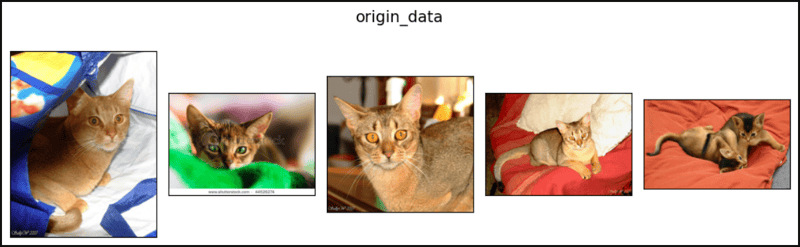
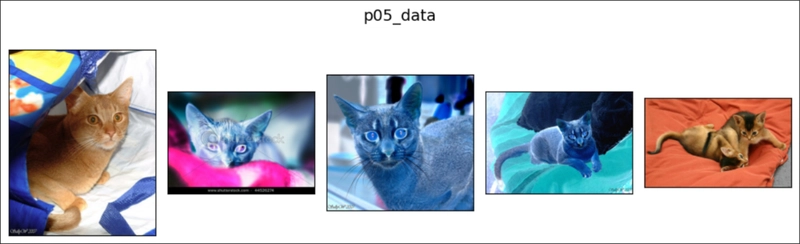
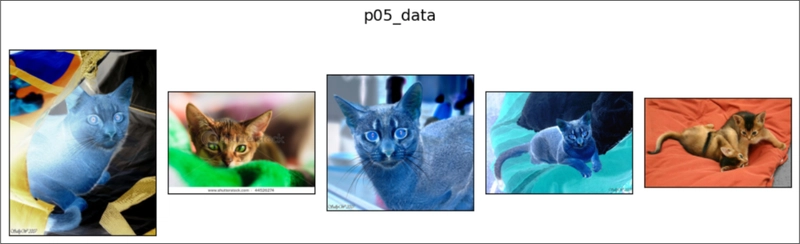
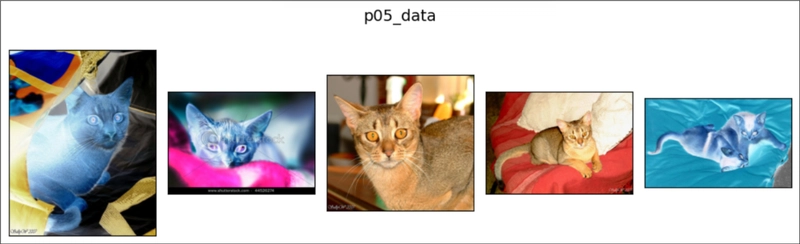
RandomInvert() can randomly invert an image as shown below:
*Memos:
- The 1st argument for initialization is
p(Optional-Default:0.5-Type:intorfloat): *Memos:- It's the probability of whether an image is inverted or not.
- It must be
0 <= x <= 1.
- The 1st argument is
img(Required-Type:PIL Imageortensor(int)): *Memos:- A tensor must be 2D or 3D.
- Don't use
img=.
-
v2is recommended to use according to V1 or V2? Which one should I use?.
from torchvision.datasets import OxfordIIITPet
from torchvision.transforms.v2 import RandomInvert

randominvert = RandomInvert()
randominvert = RandomInvert(p=0.5)

randominvert
# RandomInvert(p=0.5)

randominvert.p
# 0.5

origin_data = OxfordIIITPet(
    root="data",
    transform=None
)

p0_data = OxfordIIITPet(
    root="data",
    transform=RandomInvert(p=0)
)

p05_data = OxfordIIITPet(
    root="data",
    transform=RandomInvert(p=0.5)
)

p1_data = OxfordIIITPet(
    root="data",
    transform=RandomInvert(p=1)
)

import matplotlib.pyplot as plt

def show_images1(data, main_title=None):
    plt.figure(figsize=[10, 5])
    plt.suptitle(t=main_title, y=0.8, fontsize=14)
    for i, (im, _) in zip(range(1, 6), data):
        plt.subplot(1, 5, i)
        plt.imshow(X=im)
        plt.xticks(ticks=[])
        plt.yticks(ticks=[])
    plt.tight_layout()
    plt.show()

show_images1(data=origin_data, main_title="origin_data")
print()
show_images1(data=p0_data, main_title="p0_data")
show_images1(data=p0_data, main_title="p0_data")
show_images1(data=p0_data, main_title="p0_data")
print()
show_images1(data=p05_data, main_title="p05_data")
show_images1(data=p05_data, main_title="p05_data")
show_images1(data=p05_data, main_title="p05_data")
print()
show_images1(data=p1_data, main_title="p1_data")
show_images1(data=p1_data, main_title="p1_data")
show_images1(data=p1_data, main_title="p1_data")

# ↓ ↓ ↓ ↓ ↓ ↓ The code below is identical to the code above. ↓ ↓ ↓ ↓ ↓ ↓
def show_images2(data, main_title=None, prob=0):
    plt.figure(figsize=[10, 5])
    plt.suptitle(t=main_title, y=0.8, fontsize=14)
    for i, (im, _) in zip(range(1, 6), data):
        plt.subplot(1, 5, i)
        ri = RandomInvert(p=prob)
        plt.imshow(X=ri(im))
        plt.xticks(ticks=[])
        plt.yticks(ticks=[])
    plt.tight_layout()
    plt.show()

show_images2(data=origin_data, main_title="origin_data")
print()
show_images2(data=origin_data, main_title="p0_data", prob=0)
show_images2(data=origin_data, main_title="p0_data", prob=0)
show_images2(data=origin_data, main_title="p0_data", prob=0)
print()
show_images2(data=origin_data, main_title="p05_data", prob=0.5)
show_images2(data=origin_data, main_title="p05_data", prob=0.5)
show_images2(data=origin_data, main_title="p05_data", prob=0.5)
print()
show_images2(data=origin_data, main_title="p1_data", prob=1)
show_images2(data=origin_data, main_title="p1_data", prob=1)
show_images2(data=origin_data, main_title="p1_data", prob=1)


This content originally appeared on DEV Community and was authored by Super Kai (Kazuya Ito)
Print
Share
Comment
Cite
Upload
Translate
Updates

There are no updates yet.
Click the Upload button above to add an update.
APA
MLA
Super Kai (Kazuya Ito) | Sciencx (2025-02-17T01:57:39+00:00) RandomInvert in PyTorch. Retrieved from https://www.scien.cx/2025/02/17/randominvert-in-pytorch/
" » RandomInvert in PyTorch." Super Kai (Kazuya Ito) | Sciencx - Monday February 17, 2025, https://www.scien.cx/2025/02/17/randominvert-in-pytorch/
HARVARDSuper Kai (Kazuya Ito) | Sciencx Monday February 17, 2025 » RandomInvert in PyTorch., viewed ,<https://www.scien.cx/2025/02/17/randominvert-in-pytorch/>
VANCOUVERSuper Kai (Kazuya Ito) | Sciencx - » RandomInvert in PyTorch. [Internet]. [Accessed ]. Available from: https://www.scien.cx/2025/02/17/randominvert-in-pytorch/
CHICAGO" » RandomInvert in PyTorch." Super Kai (Kazuya Ito) | Sciencx - Accessed . https://www.scien.cx/2025/02/17/randominvert-in-pytorch/
IEEE" » RandomInvert in PyTorch." Super Kai (Kazuya Ito) | Sciencx [Online]. Available: https://www.scien.cx/2025/02/17/randominvert-in-pytorch/. [Accessed: ]
rf:citation » RandomInvert in PyTorch | Super Kai (Kazuya Ito) | Sciencx | https://www.scien.cx/2025/02/17/randominvert-in-pytorch/ |
Please log in to upload a file.
There are no updates yet.
Click the Upload button above to add an update.