
This content originally appeared on Level Up Coding - Medium and was authored by Erhan Baştürk
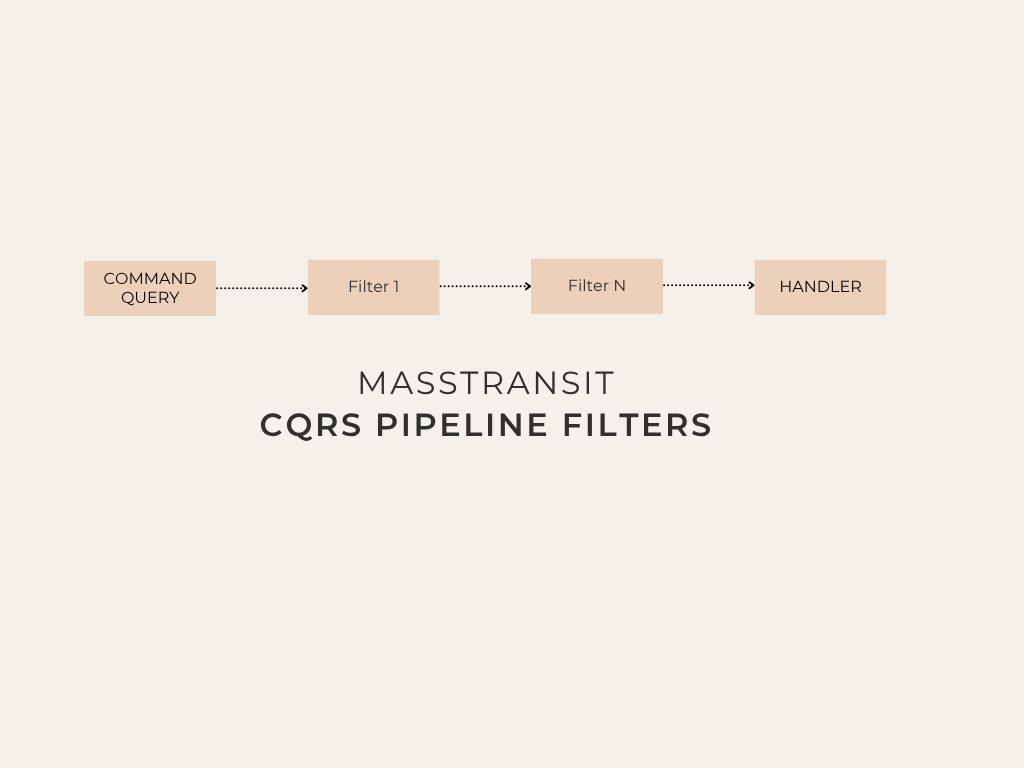
In Part 1 of our series, we established the basic CQRS and automatic handler registration infrastructure using the MassTransit In-Memory Mediator.
In this second part of the series, we will cover Pipe Filters, the MassTransit counterpart of MediatR’s Pipeline Behaviors which is essential for managing cross-cutting concerns in enterprise projects.
In software engineering, cross-cutting concerns are aspects of a program that affect multiple modules or layers and cannot be cleanly separated from the rest of the system. They represent parts of the logic that “cut across” the traditional boundaries of your application’s architecture.
For instance, Global Exception Handling structures developed to catch all potential errors resulting from a user request in a single, centralized location — perfectly fit this definition. Similarly, managing the logging of all incoming requests and outgoing API responses in one place, or handling validation errors centrally, also fits this definition.
Cleaning user input (such as trimming whitespace from the beginning and end or sanitizing it from harmful characters) is another example that falls under this concept, and this process is called sanitization.
In MediatR or similar packages, we would write Behaviors for this purpose. We can, of course, achieve this with MassTransit as well, where it is referred to as MassTransit Filters. Here, we will develop two filters together. By doing so, we will provide useful and directly applicable examples while explaining our main topic. The first of these examples will be building a centralized logging mechanism, and the second will be establishing a central validation structure utilizing FluentValidation, a validation library most of us are already familiar with.
1. Pipeline Behaviors (MassTransit Pipe Filters)
MassTransit provides a highly advanced pipeline structure for customizing the message processing pipeline. We can create our custom filters by implementing the IFilter<ConsumeContext<T>> interface.
In this phase, we will examine 2 basic filters for logging and validation. However, MassTransit allows developers to add and run many filters sequentially according to their needs.
A. Logging Filter
Let’s develop a filter that tracks the start and end times of requests and logs errors.
First, let’s create a simple ILoggable interface to mark the requests we want to log and to mask sensitive data:
public interface ILoggable
{
    IReadOnlyDictionary<string, object?> BuildLogData();
}
Next, with the filter below, we can log how long a request took to process along with the request-response payload and elapsed time information. This logging operation will occur if the LogLevel.Information level is enabled in the application settings:
using MassTransit;
using System.Diagnostics;
using System.Text.Json;

public class LoggingFilter<T>(ILogger<LoggingFilter<T>> logger)
    : IFilter<ConsumeContext<T>> where T : class
{
    public async Task Send(ConsumeContext<T> context, IPipe<ConsumeContext<T>> next)
    {
        var requestName = typeof(T).Name;
        var stopwatch = Stopwatch.StartNew();
        // Request logging (checks the logging interface to mask sensitive data if applicable)
        if (context.Message is ILoggable loggableRequest)
        {
            if (logger.IsEnabled(LogLevel.Information))
            {
                string logData = JsonSerializer.Serialize(loggableRequest.BuildLogData());
                logger.LogInformation("Handling {RequestName} with payload {Request}", requestName, logData);
            }
        }
        try
        {
            await next.Send(context); // Forward the flow to the next filter or Handler
            stopwatch.Stop();
            logger.LogInformation("{RequestName} completed successfully in {Elapsed}ms", requestName, stopwatch.ElapsedMilliseconds);
        }
        catch (Exception ex)
        {
            stopwatch.Stop();
            logger.LogError(ex, "{RequestName} failed in {Elapsed}ms", requestName, stopwatch.ElapsedMilliseconds);
            throw; // Rethrow the exception so that the Global Exception Handler can catch it
        }
    }
    public void Probe(ProbeContext context) => context.CreateFilterScope("logging");
}
B. Validation Filter
We can intercept requests before they are processed to perform validation checks and return to the user without processing the request if there is a validation error. The following filter, which integrates the FluentValidation library into the pipeline, will serve this purpose.
Error Management Note: When you catch MassTransit errors inside a global exception handler, the error is wrapped in a MassTransit.RequestException.
To access the actual exception (for example, the ValidationException thrown by FluentValidation), you can perform the following check in your exception-catching blocks:
if (exception is MassTransit.RequestException && exception.InnerException != null)
{
  exception = exception.InnerException;
}
using FluentValidation;
using MassTransit;

public class ValidationFilter<T>(IEnumerable<IValidator<T>> validators)
    : IFilter<ConsumeContext<T>> where T : class
{
    public async Task Send(ConsumeContext<T> context, IPipe<ConsumeContext<T>> next)
    {
        if (validators.Any())
        {
            var validationContext = new ValidationContext<T>(context.Message);
            var validationResults = await Task.WhenAll(
                validators.Select(v => v.ValidateAsync(validationContext, context.CancellationToken))
            );

            var failures = validationResults
                .SelectMany(r => r.Errors)
                .Where(f => f != null)
                .ToList();
            if (failures.Count != 0)
                throw new ValidationException(failures);
        }
        await next.Send(context);
    }
    public void Probe(ProbeContext context) => context.CreateFilterScope("validation");
}
2. Registering Filters to MassTransit Mediator
To ensure our filters execute in order, we update the AddMediator configuration in ServiceRegistration.cs. Filters will be triggered in the order they are added:
services.AddMediator(cfg =>
{
    // Scanning and adding handlers
    cfg.AddConsumers(consumerTypes);
    // Pipeline Filter Ordering (MediatR Behaviors Counterpart)
    cfg.ConfigureMediator((context, mediatorCfg) =>
    {
        // First data is validated and finally the action is logged.
        mediatorCfg.UseConsumeFilter(typeof(ValidationFilter<>), context);
        mediatorCfg.UseConsumeFilter(typeof(LoggingFilter<>), context);
    });
});
In Summary, What Did We Gain?
By migrating from MediatR to MassTransit’s In-Memory Mediator and leveraging its advanced middleware pipeline, we achieve several major architectural benefits:
No More MediatR Dependency (Licensing & Future-proofing):
- Cost & Compliance: We transitioned away from MediatR, removing any potential licensing, commercial usage, or organizational restrictions. By adopting MassTransit — a fully free, open-source framework under the Apache 2.0 license — we ensure that our core messaging infrastructure remains open and cost-effective forever.
- Community & Ecosystem: MassTransit is backed by an incredibly active community and a mature ecosystem that is heavily maintained. Instead of using a tool solely focused on in-memory dispatching, we get a production-ready messaging platform designed for scale.
Powerful and Flexible Pipeline (Advanced Middleware):
- A True Pipes-and-Filters Architecture: Unlike MediatR’s pipeline behaviors, which can sometimes feel rigid or harder to debug, MassTransit uses a highly optimized greenfield pipeline architecture (GreenPipes).
- Flexible Execution & Ordering: We can inject cross-cutting concerns (such as sanitization, schema validation, and request logging) with explicit control over their execution order. Filters can inspect, mutate, or short-circuit messages before they ever reach the target handlers.
- Granular Control: Since MassTransit exposes the ConsumeContext<T>, we get direct access to message metadata, headers, cancellation tokens, and scope-specific dependency injection out of the box.
Microservices Ready (Zero-friction Distributed Scaling):
- Decoupled Architecture: This is perhaps the greatest advantage. In a traditional MediatR setup, if you decide to extract a handler into a separate microservice, you are forced to rewrite your dispatching code, introduce HTTP/gRPC clients, or manually integrate a message broker.
- Simple Configuration Switch: With MassTransit, your application logic is written using consumers (IConsumer<T>). If you decide to transition from an in-memory mediator to a distributed broker (such as RabbitMQ, Azure Service Bus, or Amazon SQS), you do not need to modify a single line of your business logic (Handlers). You simply swap out the AddMediator configuration in your Dependency Injection bootstrap (ServiceRegistration.cs) with a bus configuration (e.g., UsingRabbitMq). The transport change is completely transparent to the rest of the application.
Frankly, based on my research, I can also say that MediatR is faster than MassTransit. At its core, it is a very lightweight In-Memory router. When it receives a request, it resolves the corresponding IRequestHandler from the dependency injection (DI) container and calls the method directly. There is no extra layer of abstraction in between; the process simply consists of a direct synchronous or asynchronous method call.
On the other hand, the MassTransit In-Memory Mediator structure is a scaled-down, in-memory version of MassTransit’s full-fledged Service Bus architecture. When you send a message, MassTransit passes it through a pipeline. Filters, scoped object management, logging mechanisms, and serialization/automation steps (even if optional) run on this pipeline. Of course, you can achieve this with MediatR Behaviors as well, but MassTransit Mediator runs slightly slower compared to MediatR.
However, this latency is just a drop in the ocean compared to the duration of a single async request your application would make to a database or an external API. Additionally, MediatR remains slightly more performant in terms of memory footprint.
That being said, apart from resolving all licensing issues, MassTransit brings advanced features that you can utilize throughout the entire project, such as Automatic Retry, Outbox, Saga, and Rate Limiting. For instance, it can even replace libraries like Polly, which we all know and use.
Part 2: Advanced Features in MassTransit Mediator: Pipeline Behaviors was originally published in Level Up Coding on Medium, where people are continuing the conversation by highlighting and responding to this story.
This content originally appeared on Level Up Coding - Medium and was authored by Erhan Baştürk

Erhan Baştürk | Sciencx (2026-06-22T17:20:00+00:00) Part 2: Advanced Features in MassTransit Mediator: Pipeline Behaviors. Retrieved from https://www.scien.cx/2026/06/22/part-2-advanced-features-in-masstransit-mediator-pipeline-behaviors/
Please log in to upload a file.
There are no updates yet.
Click the Upload button above to add an update.