
This content originally appeared on DEV Community and was authored by Mads Stoumann
Safari is often blamed for being “the new IE of web-browsers”. That's not fair, because Safari has recently been a “first-mover” in a lot of areas. For instance, Safari Technology Preview has implemented a lot of the stuff from the CSS Color Module Level 5 specification – color-contrast() and color-mix() among them.
Let's build a simple Color Picker using these cool new features! We'll add some JavaScript, using CSS.supports, to make it work in other browsers as well.
The markup is a simple fieldset with radio-buttons:
<fieldset class="color-wrapper">
 <!-- start iterate colors -->
  <label class="color" style="--bgc:hsl(168, 41%, 65%)">
    <input type="radio" name="cp" value="hsl(168, 41%, 65%)"><i></i>
  </label>
<!-- end iterate colors -->
</fieldset>
We'll set a custom property, --bgc, for each color, and with a dash of CSS, this it how it renders in Chrome:

Using a mask() for selected color
We'll add a mask with a checkmark-icon to the <i></i>-element:
.color i {
  aspect-ratio: 1;
  background-color: transparent;
  display: block;
  mask: no-repeat center center/var(--ico-w) var(--ico);
  -webkit-mask: no-repeat center center/var(--ico-w) var(--ico);
  width: 100%;
}
In Chrome, it now looks like this:
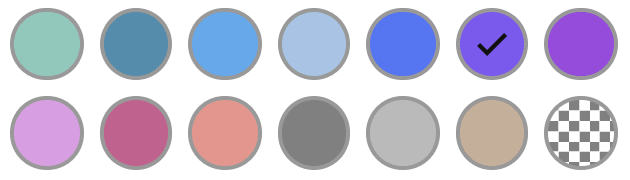
Better – but the icon will have the same color, even if the background-color is dark, like the example above. It's also a bit annoying, that the border-color is the same for all colors.
color-mix()
With the color-mix-function, we can add a colored border, based on the custom property, --bgc, mixing in 10% of black:
.color {
  border: var(--bdw, 0.125rem) solid color-mix(in hsl, #000 10%, var(--bgc));
}
color-contrast()
With the color-contrast-function, we can change the color of the icon, based on the custom property, --bgc:
.color input:checked + i {
  background-color: color-contrast(var(--bgc) vs white, black);
}
In Safari, it now looks like this:

Cool! See those beautiful, dynamic border-colors! The checkmark-icon is white on dark colors, and black on light colors.
And absolutely no JavaScript is required!
Fixing issues in Chrome & Co.
In non-Safari browsers, we'll have to use some JavaScript in order to achieve the same:
if (CSS.supports('not (color: color-contrast(red vs black, white))')) {
/* code here */
}
We'll add a method that'll iterate the labels of the fieldset, and set a custom property, --ico-c, to either black or white, depending on the brightness of the iterated color:
function setLuminance(elements) {
  elements.forEach(element => {
    const rgb = window.getComputedStyle(element).getPropertyValue('background-color');
    if (rgb) {
      const [r,g,b] = rgb.replace(/[^\d,]/g, '').split(',');
      const brightness = (299 * r + 587 * g + 114 * b) / 1000;
      element.style.setProperty('--ico-c', brightness <= 127 ? '#FFF' : '#111')
    }
  })
}
The snippet will return the color of the label as rgb, no matter if it's hex, hsl or rgb to start with, then check it's brightness, and set the --ico-c-property.
In Chrome, it now looks like this:
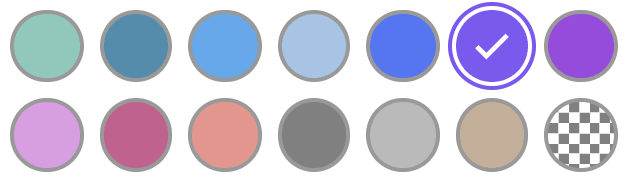
Much better! The border-colors are still a bit dull in “non-Safari”-browsers, though, but I'm going to ignore that ?
Enabling color-contrast and color-mix
In Safari Technology Preview, go to Develop > Experimental Features and enable them:

Demo
It's not working yet in – wait for it — mobile Safari, but I'll look into that!
Closing thoughts
I tried to use color-mix within color-contrast – but that didn't work!
I guess the implementation is not completely done, and thus a little buggy – but I'm looking forward to being able to mix in 80% white or black with the background-color, so the icon-color blends in more “softly” with the background-color.
This content originally appeared on DEV Community and was authored by Mads Stoumann

Mads Stoumann | Sciencx (2021-08-23T15:46:30+00:00) A simple Color-Picker using CSS5 color-contrast() and color-mix(). Retrieved from https://www.scien.cx/2021/08/23/a-simple-color-picker-using-css5-color-contrast-and-color-mix/
Please log in to upload a file.
There are no updates yet.
Click the Upload button above to add an update.