
Building a Custom React Hook in TypeScript

A step-by-step guide to creating custom React hooks in TypeScript

Sebastian Herrmann on Unsplash

According to the results of the annual survey of the State of Javascript, it doesn’t seem like React nor TypeScript is going anywhere anytime soon so it’s worth taking some time and learning how they work!

React hooks have revolutionized the way we can build React components as they tend to be considerably more intuitive than Class Components. However, one feature that isn’t taken advantage of nearly as much as it should be, is the ability to create custom hooks!

Custom hooks let us abstract away the logic of React components and re-use them! I suggest only doing this with logic that actually gets reused a ton throughout your web application.

More info about hooks can be found here.

For the sake of this article, the example I’m going to be creating is a useToggle hook! Toggling something in the UI is quite common so we should get a lot of mileage out of this one.

Building the hook

First, let’s create the file useToggle.ts, and let’s build the skeleton for our hook. All hooks must begin with the word use!

A toggle hook will typically just rely on toggling a boolean state from true to false and vice versa, however, to make it more complete let’s add some additional, optional, functionality to the hook where we can completely set it to false or true.

Let’s create the state and the skeleton of the functions:

You should import the appropriate hooks from React itself, in this case, useState and useCallback.

import {useState, useCallback } from 'react';

The useState hook has access to the previous state, this is generally safer to use so we’ll just toggle it with this functionality. The other two functions, close and open, will set the state to either true or false directly. The state of the toggle and the three functions will get returned in an array.

TypeScript

Last but not least, let’s give our hook some type-safety by letting the function know what we are expecting to return.

We return an array with the internal state of the hook, and the 3 functions to alter the state!

As a little extra we can add an initial state to the hook in case we want it to start off as closed or opened:

Conclusion

And that’s it! Hooks are a great way to abstract logic used in React components.

If you liked this feel free to connect with me on LinkedIn or Twitter.

Originally published at https://relatablecode.com on March 6, 2022.

Build with independent components for speed and scale

Instead of building monolithic apps, build independent components first and compose them into features and applications. It makes development faster and helps teams build more consistent and scalable applications.

Bit offers a great developer experience for building independent components and composing applications. Many teams start by building their Design Systems or Micro Frontends, through independent components.
Give it a try →

An independently source-controlled and shared “card” component. On the right => its dependency graph, auto-generated by Bit.

Learn More


Building a Custom React Hook in TypeScript was originally published in Bits and Pieces on Medium, where people are continuing the conversation by highlighting and responding to this story.


This content originally appeared on Bits and Pieces - Medium and was authored by Diego Ballesteros

A step-by-step guide to creating custom React hooks in TypeScript

Sebastian Herrmann on Unsplash

According to the results of the annual survey of the State of Javascript, it doesn’t seem like React nor TypeScript is going anywhere anytime soon so it’s worth taking some time and learning how they work!

React hooks have revolutionized the way we can build React components as they tend to be considerably more intuitive than Class Components. However, one feature that isn’t taken advantage of nearly as much as it should be, is the ability to create custom hooks!

Custom hooks let us abstract away the logic of React components and re-use them! I suggest only doing this with logic that actually gets reused a ton throughout your web application.

More info about hooks can be found here.

For the sake of this article, the example I’m going to be creating is a useToggle hook! Toggling something in the UI is quite common so we should get a lot of mileage out of this one.

Building the hook

First, let’s create the file useToggle.ts, and let’s build the skeleton for our hook. All hooks must begin with the word use!

A toggle hook will typically just rely on toggling a boolean state from true to false and vice versa, however, to make it more complete let’s add some additional, optional, functionality to the hook where we can completely set it to false or true.

Let’s create the state and the skeleton of the functions:

You should import the appropriate hooks from React itself, in this case, useState and useCallback.

import {useState, useCallback } from 'react';

The useState hook has access to the previous state, this is generally safer to use so we’ll just toggle it with this functionality. The other two functions, close and open, will set the state to either true or false directly. The state of the toggle and the three functions will get returned in an array.

TypeScript

Last but not least, let’s give our hook some type-safety by letting the function know what we are expecting to return.
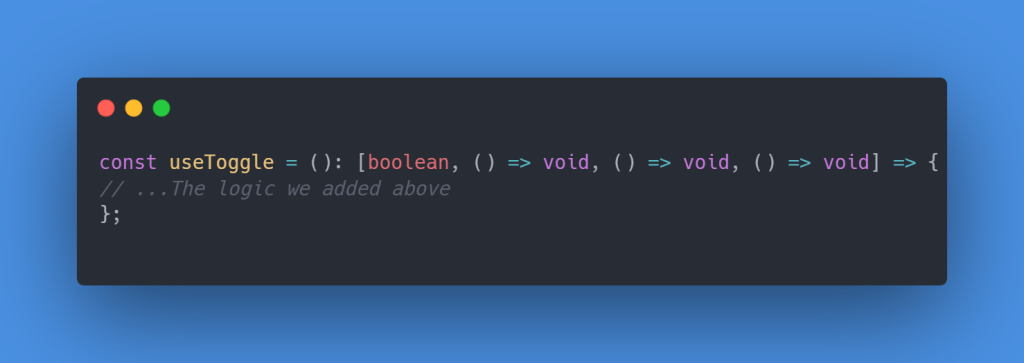
We return an array with the internal state of the hook, and the 3 functions to alter the state!

As a little extra we can add an initial state to the hook in case we want it to start off as closed or opened:

Conclusion

And that’s it! Hooks are a great way to abstract logic used in React components.

If you liked this feel free to connect with me on LinkedIn or Twitter.

Originally published at https://relatablecode.com on March 6, 2022.

Build with independent components for speed and scale

Instead of building monolithic apps, build independent components first and compose them into features and applications. It makes development faster and helps teams build more consistent and scalable applications.

Bit offers a great developer experience for building independent components and composing applications. Many teams start by building their Design Systems or Micro Frontends, through independent components.
Give it a try →
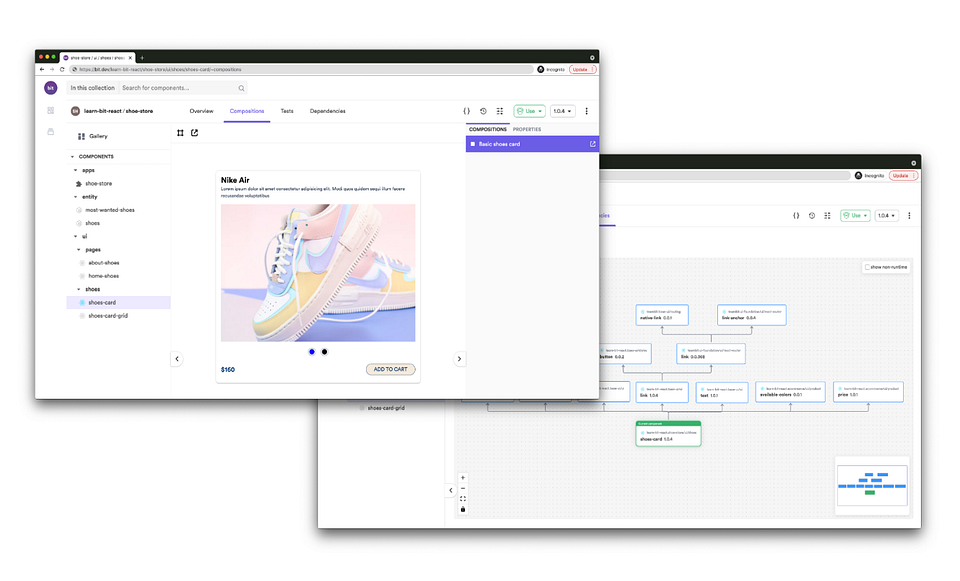
An independently source-controlled and shared “card” component. On the right => its dependency graph, auto-generated by Bit.

Learn More


Building a Custom React Hook in TypeScript was originally published in Bits and Pieces on Medium, where people are continuing the conversation by highlighting and responding to this story.


This content originally appeared on Bits and Pieces - Medium and was authored by Diego Ballesteros


Print Share Comment Cite Upload Translate Updates
APA

Diego Ballesteros | Sciencx (2022-03-10T09:11:09+00:00) Building a Custom React Hook in TypeScript. Retrieved from https://www.scien.cx/2022/03/10/building-a-custom-react-hook-in-typescript/

MLA
" » Building a Custom React Hook in TypeScript." Diego Ballesteros | Sciencx - Thursday March 10, 2022, https://www.scien.cx/2022/03/10/building-a-custom-react-hook-in-typescript/
HARVARD
Diego Ballesteros | Sciencx Thursday March 10, 2022 » Building a Custom React Hook in TypeScript., viewed ,<https://www.scien.cx/2022/03/10/building-a-custom-react-hook-in-typescript/>
VANCOUVER
Diego Ballesteros | Sciencx - » Building a Custom React Hook in TypeScript. [Internet]. [Accessed ]. Available from: https://www.scien.cx/2022/03/10/building-a-custom-react-hook-in-typescript/
CHICAGO
" » Building a Custom React Hook in TypeScript." Diego Ballesteros | Sciencx - Accessed . https://www.scien.cx/2022/03/10/building-a-custom-react-hook-in-typescript/
IEEE
" » Building a Custom React Hook in TypeScript." Diego Ballesteros | Sciencx [Online]. Available: https://www.scien.cx/2022/03/10/building-a-custom-react-hook-in-typescript/. [Accessed: ]
rf:citation
» Building a Custom React Hook in TypeScript | Diego Ballesteros | Sciencx | https://www.scien.cx/2022/03/10/building-a-custom-react-hook-in-typescript/ |

Please log in to upload a file.


There are no updates yet.
Click the Upload button above to add an update.

You must be logged in to translate posts. Please log in or register.