
Unit Test with PyTest

Introduction To Unit Test in Python Using PyTest

Pytest logo. Source

We can check if a code is working correctly by testing it. Unit testing is a software testing method that checks whether a piece of code, a unit in the system, is working correctly. Ideally, even the smallest piece of code should be tested, and that code will not be released without testing.

The testing process of a program consists of different levels. Each level has its own dynamics.

Test Pyramid. Source

At the bottom, the most basic level is unit testing. As mentioned above, every single unit is tested. This unit can be a method, or it can be a class, etc. A higher level is testing multiple components together. It is testing the integrated interoperability of the units. At the top is UI testing (also called system testing, or end-to-end testing). Now at this level, the entire building is tested for use cases. What is tested here is whether the use case is met. After these stages, there is the user acceptance test stage. This part is done by users.

The more detailed and more testing at the lower levels, the less testing intensity is required at the higher levels. That is, success at the lower levels facilitates the above tasks.

Again at lower levels tests are faster (should be fast). Since the number of tests will be too large at the lower levels, if these tests are slow, there will be a backlog. As you go up, the number of tests will decrease, but their duration will increase. In parallel, the costs of tests at higher levels are higher.

The lower-level tests are intended to prevent bugs. The above tests detect bugs.

What is the unit? In terms of object-oriented programming, the unit is the class. For functional programming, it is a function. A class also consists of multiple methods. In the OOP case, whether we accept the class as a unit or each of their methods will actually depend on our point of view. Both are OK.

A well-written test clearly demonstrates the anatomy of a structure.

“The act of writing a unit test is more an act of design than of verification. It is also more an act of documentation than of verification. The act of writing a unit test closes a remarkable number of feedback loops, the least of which is the one pertaining to verification of function.” Robert Martin.

Robert Martin. Source: Wikipedia
  • Test coverage indicates the degree to which a program has been tested. Of course, we want this ratio to be high. A low indicates poor quality, but a high does not directly indicate that everything is great.
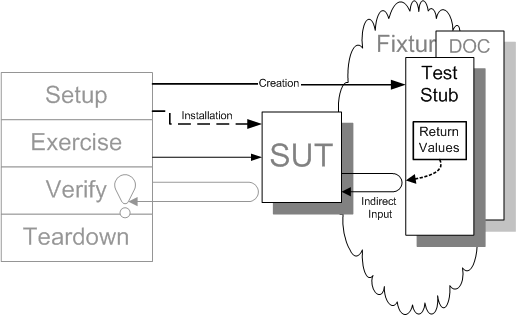
  • SUT: system under test. Whichever class we are testing is the SUT.
  • DOC: Dependency on a component. Other components on which the component we are testing is dependent (dependencies).
  • Mocking: We must isolate the tested component from its dependencies. We have to get rid of DOCs in a SUT. This way the bug will only belong to the SUT.
Mocking. Source

Instead of dependencies, we put constructs that emulate them.

  • Test Case: Testing a case.
  • Test Suite: Many test cases together.
  • Test Method & Class: Test cases often require test methods, and test suites often require test classes.
  • AAA: Arrange, Act, Assert. Stages of a unit test. Arrange: preparing for a test, getting a test ready, setup. Act: Exercise the test. Assert: Verify the result.
AAA. Source
  • White Box & Black Box: A unit test is a white box test. The internal structure is visible. On the contrary, system tests are black box tests. The internal structures of the systems are invisible, the systems are tested through APIs.
  • Regression: These are the tests that reveal whether there is a disruption in the system when a change is made in a unit.
DALLE: a python that performs complete unit testing on every piece of software. (otto dix style)

PyTest

Pytest is a unit testing framework. There are many different unit testing libraries available for Python, for example, unittest is a built-in library. However, PyTest is one of the most popular unit-testing libraries due to its many features.

pip install pytest

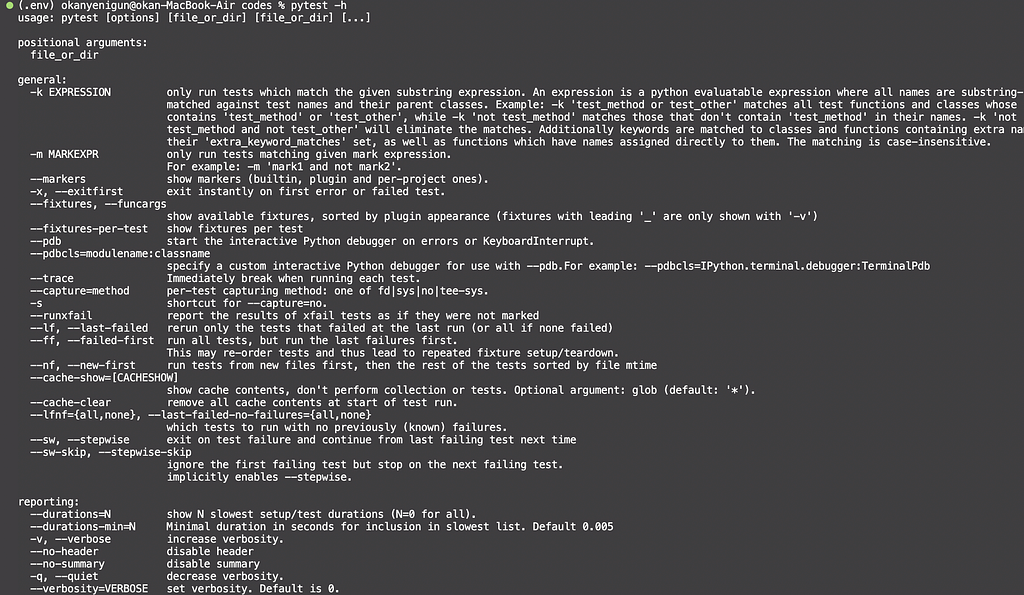
Type pytest -h in your command line to list all methods you can use:

Help. Image by the author.

Let’s start simple. I have a foo and a boo to test.

foo and boo functions. Image by the author.

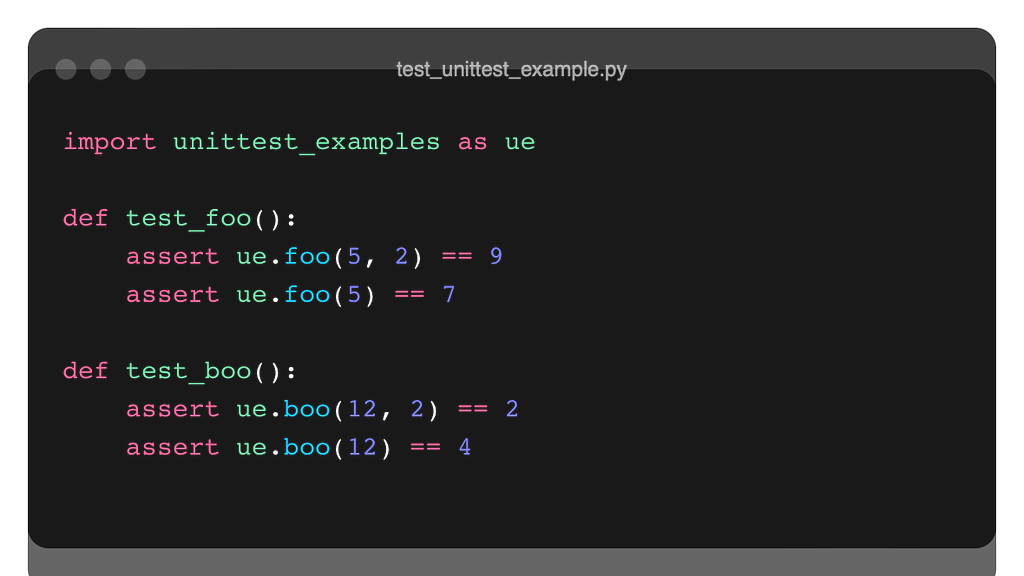
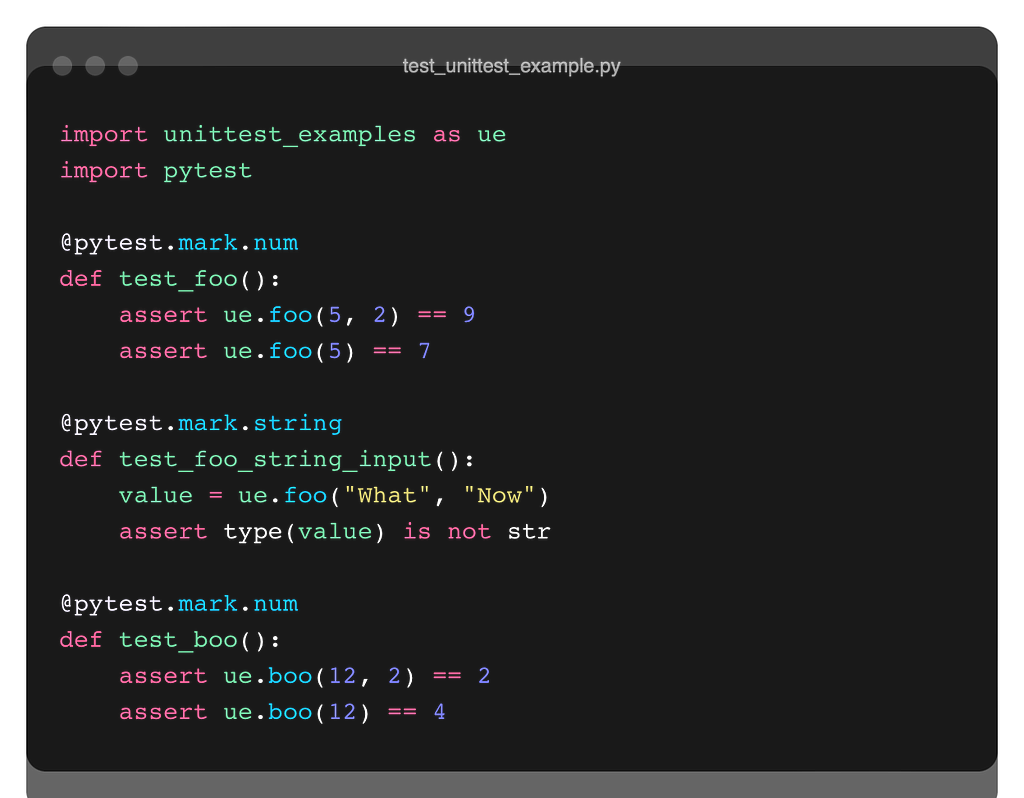
To test these, I have created a file named test_unittest_example.py. I have used the ‘test_’ prefix when naming because Pytest detects files with a ‘test’ prefix automatically. I will do that when I am naming the test methods.

Let’s write 2 test functions for foo and boo. These functions will also start with the ‘test_’ prefix. I will use the assertion construct inside the tests. Hey, wait a minute, whatever assertion was, you can remember them before continuing.

Defensive Programming in Python

Tests

To run the tests, we will run a command in the shell where the test scripts are located.

xxx-MacBook-Air codes % pytest test_unittest_example.py
OR
xxx-MacBook-Air codes % py.test
#this will detect the test py files automatically in the folder, that's why I named the test py files and functions with the 'test' prefix.

Output is displayed in the shell as both of the tests are passed. You can also see the coverage rate of the tests (100%) and how long it took to complete them in the printout.

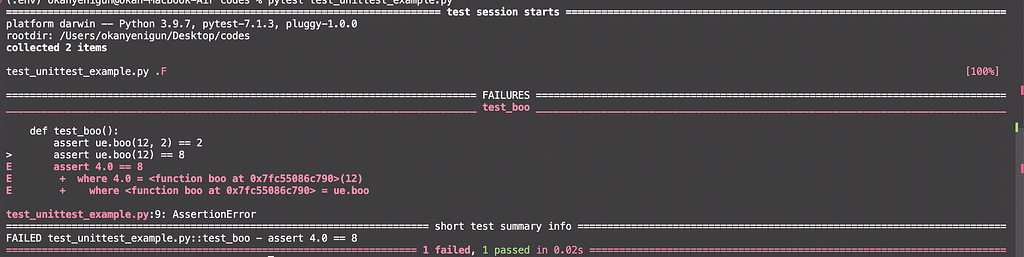
Let’s make a mistake and see what will happen in the output.

#instead of
#assert ue.boo(12) == 4
assert ue.boo(12) == 8

Now, we have 1 failed test and 1 passed test. It gives us information about the assertion failures (in red in my VScode).

Options

We can use flags when running the shell commands to use other properties of PyTest.

v : Verbose, displays additional information.

xxx-MacBook-Air codes % pytest test_unittest_example.py -v
OR 
xxx-MacBook-Air codes % py.test -v

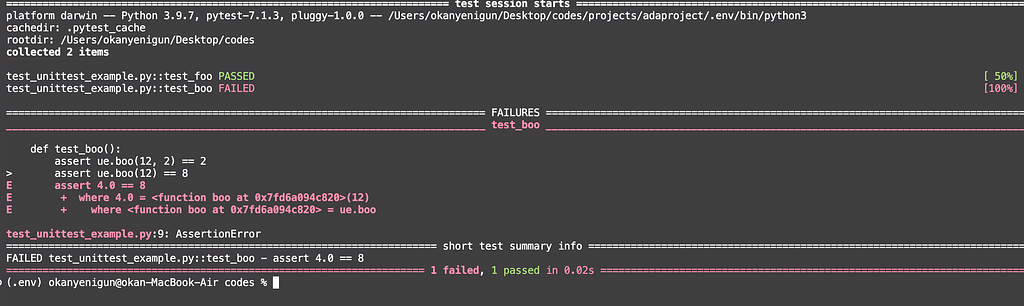
We can also see the details of which tests passed and which did not.

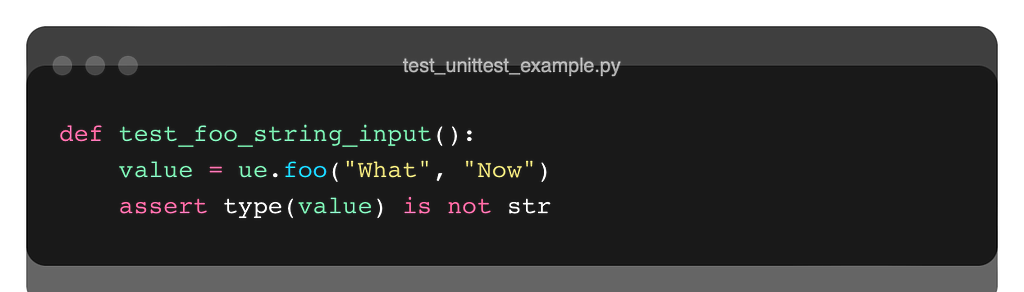
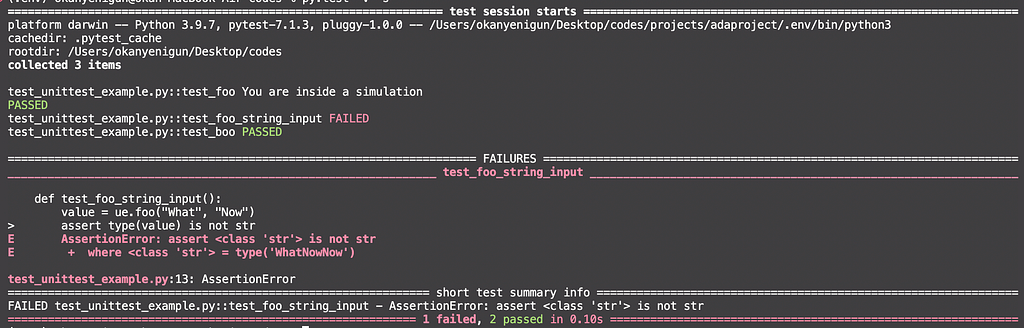
I added another test for the foo function that operates a summation. So, by the nature of Python, it can concatenate two strings together, and I don’t want that to happen. Then let me write a separate test that checks for that.

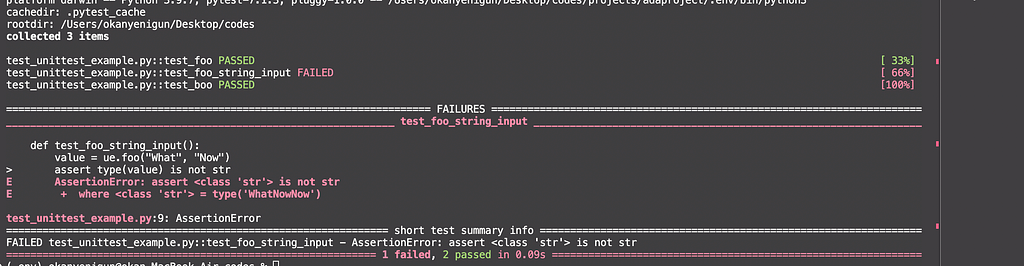
It failed.

-q for short info.

py.test -q

:: run only declared tests in a test file.

pytest test_unittest_example.py::test_foo

-k “ “ only runs tests that contain the phrase you give in the name.

pytest test_unittest_example.py -v -k "foo"

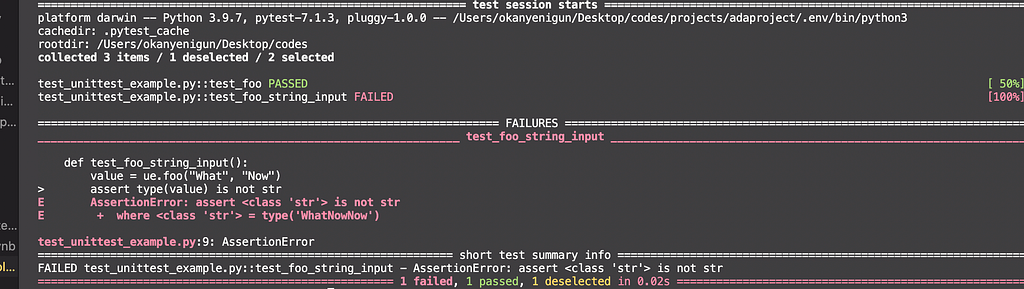
We can even add logical operations (add, or):

pytest test_unittest_example.py -v -k "boo or input"

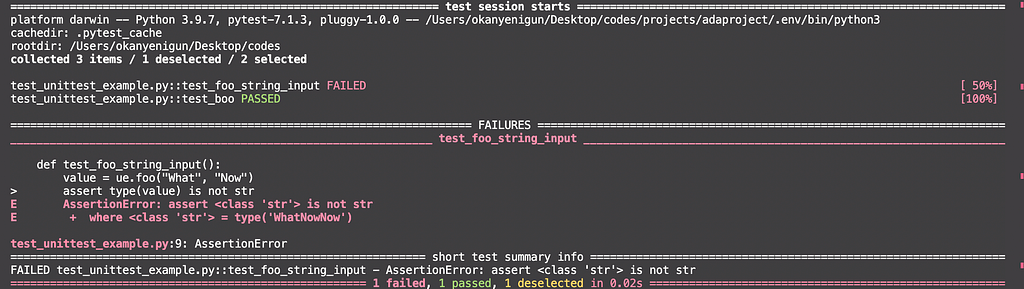
-m mark expressions. Similarly, we can mark any test with a pytest decorator and only run them.

py.test -v -m num

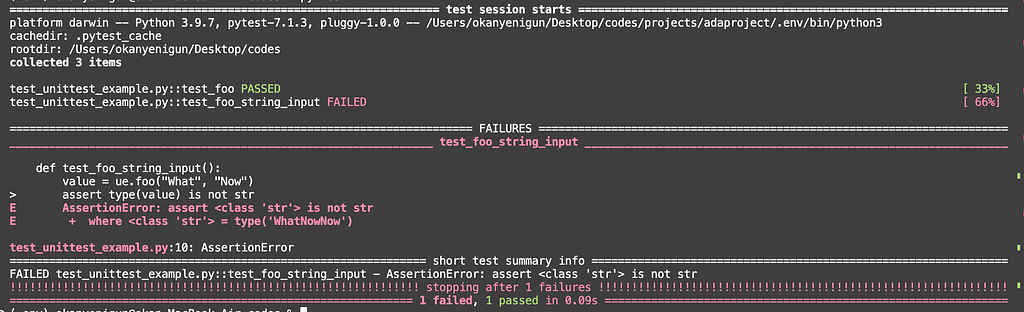
-x early stopping. Whenever the first failure occurs, pytest will terminate the process.

—- maxfail=2 ; after n failure, pytest will terminate the process.

py.test -v --maxfail=1

—- tb=no failure details will not show up.

py.test -v -x --tb=no

mark.skip -rsx We can define reasons to skip specific tests. Thus, we can organize test processes for different purposes.

pytest -v -rsx

mark.skipif We can add conditions to skip. Below, it checks the Python version and runs the test if the condition is met.

-s or — -capture=no to display print statements in a test function.

py.test -v -s
or
py.test -v --capture=no

Parameterizing

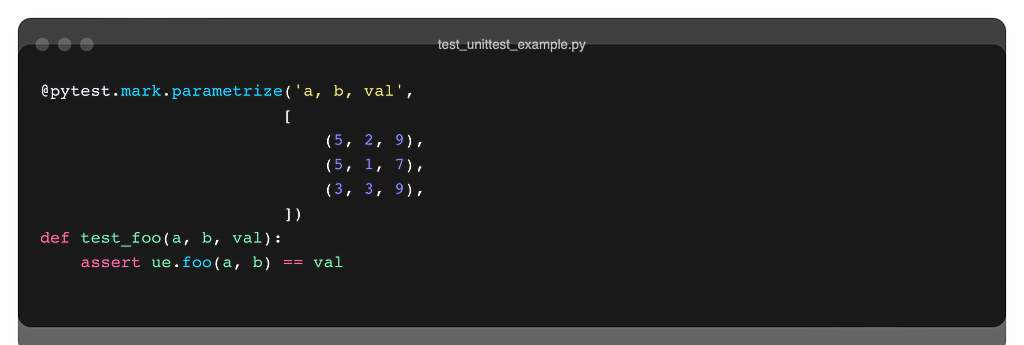
We can parameterize test cases using parametrize decorator of Pytest. In this way, we do not need to write multiple assertions or functions for the same test.

Fixtures

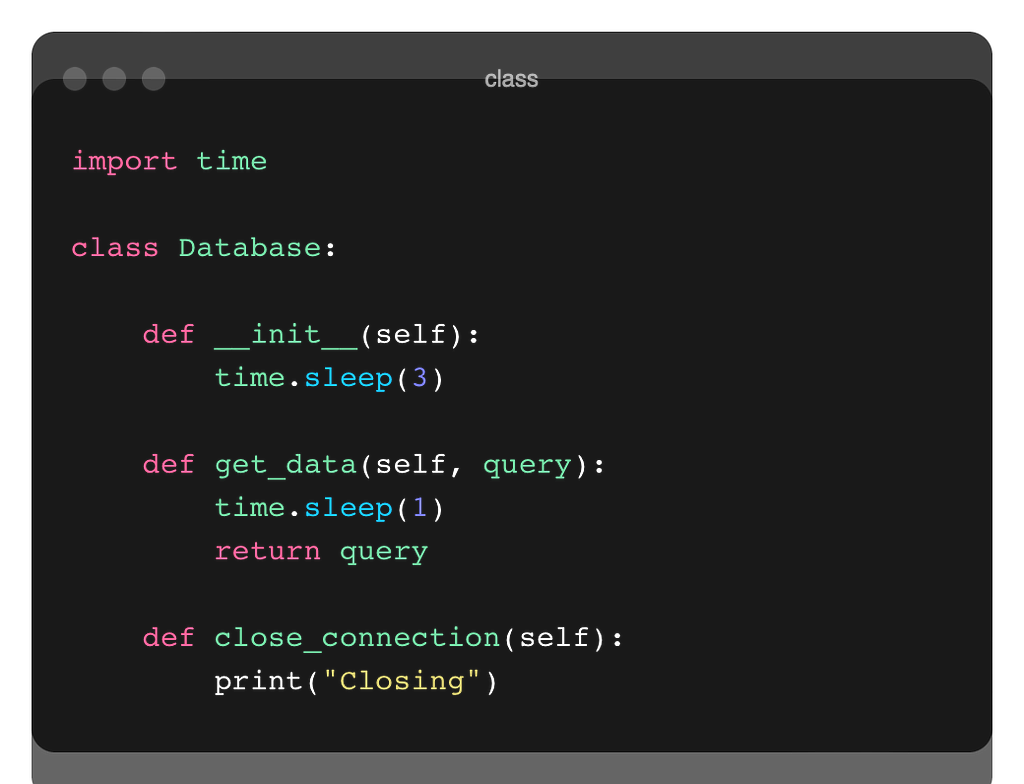
Suppose you have a test case where you connect to a database. Connecting and pulling data is always time-consuming. Let the following simple class structure represent the database:

Let’s write 2 different test cases accordingly.

As you can see, there are repetitive processes here. In both tests, we connect to the database from the beginning. Instead, we can eliminate duplication by identifying common operations at the beginning and end of the testing process.

The setup_module function runs at the first start of a test module. The teardown_module function runs at the end of the test module. They are automatically detected by Pytest.

In this way, we connect the database and close the connection only once.

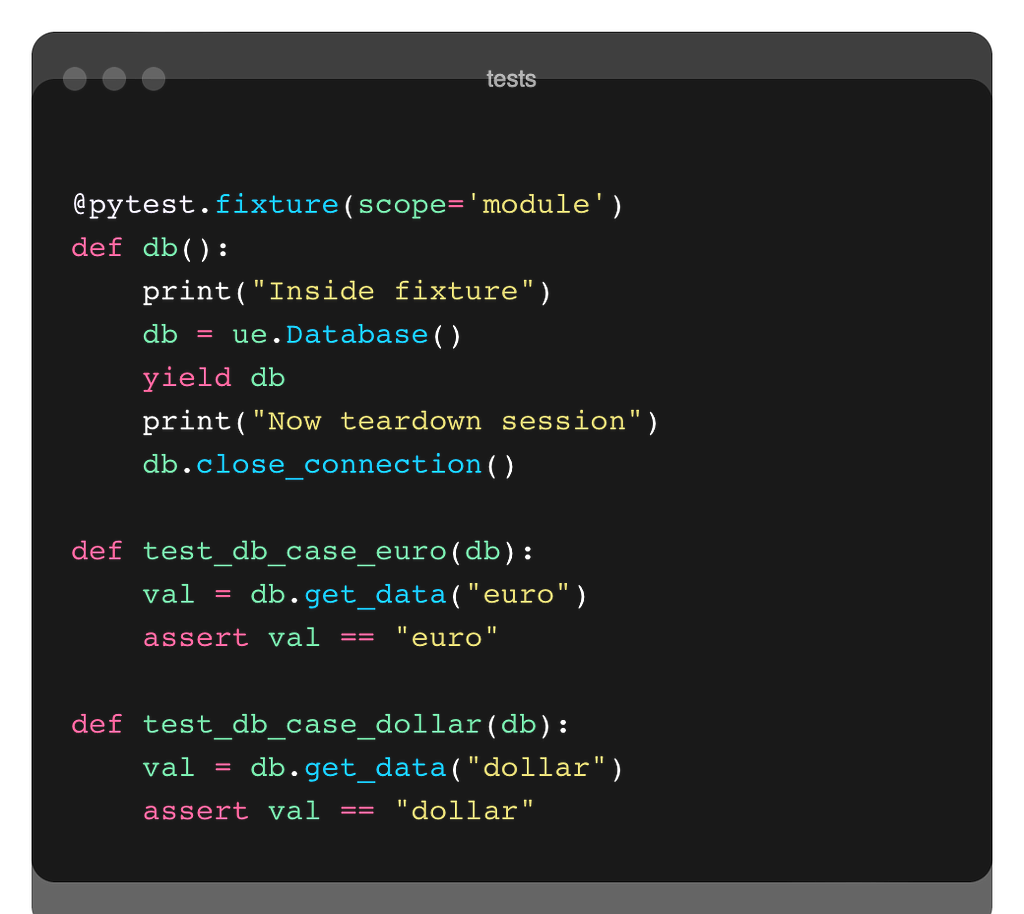
Another way to handle this is to use the fixture decorator of Pytest. We define a function that contains both setup and teardown parts. We return the db object with the yield keyword. After yield, the rest is the teardown part.

Let’s work on another example. In the example below, there is an aircraft class (Flight) and a customer database class (CustomerDb). We can add passengers to the Flight class, get the list of passengers, get the total number of passengers and calculate the total revenue. CustomerDb determines the discount rates according to the membership status of the customers.

https://medium.com/media/2ac3b8442d3e3c1bd68c2a204da27f59/href

Let’s test various situations for an application designed in this way.

  • Can we add passengers seamlessly?
  • Is the passenger we add included in the passenger list?
  • It is necessary that we cannot add new passengers when the aircraft capacity is full, is there any measure against this situation?
  • Can we calculate the total revenue correctly?

Let’s take these tests one by one.

https://medium.com/media/418b166a59d9db18ac0d14acdbcf2a42/href

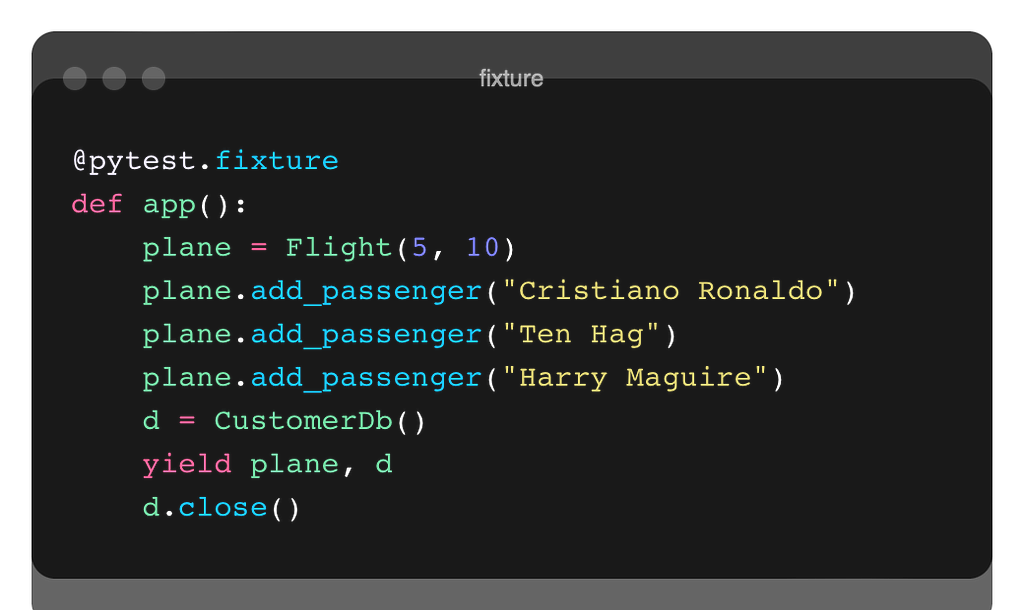
In the beginning, we set up our test in a way that prevents us from falling into repetition with the help of a fixture.

Since we returned two variables in the fixture, we got a tuple. Therefore, in order to access the Flight object, we need to get the 0th index. We have already added 3 passengers in the fixture. Luke & Bruno became the fourth passenger.

Catch Thrown Errors

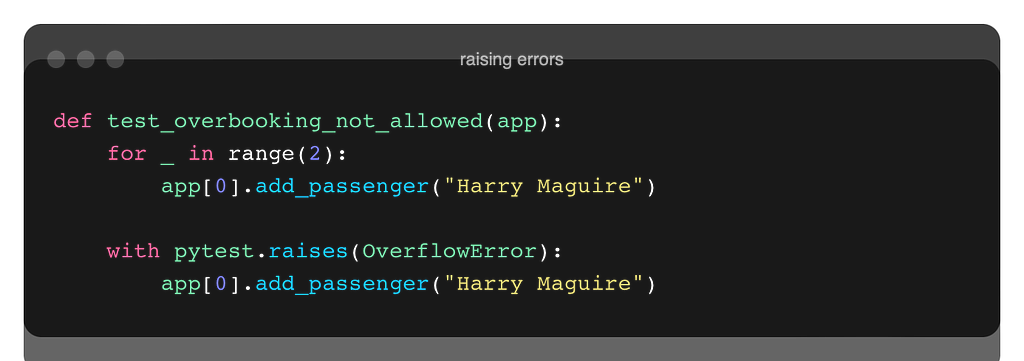
If the capacity is full and we want to add another passenger, remember we raised an OverflowError.

if booked == self.capacity:
raise OverflowError("Flight is fully booked!")

We can catch the errors sent in our tests and make adjustments accordingly. For example, in the test below, since the OverflowError is an error I expect, I ensure that it does not give an error if such a situation is encountered. After the with keyword line, I could issue any command I wanted.
However, if I tried to add 3 new passengers instead of 2 new passengers, the test would not pass because this process would be above the with expression.

Mocking

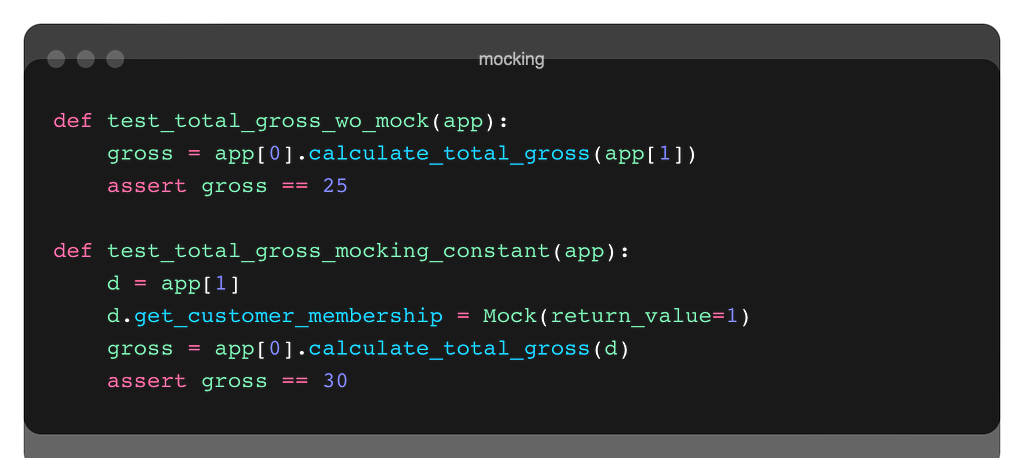
As you may recall, the mocking process was eliminating dependencies. The first test is not mocked. In this test, the processing is done directly on the database. If we want the test to be independent of the database (we don’t want changes to the database to affect the test), we can apply mocking.

from unittest.mock import Mock

Whenever the get_customer_membership method of the database object is called, the return value will be a constant (1 in our case).

Apart from that, we can also define the mock operation with a function using side effects.

Let’s run the pytest command in the shell to check the results of the test:

pytest -v

Integration Test (REST API)

Finally, let’s do an integration test case study over the REST API. We will use the https://todo.pixegami.io/ site for this. A simple application where we can fulfill REST API requests.

You can reach the documentation from here.

The TaskUtility class contains ENDPOINT methods. We perform API operations with static methods here. new_task_payload: creates data for a new record. Thanks to the uuid library, the user_id and content are randomized.

https://medium.com/media/aba0bd353f8bcd4389c15be5bd6095f0/href

So, let’s examine the test cases:

If the request is successful we need to get the 200 status code.

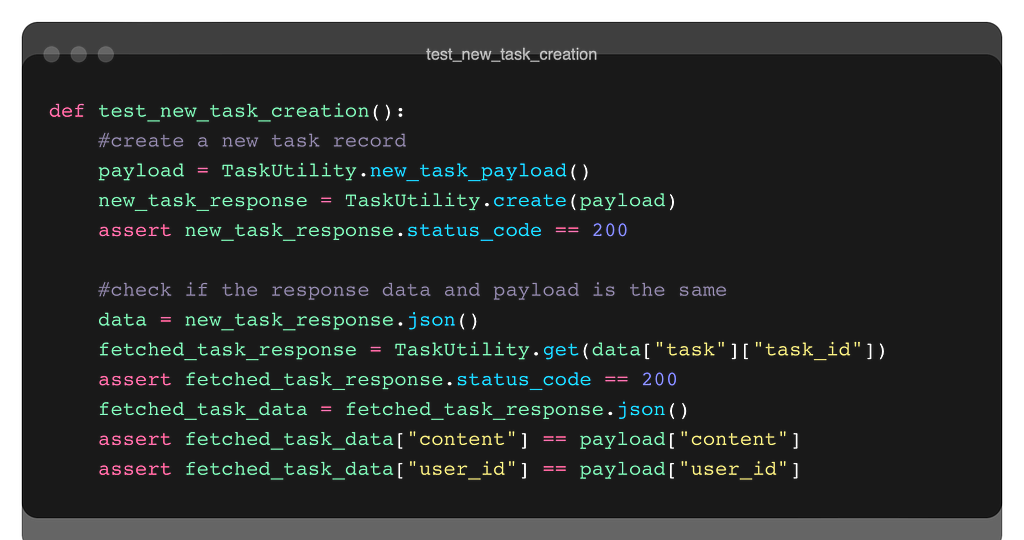
In the second test, first, we create a new task record and check if it was successful from the status code of the response. Then, we pull the newly created data with the get method using with the task id number and check whether it is the same as the content we used when creating the new record at first.

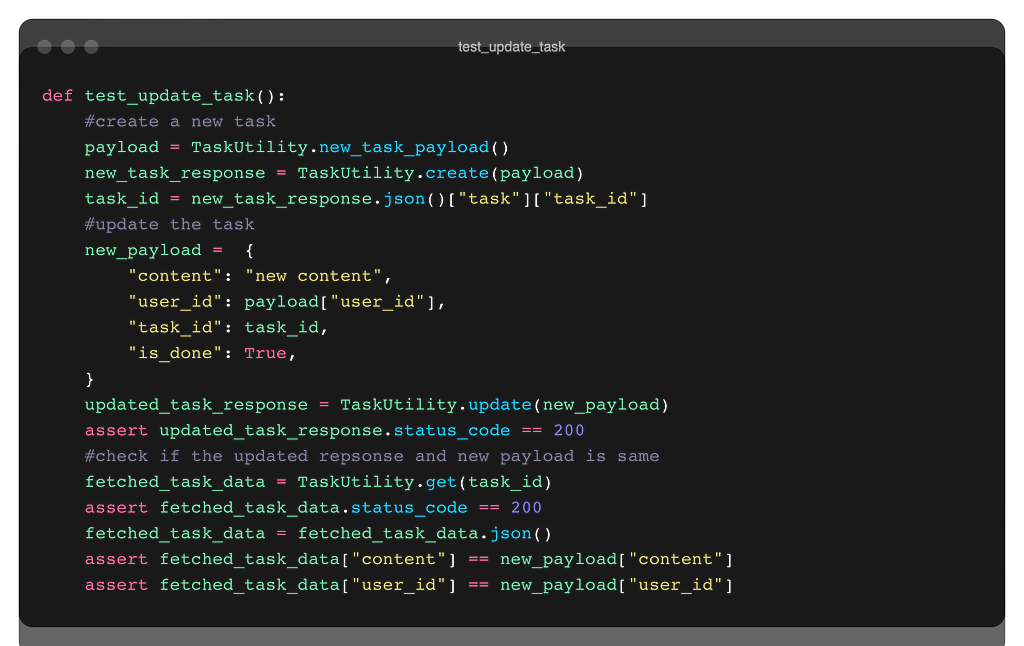
Similar steps for the update process…

We create n new records. Then we pull all the records according to the user_id. We compare numbers.

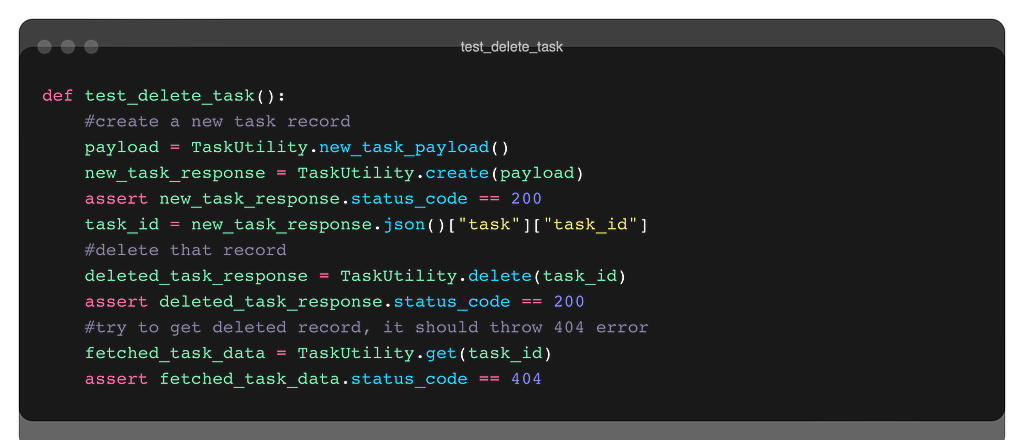
Similar operations… Note that we check with the 404 code whether the record we deleted is actually deleted.

Testing processes are very important for quality code and quality systems. In fast development environments, time constraints, and lack of resources, it can be ignored or not given the necessary attention. However, the testing process should not be skipped, especially when considered together with TDD.

There are many testing libraries written for Python (including the built-in unittest library). Pytest is a widely used and widely recognized library in the industry. It has many features. In this short blog post, I tried to talk about some critical issues. Thanks for reading this far.

Read More…

References

https://pytest.org/

https://docs.python.org/3/library/unittest.html

https://realpython.com/pytest-python-testing/

https://www.youtube.com/watch?v=YbpKMIUjvK8&t=1055s

https://www.youtube.com/watch?v=_QtM7QGuj1A&list=PLS1QulWo1RIaNFUz4zrztWlCJgkpXht-H

https://www.youtube.com/watch?v=7dgQRVqF1N0&t=1558s


Unit Test with PyTest was originally published in Level Up Coding on Medium, where people are continuing the conversation by highlighting and responding to this story.


This content originally appeared on Level Up Coding - Medium and was authored by Okan Yenigün

Introduction To Unit Test in Python Using PyTest
Pytest logo. Source

We can check if a code is working correctly by testing it. Unit testing is a software testing method that checks whether a piece of code, a unit in the system, is working correctly. Ideally, even the smallest piece of code should be tested, and that code will not be released without testing.

The testing process of a program consists of different levels. Each level has its own dynamics.

Test Pyramid. Source

At the bottom, the most basic level is unit testing. As mentioned above, every single unit is tested. This unit can be a method, or it can be a class, etc. A higher level is testing multiple components together. It is testing the integrated interoperability of the units. At the top is UI testing (also called system testing, or end-to-end testing). Now at this level, the entire building is tested for use cases. What is tested here is whether the use case is met. After these stages, there is the user acceptance test stage. This part is done by users.

The more detailed and more testing at the lower levels, the less testing intensity is required at the higher levels. That is, success at the lower levels facilitates the above tasks.

Again at lower levels tests are faster (should be fast). Since the number of tests will be too large at the lower levels, if these tests are slow, there will be a backlog. As you go up, the number of tests will decrease, but their duration will increase. In parallel, the costs of tests at higher levels are higher.

The lower-level tests are intended to prevent bugs. The above tests detect bugs.

What is the unit? In terms of object-oriented programming, the unit is the class. For functional programming, it is a function. A class also consists of multiple methods. In the OOP case, whether we accept the class as a unit or each of their methods will actually depend on our point of view. Both are OK.

A well-written test clearly demonstrates the anatomy of a structure.

“The act of writing a unit test is more an act of design than of verification. It is also more an act of documentation than of verification. The act of writing a unit test closes a remarkable number of feedback loops, the least of which is the one pertaining to verification of function.” Robert Martin.

Robert Martin. Source: Wikipedia
  • Test coverage indicates the degree to which a program has been tested. Of course, we want this ratio to be high. A low indicates poor quality, but a high does not directly indicate that everything is great.
  • SUT: system under test. Whichever class we are testing is the SUT.
  • DOC: Dependency on a component. Other components on which the component we are testing is dependent (dependencies).
  • Mocking: We must isolate the tested component from its dependencies. We have to get rid of DOCs in a SUT. This way the bug will only belong to the SUT.
Mocking. Source

Instead of dependencies, we put constructs that emulate them.

  • Test Case: Testing a case.
  • Test Suite: Many test cases together.
  • Test Method & Class: Test cases often require test methods, and test suites often require test classes.
  • AAA: Arrange, Act, Assert. Stages of a unit test. Arrange: preparing for a test, getting a test ready, setup. Act: Exercise the test. Assert: Verify the result.
AAA. Source
  • White Box & Black Box: A unit test is a white box test. The internal structure is visible. On the contrary, system tests are black box tests. The internal structures of the systems are invisible, the systems are tested through APIs.
  • Regression: These are the tests that reveal whether there is a disruption in the system when a change is made in a unit.

DALLE: a python that performs complete unit testing on every piece of software. (otto dix style)

PyTest

Pytest is a unit testing framework. There are many different unit testing libraries available for Python, for example, unittest is a built-in library. However, PyTest is one of the most popular unit-testing libraries due to its many features.

pip install pytest

Type pytest -h in your command line to list all methods you can use:
Help. Image by the author.

Let’s start simple. I have a foo and a boo to test.

foo and boo functions. Image by the author.

To test these, I have created a file named test_unittest_example.py. I have used the ‘test_’ prefix when naming because Pytest detects files with a ‘test’ prefix automatically. I will do that when I am naming the test methods.

Let’s write 2 test functions for foo and boo. These functions will also start with the ‘test_’ prefix. I will use the assertion construct inside the tests. Hey, wait a minute, whatever assertion was, you can remember them before continuing.

Defensive Programming in Python
Tests

To run the tests, we will run a command in the shell where the test scripts are located.

xxx-MacBook-Air codes % pytest test_unittest_example.py
OR
xxx-MacBook-Air codes % py.test
#this will detect the test py files automatically in the folder, that's why I named the test py files and functions with the 'test' prefix.

Output is displayed in the shell as both of the tests are passed. You can also see the coverage rate of the tests (100%) and how long it took to complete them in the printout.

Let’s make a mistake and see what will happen in the output.

#instead of
#assert ue.boo(12) == 4
assert ue.boo(12) == 8

Now, we have 1 failed test and 1 passed test. It gives us information about the assertion failures (in red in my VScode).
Options

We can use flags when running the shell commands to use other properties of PyTest.

v : Verbose, displays additional information.

xxx-MacBook-Air codes % pytest test_unittest_example.py -v
OR 
xxx-MacBook-Air codes % py.test -v
We can also see the details of which tests passed and which did not.

I added another test for the foo function that operates a summation. So, by the nature of Python, it can concatenate two strings together, and I don’t want that to happen. Then let me write a separate test that checks for that.
It failed.
-q for short info.

py.test -q

:: run only declared tests in a test file.

pytest test_unittest_example.py::test_foo

-k “ “ only runs tests that contain the phrase you give in the name.

pytest test_unittest_example.py -v -k "foo"
We can even add logical operations (add, or):

pytest test_unittest_example.py -v -k "boo or input"
-m mark expressions. Similarly, we can mark any test with a pytest decorator and only run them.
py.test -v -m num

-x early stopping. Whenever the first failure occurs, pytest will terminate the process.
—- maxfail=2 ; after n failure, pytest will terminate the process.

py.test -v --maxfail=1
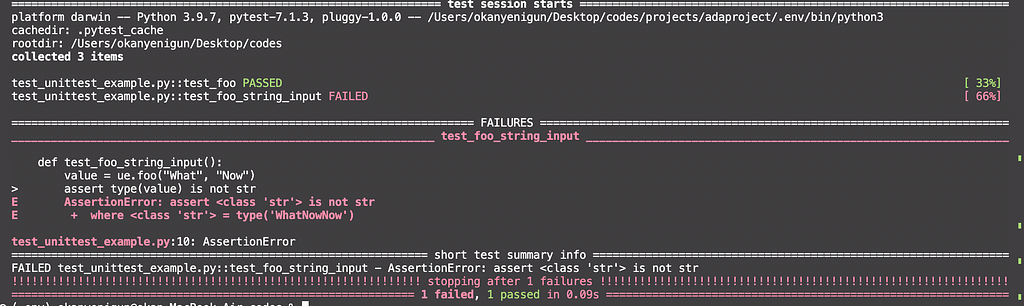
—- tb=no failure details will not show up.

py.test -v -x --tb=no

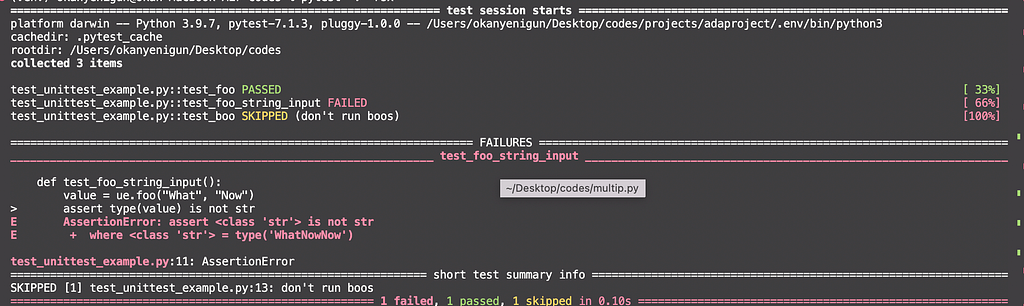
mark.skip -rsx We can define reasons to skip specific tests. Thus, we can organize test processes for different purposes.
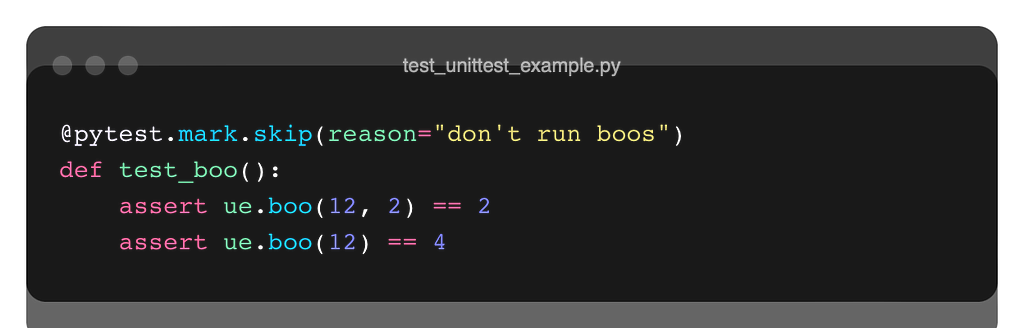
pytest -v -rsx
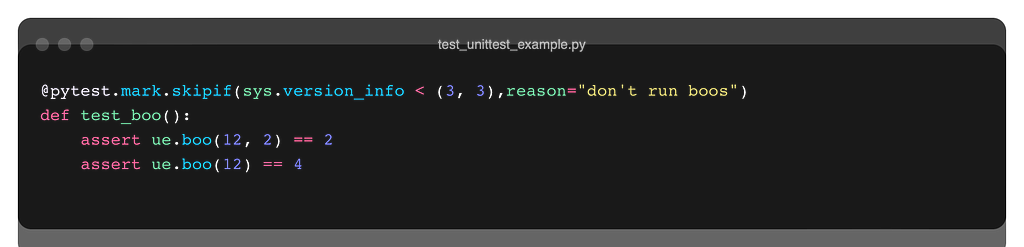
mark.skipif We can add conditions to skip. Below, it checks the Python version and runs the test if the condition is met.
-s or — -capture=no to display print statements in a test function.

py.test -v -s
or
py.test -v --capture=no
Parameterizing

We can parameterize test cases using parametrize decorator of Pytest. In this way, we do not need to write multiple assertions or functions for the same test.
Fixtures

Suppose you have a test case where you connect to a database. Connecting and pulling data is always time-consuming. Let the following simple class structure represent the database:
Let’s write 2 different test cases accordingly.

As you can see, there are repetitive processes here. In both tests, we connect to the database from the beginning. Instead, we can eliminate duplication by identifying common operations at the beginning and end of the testing process.

The setup_module function runs at the first start of a test module. The teardown_module function runs at the end of the test module. They are automatically detected by Pytest.
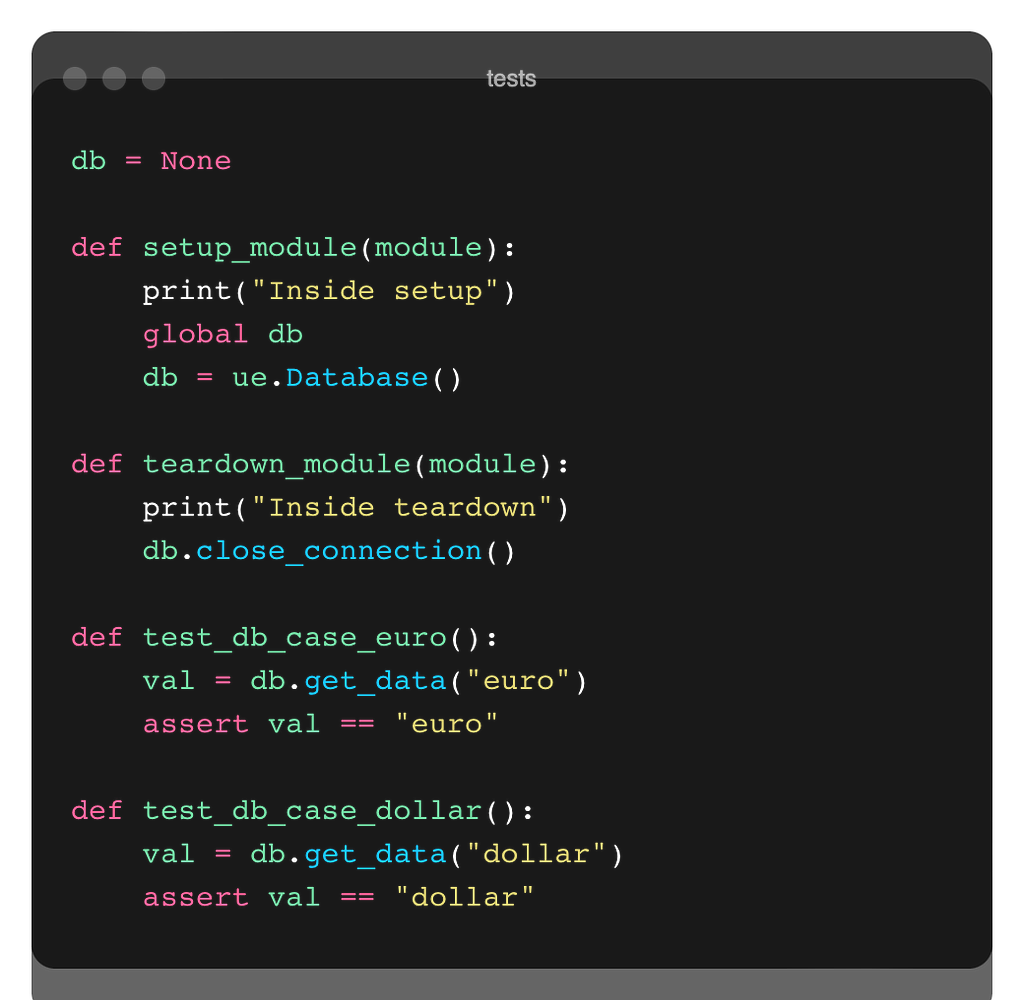
In this way, we connect the database and close the connection only once.

Another way to handle this is to use the fixture decorator of Pytest. We define a function that contains both setup and teardown parts. We return the db object with the yield keyword. After yield, the rest is the teardown part.
Let’s work on another example. In the example below, there is an aircraft class (Flight) and a customer database class (CustomerDb). We can add passengers to the Flight class, get the list of passengers, get the total number of passengers and calculate the total revenue. CustomerDb determines the discount rates according to the membership status of the customers.

Let’s test various situations for an application designed in this way.

  • Can we add passengers seamlessly?
  • Is the passenger we add included in the passenger list?
  • It is necessary that we cannot add new passengers when the aircraft capacity is full, is there any measure against this situation?
  • Can we calculate the total revenue correctly?

Let’s take these tests one by one.

In the beginning, we set up our test in a way that prevents us from falling into repetition with the help of a fixture.
Since we returned two variables in the fixture, we got a tuple. Therefore, in order to access the Flight object, we need to get the 0th index. We have already added 3 passengers in the fixture. Luke & Bruno became the fourth passenger.

Catch Thrown Errors

If the capacity is full and we want to add another passenger, remember we raised an OverflowError.

if booked == self.capacity:
raise OverflowError("Flight is fully booked!")

We can catch the errors sent in our tests and make adjustments accordingly. For example, in the test below, since the OverflowError is an error I expect, I ensure that it does not give an error if such a situation is encountered. After the with keyword line, I could issue any command I wanted.
However, if I tried to add 3 new passengers instead of 2 new passengers, the test would not pass because this process would be above the with expression.
Mocking

As you may recall, the mocking process was eliminating dependencies. The first test is not mocked. In this test, the processing is done directly on the database. If we want the test to be independent of the database (we don’t want changes to the database to affect the test), we can apply mocking.

from unittest.mock import Mock
Whenever the get_customer_membership method of the database object is called, the return value will be a constant (1 in our case).

Apart from that, we can also define the mock operation with a function using side effects.
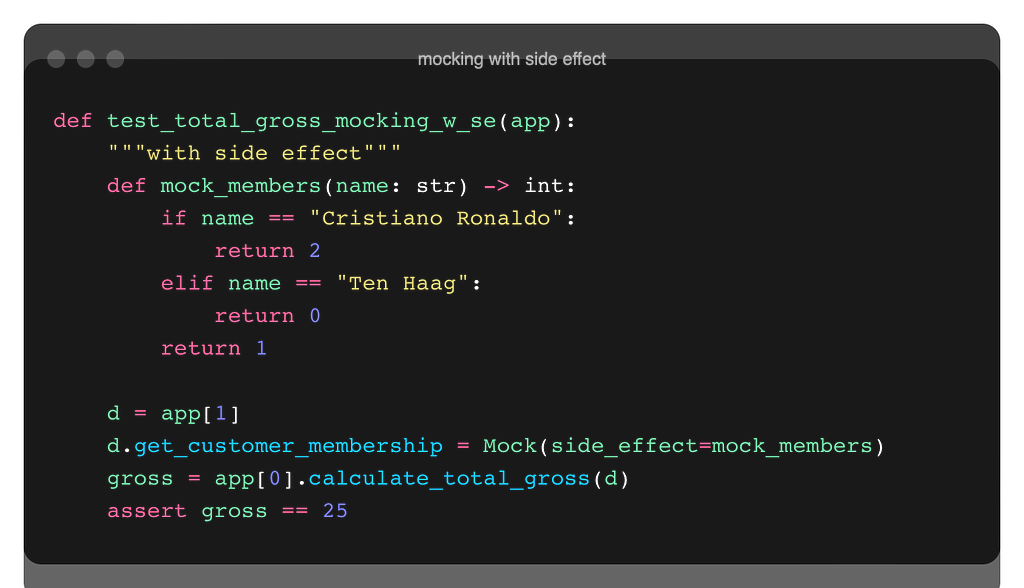
Let’s run the pytest command in the shell to check the results of the test:

pytest -v

Integration Test (REST API)

Finally, let’s do an integration test case study over the REST API. We will use the https://todo.pixegami.io/ site for this. A simple application where we can fulfill REST API requests.

You can reach the documentation from here.

The TaskUtility class contains ENDPOINT methods. We perform API operations with static methods here. new_task_payload: creates data for a new record. Thanks to the uuid library, the user_id and content are randomized.

So, let’s examine the test cases:
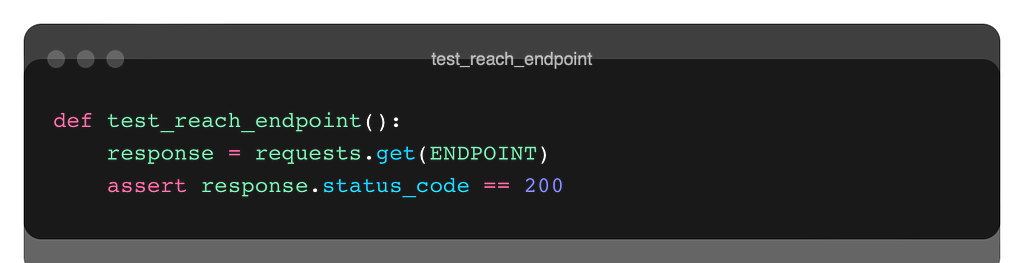
If the request is successful we need to get the 200 status code.

In the second test, first, we create a new task record and check if it was successful from the status code of the response. Then, we pull the newly created data with the get method using with the task id number and check whether it is the same as the content we used when creating the new record at first.
Similar steps for the update process…
We create n new records. Then we pull all the records according to the user_id. We compare numbers.

Similar operations… Note that we check with the 404 code whether the record we deleted is actually deleted.
Testing processes are very important for quality code and quality systems. In fast development environments, time constraints, and lack of resources, it can be ignored or not given the necessary attention. However, the testing process should not be skipped, especially when considered together with TDD.

There are many testing libraries written for Python (including the built-in unittest library). Pytest is a widely used and widely recognized library in the industry. It has many features. In this short blog post, I tried to talk about some critical issues. Thanks for reading this far.

Read More…

References

https://pytest.org/

https://docs.python.org/3/library/unittest.html

https://realpython.com/pytest-python-testing/

https://www.youtube.com/watch?v=YbpKMIUjvK8&t=1055s

https://www.youtube.com/watch?v=_QtM7QGuj1A&list=PLS1QulWo1RIaNFUz4zrztWlCJgkpXht-H

https://www.youtube.com/watch?v=7dgQRVqF1N0&t=1558s


Unit Test with PyTest was originally published in Level Up Coding on Medium, where people are continuing the conversation by highlighting and responding to this story.


This content originally appeared on Level Up Coding - Medium and was authored by Okan Yenigün


Print Share Comment Cite Upload Translate Updates
APA

Okan Yenigün | Sciencx (2022-10-21T02:07:15+00:00) Unit Test with PyTest. Retrieved from https://www.scien.cx/2022/10/21/unit-test-with-pytest/

MLA
" » Unit Test with PyTest." Okan Yenigün | Sciencx - Friday October 21, 2022, https://www.scien.cx/2022/10/21/unit-test-with-pytest/
HARVARD
Okan Yenigün | Sciencx Friday October 21, 2022 » Unit Test with PyTest., viewed ,<https://www.scien.cx/2022/10/21/unit-test-with-pytest/>
VANCOUVER
Okan Yenigün | Sciencx - » Unit Test with PyTest. [Internet]. [Accessed ]. Available from: https://www.scien.cx/2022/10/21/unit-test-with-pytest/
CHICAGO
" » Unit Test with PyTest." Okan Yenigün | Sciencx - Accessed . https://www.scien.cx/2022/10/21/unit-test-with-pytest/
IEEE
" » Unit Test with PyTest." Okan Yenigün | Sciencx [Online]. Available: https://www.scien.cx/2022/10/21/unit-test-with-pytest/. [Accessed: ]
rf:citation
» Unit Test with PyTest | Okan Yenigün | Sciencx | https://www.scien.cx/2022/10/21/unit-test-with-pytest/ |

Please log in to upload a file.


There are no updates yet.
Click the Upload button above to add an update.

You must be logged in to translate posts. Please log in or register.