
This content originally appeared on Level Up Coding - Medium and was authored by D Varghese
The concept of viewport and viewBox is tricky for novice D3 developers

Concept of viewport
You can think of SVG is an infinitely boundless sheet with a X Y coordinate system starting at the top left corner at (0, 0), much like a spreadsheet.
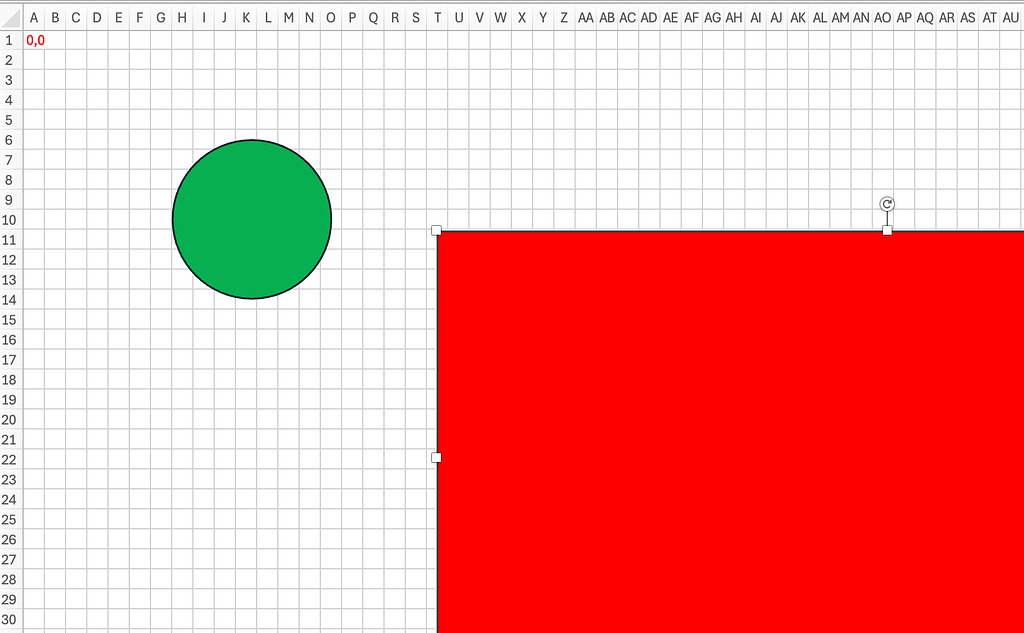
Your view into the spreadsheet at any one moment is limited, that means you can’t see it all. In the above image, you are looking at a rectangular area encompassing columns A to AU and rows 1 to 30. This rectangular area is your viewport into the spreadsheet.
In the below image, you can see the same spreadsheet through a bigger viewport.
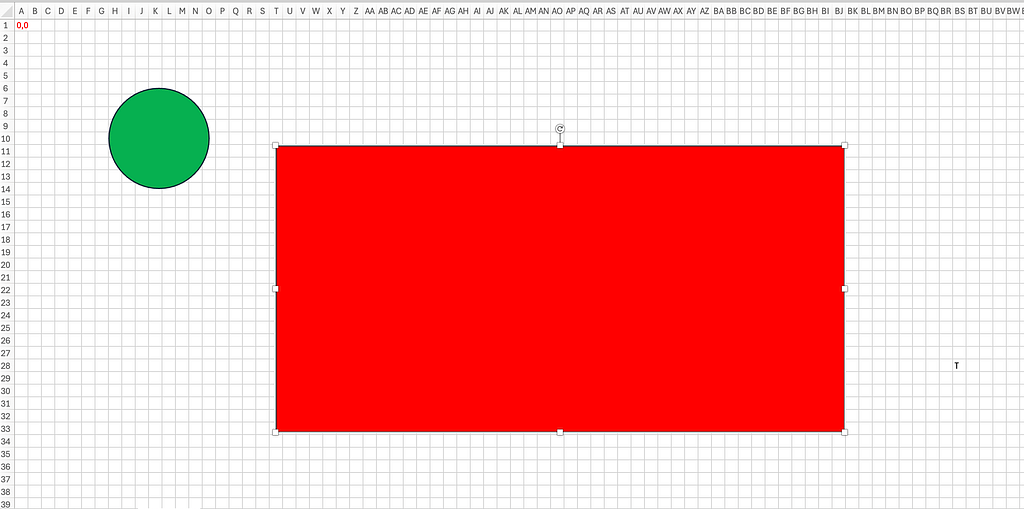
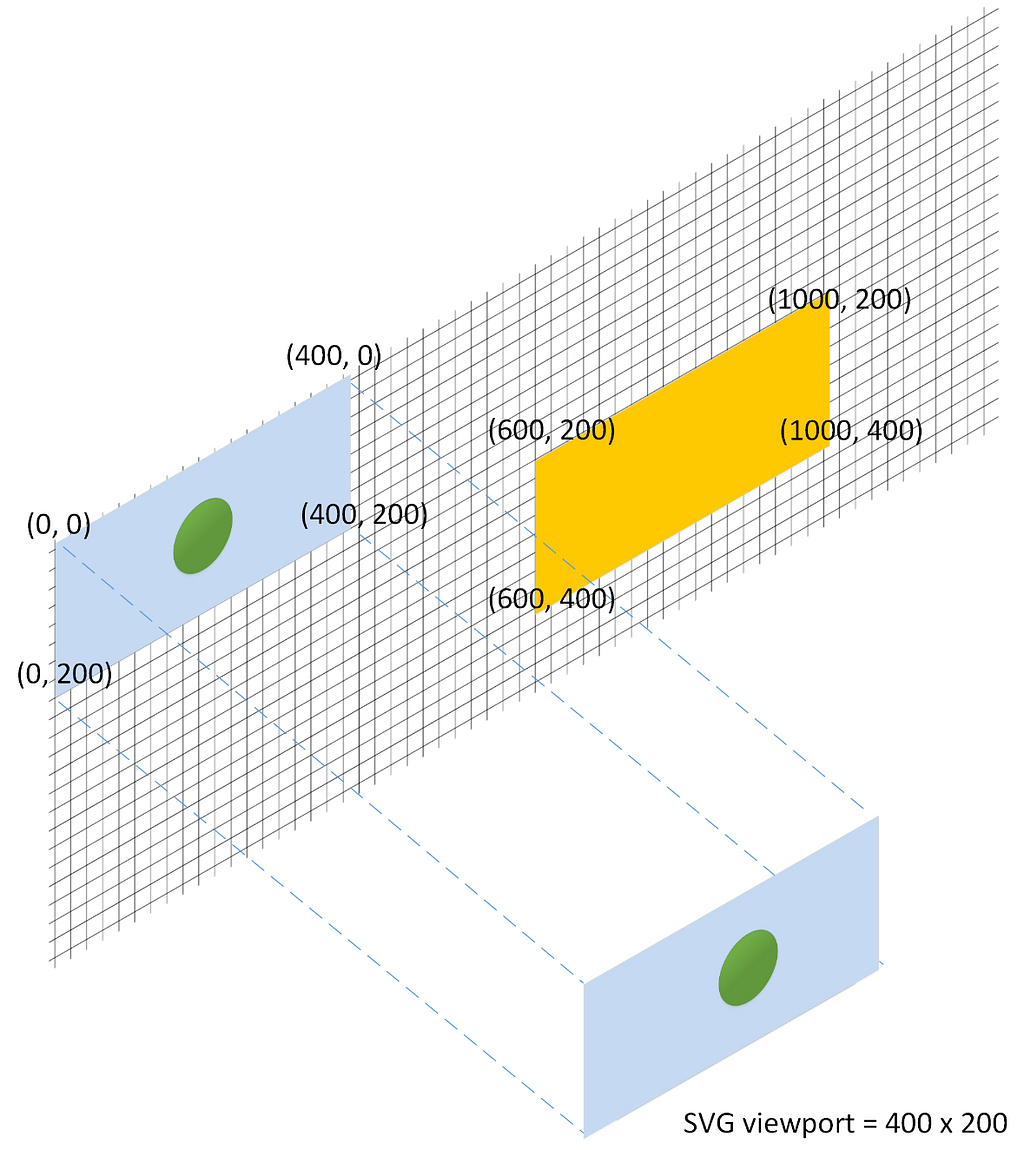
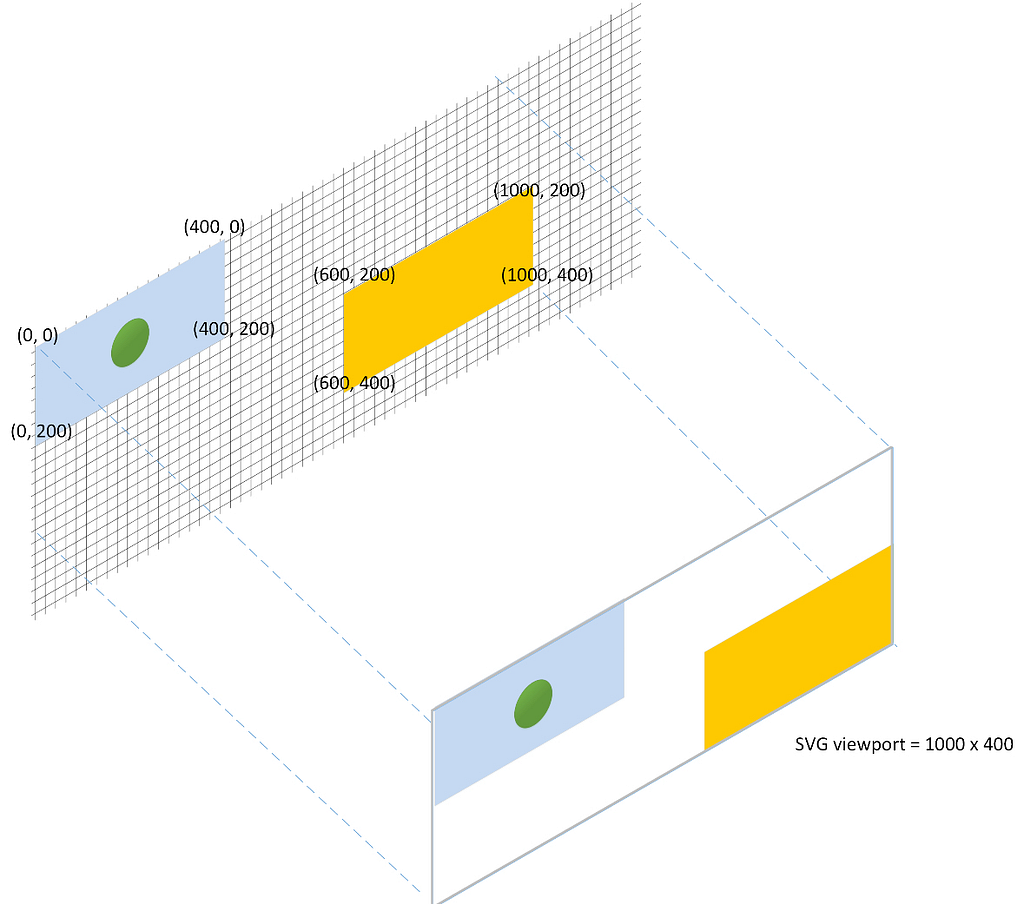
In the SVG world, the viewport is the width and height of the SVG. Even though you can add a rectangle at (10,000, 10,000)th position, if the SVG’s width is 400 and height 200, you wouldn’t see it.
Examples of viewport
1. SVG viewport showing only the elements within width 400 and height 200
{
  const width = 400;
  const height = 200;

  const svg = d3.create("svg")
    .attr("width", width)
    .attr("height", height)
    .style("border", "1px solid black");

  // Light blue rectangle
  svg.append("rect")
    .attr("x", 0)
    .attr("y", 0)
    .attr("width", 400)
    .attr("height", 200)
    .attr("fill", "lightblue");

  // Green circle
  svg.append("circle")
    .attr("cx", 200)
    .attr("cy", 100)
    .attr("r", 50)
    .attr("fill", "green");

  // Orange rectangle
  svg.append("rect")
    .attr("x", 600)
    .attr("y", 200)
    .attr("width", 400)
    .attr("height", 200)
    .attr("fill", "orange");

  return svg.node();
}
2. SVG viewport showing the elements within width 1000 and height 400
{
  const width = 1000;
  const height = 400;

  const svg = d3.create("svg")
    .attr("width", width)
    .attr("height", height)
    .style("border", "1px solid black");

  // Light blue rectangle
  svg.append("rect")
    .attr("x", 0)
    .attr("y", 0)
    .attr("width", 400)
    .attr("height", 200)
    .attr("fill", "lightblue");

  // Green circle
  svg.append("circle")
    .attr("cx", 200)
    .attr("cy", 100)
    .attr("r", 50)
    .attr("fill", "green");

  // Orange rectangle
  svg.append("rect")
    .attr("x", 600)
    .attr("y", 200)
    .attr("width", 400)
    .attr("height", 200)
    .attr("fill", "orange");

  return svg.node();
}
Concept of viewBox
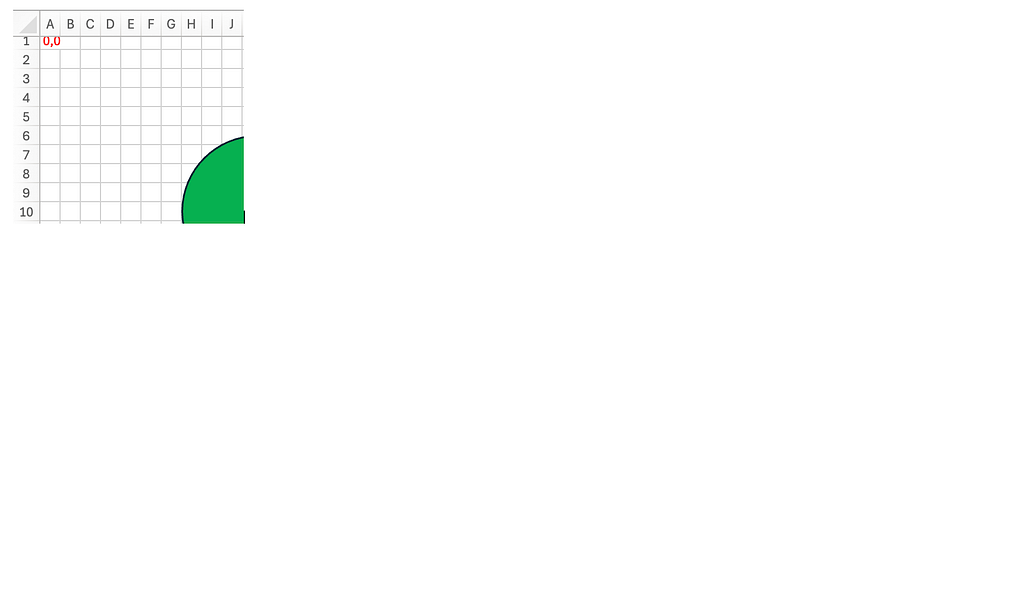
Suppose if you snapshot an area of the spreadsheet, say area encompassing columns A to J and rows 1 to 10, this is how it will look.
Next, if you stretch and fit the snapshot onto a rectangular area bound between columns A to Z and row 1 to 25, this is how it will look. See it got zoomed in.
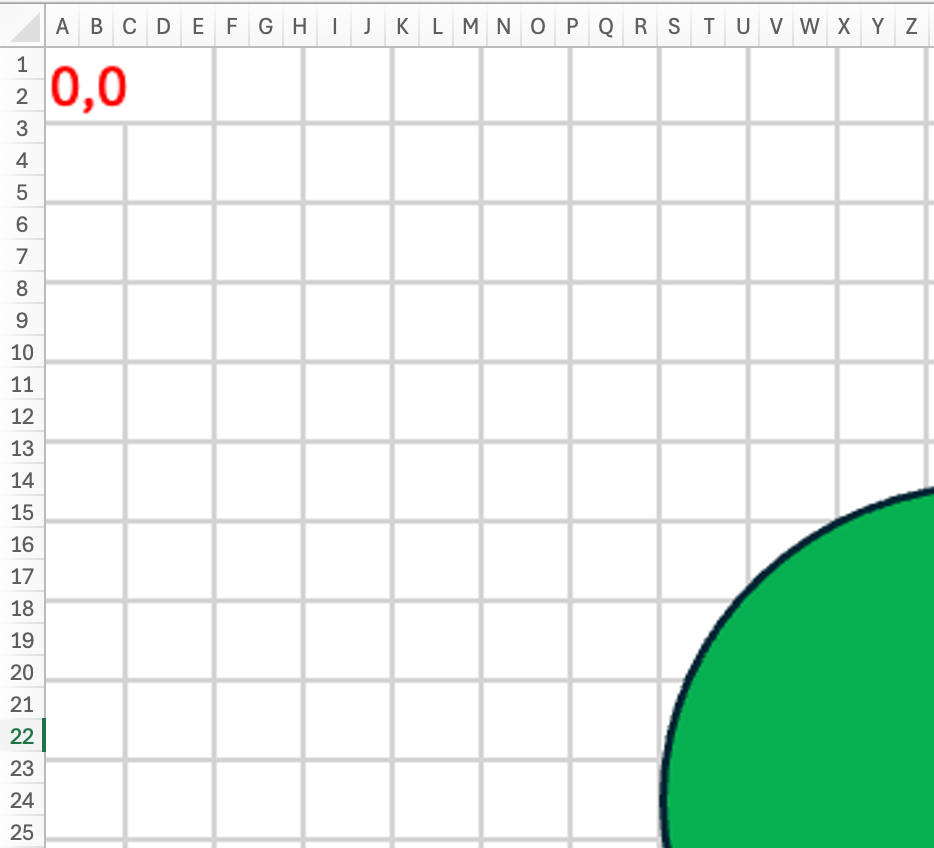
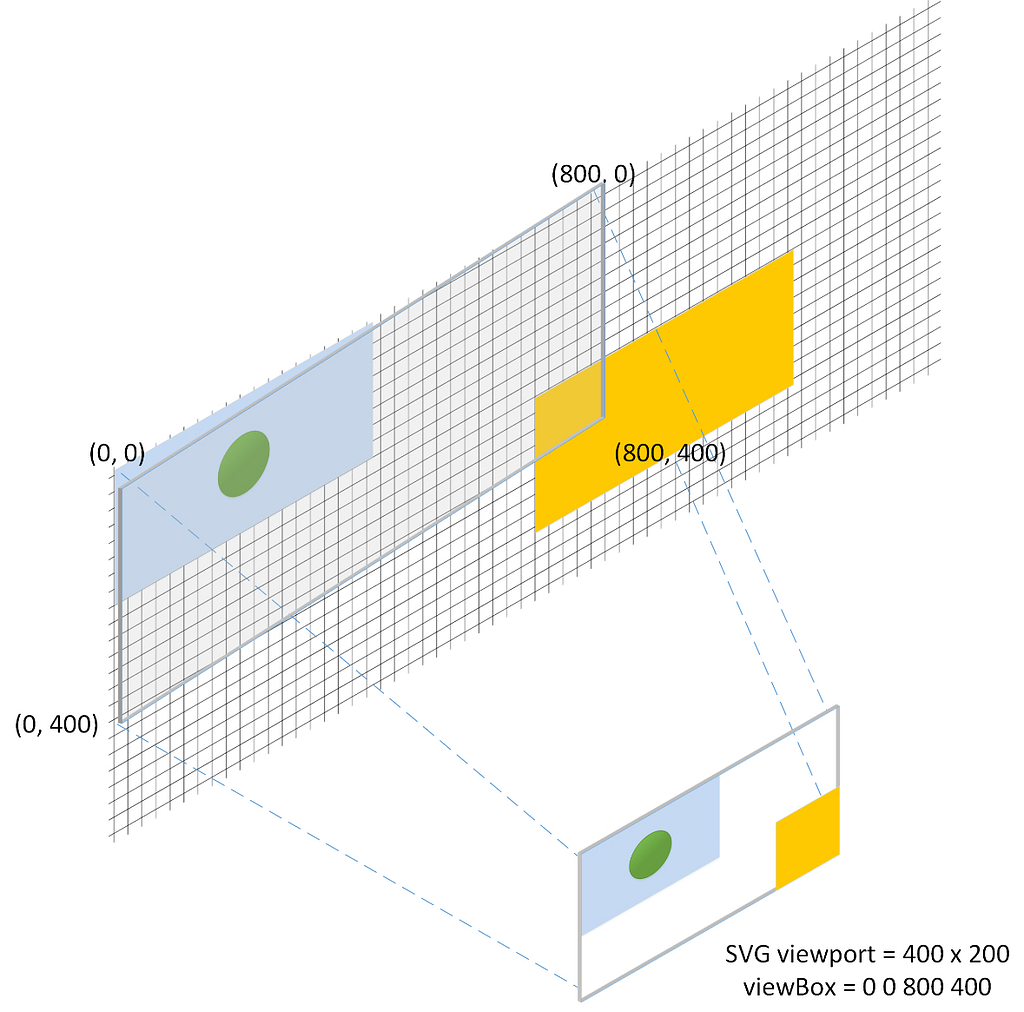
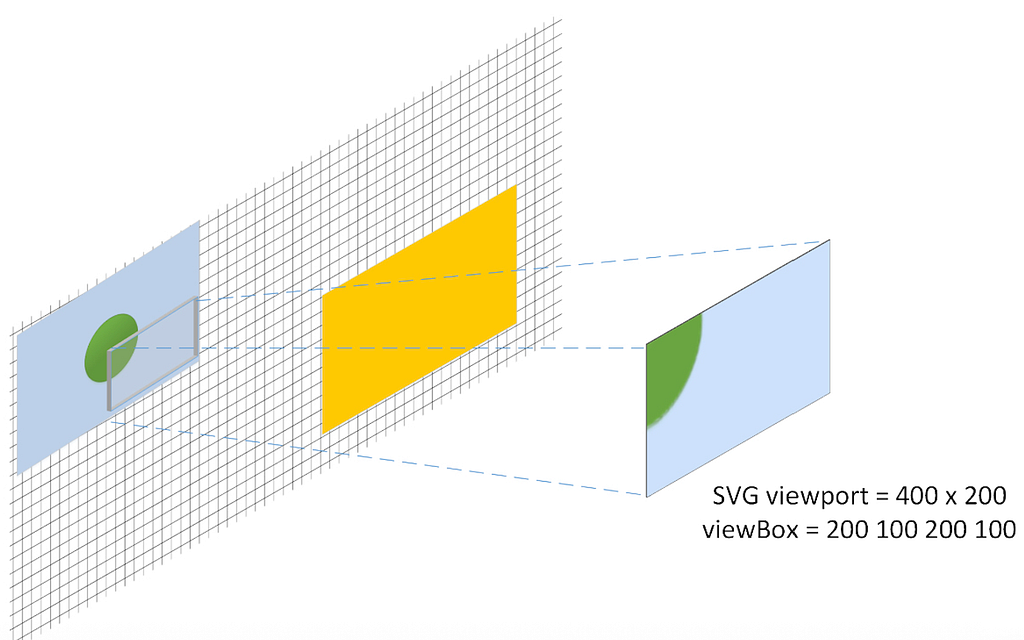
In the SVG world, viewBox plays the role of snapshotting. The snapshot area is defined by the x and y coordinates of the top left corner of the viewBox and the width and height of the viewBox.
Stretching the snapshot to fit into the rectangular area is equivalent to viewing this viewBoxed elements within the width * height viewport bounds of the SVG.
viewBox Examples
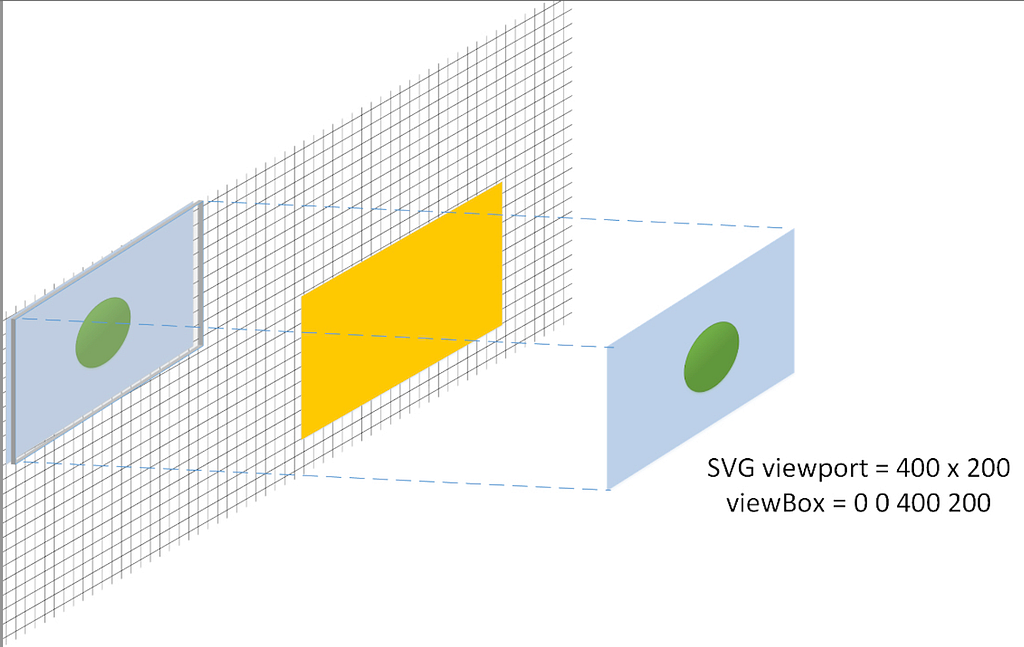
- viewBox snapshots an area (400 x 200) from (0, 0) origin and displays through a SVG viewport with the same area (400 x 200)
{
  const width = 400;
  const height = 200;

  const svg = d3.create("svg")
    .attr("width", width)
    .attr("height", height)
    .style("border", "1px solid black");

  // Light blue rectangle
  svg.append("rect")
    .attr("x", 0)
    .attr("y", 0)
    .attr("width", 400)
    .attr("height", 200)
    .attr("fill", "lightblue");

  // Green circle
  svg.append("circle")
    .attr("cx", 200)
    .attr("cy", 100)
    .attr("r", 50)
    .attr("fill", "green");

  // Orange rectangle
  svg.append("rect")
    .attr("x", 600)
    .attr("y", 200)
    .attr("width", 400)
    .attr("height", 200)
    .attr("fill", "orange");

  // viewBox
  svg.attr("viewBox", "0 0 400 200");

  return svg.node();
}
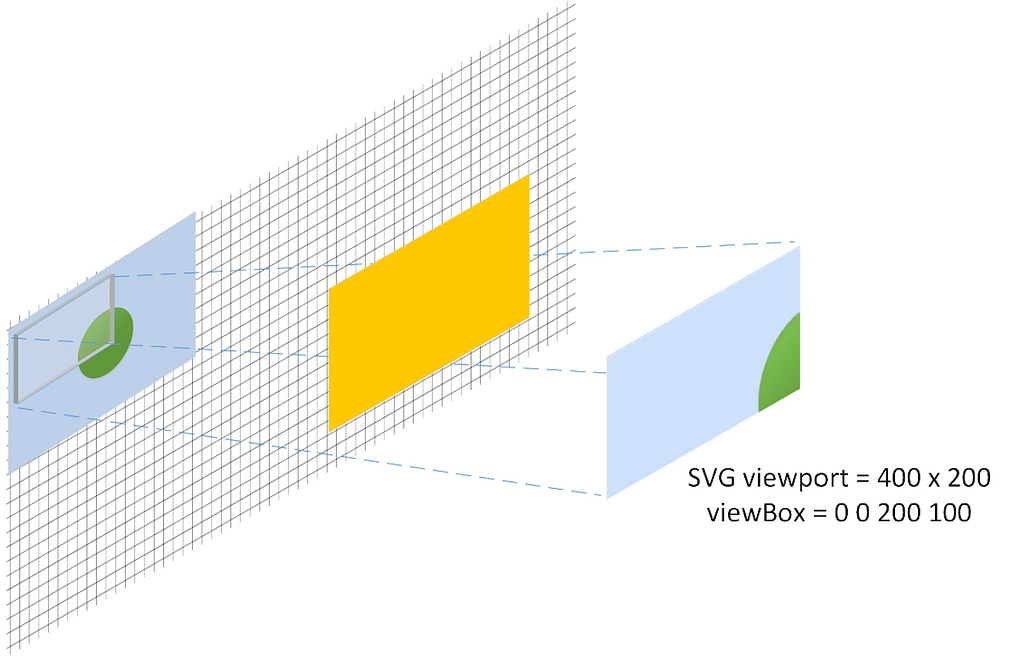
2. viewBox snapshots a smaller area (200 x 100) from (0, 0) origin and displays through a larger SVG viewport area (400, 200)
{
  const width = 400;
  const height = 200;

  const svg = d3.create("svg")
    .attr("width", width)
    .attr("height", height)
    .style("border", "1px solid black");

  // Light blue rectangle
  svg.append("rect")
    .attr("x", 0)
    .attr("y", 0)
    .attr("width", 400)
    .attr("height", 200)
    .attr("fill", "lightblue");

  // Green circle
  svg.append("circle")
    .attr("cx", 200)
    .attr("cy", 100)
    .attr("r", 50)
    .attr("fill", "green");

  // Orange rectangle
  svg.append("rect")
    .attr("x", 600)
    .attr("y", 200)
    .attr("width", 400)
    .attr("height", 200)
    .attr("fill", "orange");

  // viewBox
  svg.attr("viewBox", "0 0 200 100");

  return svg.node();
}
3. viewBox snapshots a larger area (800 x 400) from (0, 0) origin and displays it through a smaller SVG viewport area (400, 200)
{
  const width = 400;
  const height = 200;

  const svg = d3.create("svg")
    .attr("width", width)
    .attr("height", height)
    .style("border", "1px solid black");

  // Light blue rectangle
  svg.append("rect")
    .attr("x", 0)
    .attr("y", 0)
    .attr("width", 400)
    .attr("height", 200)
    .attr("fill", "lightblue");

  // Green circle
  svg.append("circle")
    .attr("cx", 200)
    .attr("cy", 100)
    .attr("r", 50)
    .attr("fill", "green");

  // Orange rectangle
  svg.append("rect")
    .attr("x", 600)
    .attr("y", 200)
    .attr("width", 400)
    .attr("height", 200)
    .attr("fill", "orange");

  // viewBox
  svg.attr("viewBox", "0 0 800 400");

  return svg.node();
}
4. viewBox snapshots a smaller area (200 x 100) from a non zero (200, 100) origin and displays it through a larger SVG viewport area (400, 200)
{
  const width = 400;
  const height = 200;

  const svg = d3.create("svg")
    .attr("width", width)
    .attr("height", height)
    .style("border", "1px solid black");

  // Light blue rectangle
  svg.append("rect")
    .attr("x", 0)
    .attr("y", 0)
    .attr("width", 400)
    .attr("height", 200)
    .attr("fill", "lightblue");

  // Green circle
  svg.append("circle")
    .attr("cx", 200)
    .attr("cy", 100)
    .attr("r", 50)
    .attr("fill", "green");

  // Orange rectangle
  svg.append("rect")
    .attr("x", 600)
    .attr("y", 200)
    .attr("width", 400)
    .attr("height", 200)
    .attr("fill", "orange");

  // viewBox
  svg.attr("viewBox", "200 100 200 100");

  return svg.node();
}
D3.js SVG viewport and viewBox was originally published in Level Up Coding on Medium, where people are continuing the conversation by highlighting and responding to this story.
This content originally appeared on Level Up Coding - Medium and was authored by D Varghese

D Varghese | Sciencx (2025-09-22T14:12:12+00:00) D3.js SVG viewport and viewBox. Retrieved from https://www.scien.cx/2025/09/22/d3-js-svg-viewport-and-viewbox/
Please log in to upload a file.
There are no updates yet.
Click the Upload button above to add an update.