
This content originally appeared on Level Up Coding - Medium and was authored by suhas murthy
Or: how a credit-based billing shock forced our team to stop treating AI tooling like a black box
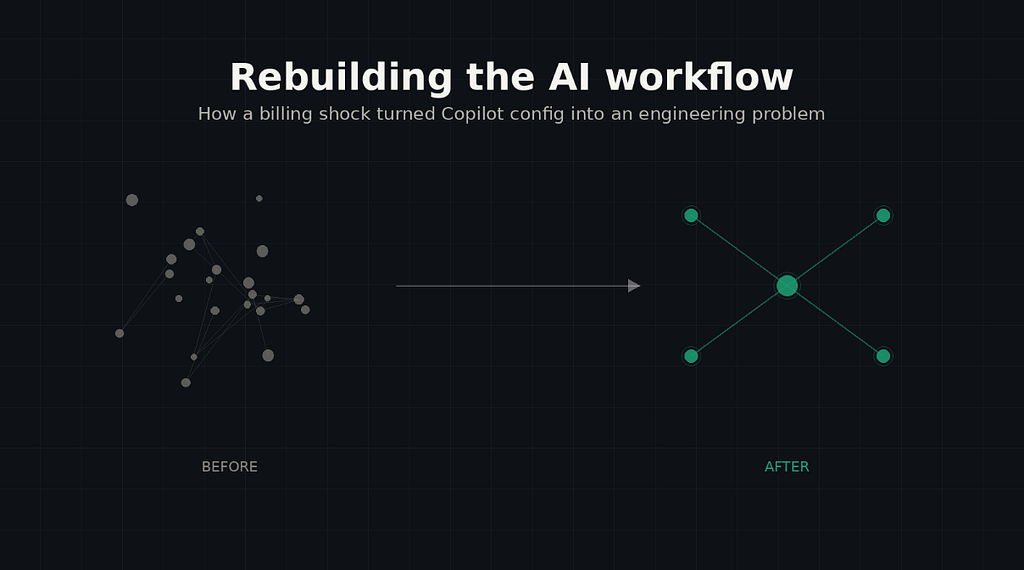
I didn’t want to use GitHub Copilot.
Not in the “I have concerns about AI” way — I just didn’t see the point. I’d been writing React and TypeScript for over a decade. Autocomplete that finishes my useState line wasn't going to change how I worked. I used it the way most skeptical developers do: half-heartedly, mostly ignoring the suggestions, occasionally annoyed when it guessed wrong.
Initially, the suggestions were just annoying. They’d come in mid-type, rarely what I actually wanted — I’d end up adding throwaway comments just to coax a decent suggestion out of it. That changed when I started using agent mode. I could put my actual thought into it and get real output back. That’s what drew me in.
The reckless phase
I won’t pretend my early agent-mode usage was disciplined. It wasn’t. I was throwing half-formed thoughts at it — vague, underspecified, whatever was in my head at the moment — and asking it to just go. Some of it worked. A lot of it didn’t.
And I reacted exactly like you’d expect: when it worked, I was impressed. When it didn’t, my reaction wasn’t “I gave it a bad prompt” — it was “these AI tools will never work.” Appreciating it one moment, writing it off the next.
What pulled me out of it wasn’t a tutorial or a course. It was necessity. Our team hit a wall on a legacy migration project — moving a sprawling VB.NET/ASP.NET Web Forms system to a modern React SPA — and the volume of work made it obvious we couldn’t keep going at manual pace. If AI was ever going to earn its place, this was the test.
From vague prompts to a real system
The first real shift was small: predefined, reusable prompts instead of retyping context every time. We built three — a senior React developer prompt, a unit test engineer prompt, a frontend architect prompt — mostly because I’m a developer and retyping the same context repeatedly felt like a problem worth solving.
It helped. But it also exposed the next ceiling. Predefined prompts gave us consistency, not leverage. On anything that counted as a real feature, we were still doing a lot of manual work around the edges. The output was better. The bottleneck hadn’t moved.
That’s what pushed us toward agents — and toward a structure that ended up being the actual unlock: splitting complex feature work into three distinct phases, each with its own agent.
Plan. Understand the feature, map the blast radius, figure out what’s actually being touched. Generate. Turn the plan into an implementation spec. Implement. Execute it.
We paired this with deliberate model selection — Opus for the planning and generation work, where reasoning quality mattered most, and a faster, cheaper model for implementation, where the work was closer to disciplined execution than judgment. We even built a fourth agent on top of this — a React/legacy parity checker, specifically for the migration, that compared old VB.NET behaviour against the new React implementation and flagged gaps.
This is where it stopped feeling like a chat tool and started feeling like infrastructure. Migration velocity improved. Bottlenecks that used to take a day to even locate got surfaced in an hour.
For a while, it felt solved.
Then the billing model changed
GitHub Copilot moved to credit-based, usage-billed consumption. And the plan/generate/implement workflow we’d built — the one running Opus across two of three phases, on every feature, regardless of size — got expensive fast.
We had built something that worked, and then the economics underneath it changed. Suddenly the question wasn’t does this help — it was what does this actually cost, per feature, per developer, per month, and can we justify it.
That question is what turned this from a tooling story into an engineering problem.
Treating the AI config like production code
The instinct when costs spike is to just use the tool less. We didn’t want that — the workflow was genuinely good. So instead we audited it like we’d audit any other system that got expensive: find the waste, not the value.
A few things stood out immediately once we actually looked:
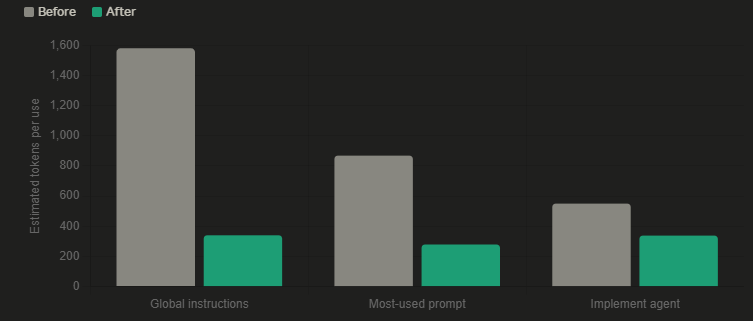
The global instructions file was loading on every single request, for every developer, regardless of relevance. It had grown to 185 lines — code-heavy blocks for RTK Query and Zod validation, a commands table that already existed in package.jsonbranch-naming conventions. None of that applied to most requests, but all of it got paid for every time. We cut it to roughly 28 lines, kept only the architecture map and core rules, and moved the specialized content into path-scoped instruction files that only load when relevant files are actually open. That single change cut per-request instruction tokens by close to 90%.
Our most-used prompt repeated itself. The approval workflow — understand, propose, preview, approve, implement — was written out in full across four separate sections instead of defined once. Beyond the token waste, two near-identical instruction blocks is a quality risk: it gives the model two slightly different versions of the same instruction to reconcile, which is exactly the kind of ambiguity that produces inconsistent output. Collapsing it to one definition cut tokens by roughly two-thirds and made behavior more predictable.
The plan agent treated every feature as equally complex. A two-file tweak was running the same Opus-powered research subagent as a nine-file architectural change. That was the real cost driver, and the fix wasn’t trimming text — it was restructuring the workflow so the plan agent classifies complexity first, as a near-zero-cost step, before any research runs at all. Research depth and model choice now scale to that classification: light models for low complexity, Sonnet for medium, Opus reserved for the high-complexity work where it’s actually earning its cost.
The result, roughly: 75% fewer tokens across the optimized artifacts, and up to 6x cheaper cost per run on the plan/generate steps through model-matching alone. We didn’t use AI less — we just used the right model for the job.
What this actually changed in how I think about AI tooling
The instructions file lesson is the one I keep coming back to: the most expensive part of an AI workflow usually isn’t the hard reasoning step. It’s the boilerplate getting silently reloaded on every single interaction. That’s not an AI-specific insight, honestly — it’s the same lesson as any system with a hot path. We just hadn’t been looking at our Copilot config that way. It took a billing shock to make us look.
I realised Copilot isn’t just a chat application — it should be treated like an engineering problem. You constantly improve the architecture, watch the pricing, keep it cost-effective, but never compromise on the output it produces.
I’m still early in figuring out where this goes next. We’re mid-rollout on the optimized config, monitoring credits per PR over the next few weeks to see if the projected savings hold in practice, and I expect there’s another round of this once the agents and instructions drift again — they always do. We’re still figuring out how to balance cost against output — that part isn’t solved. But one thing’s clear: don’t wait for a billing shock to force the audit. Do it before you have to.
I’m a Senior Product Engineer leading frontend architecture and AI-native tooling adoption for a team migrating a legacy enterprise system to React. If you’re working through similar AI-tooling-at-scale problems, I’d like to hear how you’re approaching it.
GitHub Copilot: how it started, how it went, what challenges I’m facing was originally published in Level Up Coding on Medium, where people are continuing the conversation by highlighting and responding to this story.
This content originally appeared on Level Up Coding - Medium and was authored by suhas murthy

suhas murthy | Sciencx (2026-06-22T15:43:56+00:00) GitHub Copilot: how it started, how it went, what challenges I’m facing. Retrieved from https://www.scien.cx/2026/06/22/github-copilot-how-it-started-how-it-went-what-challenges-im-facing/
Please log in to upload a file.
There are no updates yet.
Click the Upload button above to add an update.