
This content originally appeared on Level Up Coding - Medium and was authored by Manjunath Venkobarao
This post reflects patterns and observations from building agent systems in production environments. The agentic AI space is evolving rapidly — treat this as learning and exploration, not prescription. Recommendations from framework authors and the broader community will continue to refine these patterns.
There is a pattern emerging in enterprise AI development that most teams discover too late — they build agent capabilities that work well inside one tool, then realize those capabilities cannot be reused anywhere else. Every new agent, every new platform, every new use case requires rebuilding the same logic from scratch.
This post is about a different approach: separating what an agent knows from what it can do, and connecting both through a protocol that any tool can understand.
The Problem with How Most Teams Build Agent Skills
When teams start building agents, the natural instinct is to put everything in one place. The instructions, the business logic, the tool invocations — all bundled together inside a single platform. It works. The agent runs. The demo looks good.
The problem surfaces later.
The capability is now locked inside that one platform. Want to use it in a different agent? Rebuild it. Want a scheduled job to call the same logic? Rebuild it. Want another team to leverage what you built? They cannot find it, let alone reuse it.
This is not a hypothetical scenario. It is the current state in most organizations that have started building agents at scale. Multiple teams, each building their own version of similar capabilities, with no visibility into what already exists and no mechanism to share what they build.
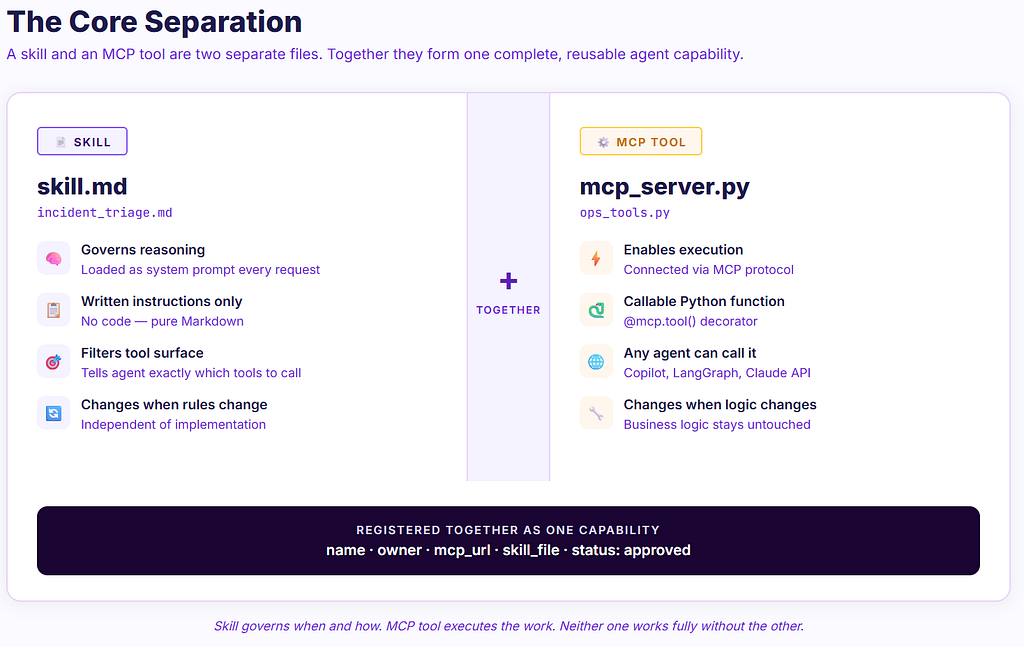
The root cause is a missing separation of concerns. Agent capabilities need to be split into two distinct things:
- Skills — the instructions that tell an agent when and how to act
- Tools — the executable functions that actually do the work
These are different. They serve different purposes. And keeping them separate is what makes agent capabilities reusable.
What a Skill Actually Is
A skill is a Markdown file. That is it.
It contains written instructions — the same way you would brief a colleague on how to handle a specific type of request. It tells the agent what the capability does, when to use it, what rules to follow, and what tools to call.
Think of it as a Standard Operating Procedure for your agent. The SOP does not execute anything. It governs reasoning. The agent reads the skill as part of its context and uses it to make decisions about what to do and how to do it.
The example below is intentionally generic — the same structure applies to customer support routing, financial operations, HR workflows, document processing, or any domain where an agent needs to handle requests with specific tools and rules:
# Incident Triage Skill
## Purpose
Triage incoming infrastructure alerts and route them
to the appropriate resolution path.
## When to Use
- Incoming alert mentions CPU, memory, disk, or network
- Service health check has failed
- User reports application is slow or unavailable
- On-call engineer requests incident assessment
## Tools Available
### check_service_status
- When to call: First step for any incoming alert
- Confirm service is degraded before taking action
- Parameters: service_name (string), environment (string)
- Returns: current status, uptime, recent error rate
### create_incident_ticket
- When to call: Service confirmed degraded AND severity HIGH or CRITICAL
- Do NOT create a ticket for informational alerts
- Parameters: title, severity, affected_service, description
- Returns: ticket_id, ticket_url
### escalate_to_oncall
- When to call: Only AFTER create_incident_ticket succeeds
- Never escalate without a valid ticket_id
- Parameters: ticket_id, oncall_team, message
- Returns: escalation confirmation
## Rules
- Always check_service_status before any other action
- Severity: CPU > 90% = CRITICAL, CPU 75–90% = HIGH
- Never create duplicate tickets — check if one exists first
- Always include the alert timestamp in the description
## Out of Scope
This skill does not cover deployment rollbacks or infrastructure
provisioning. For those requests respond:
"This requires a change action. Please raise a change request
through the standard process."
## Expected Output
- Confirm action taken
- Include ticket ID if created
- State current service status
- Do not include raw JSON or internal tool output
The skill file contains no code. It does not execute anything. It is purely instructions — a document that shapes how the agent reasons when it encounters a relevant request.
A note on standards: In December 2025, Anthropic published Agent Skills as an open standard at agentskills.io, designed for cross-platform portability. Skills written for Claude can now work in other AI systems that adopt the standard — OpenAI and Cursor have already adopted it. The structure described in this post aligns with that standard. What started as a pattern is becoming infrastructure.
What MCP Is and Why It Matters
MCP — Model Context Protocol — is an open standard for connecting AI agents to external tools and services. Introduced by Anthropic in late 2024 and subsequently donated to the Agentic AI Foundation, it is now implemented by Anthropic, OpenAI, Microsoft, Cursor, Cloudflare, and others. It is language-agnostic — servers exist in Python, TypeScript, Go, Rust, and more. Copilot Studio supports it natively since May 2025.
References:
- MCP Official Specification
- Anthropic MCP Introduction
- Anthropic Agent Skills — Open Standard
- Microsoft Copilot Studio MCP Support
- GitHub Copilot MCP Support
The key insight behind MCP is simple: instead of every agent having its own bespoke integration with every tool, there is one standard protocol. A capability exposed as an MCP server is callable from any agent or platform that speaks MCP — without any changes to the underlying implementation.
In practical terms, this means a capability your team builds today is available to every agent, every platform, and every future tool that adopts the same standard. You build once. It works everywhere.
An MCP tool is a Python function wrapped with a decorator that exposes it through the MCP protocol:
# Using FastMCP — https://github.com/jlowin/fastmcp
from fastmcp import FastMCP
mcp = FastMCP("Operations Tools")# Your existing business logic — completely unchanged
def _check_service(service_name: str, environment: str) -> dict:
return {"status": "degraded", "uptime": "99.1%", "error_rate": "4.2%"}
@mcp.tool()
def check_service_status(service_name: str, environment: str) -> dict:
    """Check current health status of a service.
    Args:
        service_name: Name of the service to check
        environment: Target environment (prod, staging, dev)
    Returns:
        Current status, uptime percentage, and error rate
    """
    return _check_service(service_name, environment)
if __name__ == "__main__":
    mcp.run()
The business logic stays exactly as it is. The MCP wrapper is a few lines around it. The docstring is what the agent reads to understand what the tool does and when to call it.
How Skills and MCP Tools Work Together
The skill file and the MCP tool are two separate files that work as a pair. The skill tells the agent the rules and reasoning — loaded as the system prompt. The MCP tool gives the agent the ability to execute — bound at runtime.
skill.md         →   system prompt    →   agent reasoning
mcp_server.py    →   bind_tools()     →   agent execution
The critical insight about tools: even if an MCP server exposes 20 tools, the skill acts as a filter. The agent reads which tools the skill mentions and reaches only for those. Without a skill, the agent has to reason about all 20 tools from scratch every request. The skill reduces the decision space and prevents wrong tool selection.
The separation of concerns in full:
Skill (.md file) MCP Tool (.py file) What it is Written instructions Callable function Purpose Governs reasoning Executes the action Loaded as System prompt Tool binding or MCP server Changes when Business rules change Implementation changes Testable? Hard — requires evaluation Yes — standard unit tests Who writes it Domain expert or engineer Engineer
In a LangGraph Agent
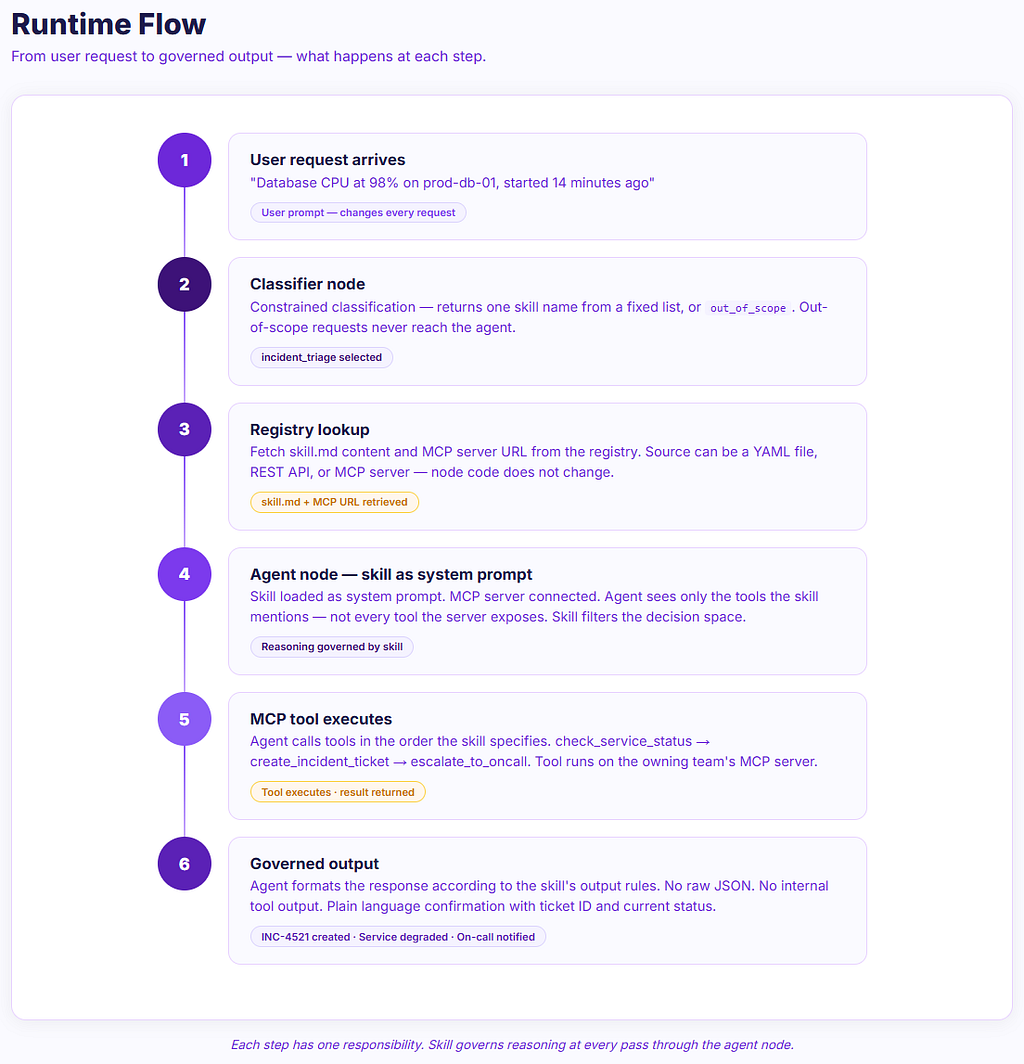
The skill is loaded from the registry. Tools are not hardcoded — they are discovered at runtime from the MCP server. The skill tells the agent which tools to call and when. The MCP server exposes them. No bind_tools(), no tool imports.
from langgraph.graph import StateGraph, END
from langchain_anthropic import ChatAnthropic
from typing import TypedDict, Annotated
import operator, pathlib
# Step 1 — load skill from registry
def get_skill(name: str) -> str:
    return pathlib.Path(f"skills/{name}.md").read_text()
skill_md = get_skill("incident_triage")# Step 2 — LLM with MCP server connected
# Tools are discovered automatically — no bind_tools() needed
llm = ChatAnthropic(model="claude-sonnet-4-20250514")
MCP_SERVERS = [{
    "type": "url",
    "url": "https://your-mcp-server/mcp",
    "name": "ops-tools"
}]
class AgentState(TypedDict):
messages: Annotated[list, operator.add]
def agent_node(state: AgentState):
    messages = state["messages"]
    if not any(m.get("role") == "system" for m in messages):
        messages = [{"role": "system", "content": skill_md}] + messages
    # Agent reads skill → decides which MCP tool to call → executes
    response = llm.with_config({
        "mcp_servers": MCP_SERVERS
    }).invoke(messages)
return {"messages": [response]}def should_continue(state: AgentState):
last = state["messages"][-1]
if hasattr(last, "tool_calls") and last.tool_calls:
return "tools"
return END
graph = StateGraph(AgentState)
graph.add_node("agent", agent_node)
graph.set_entry_point("agent")
graph.add_conditional_edges("agent", should_continue)
app = graph.compile()
The Skill as the System Prompt — and What That Means
When the agent runs, the skill becomes the system prompt. This is the standing context that shapes every decision the agent makes throughout the conversation. The user prompt changes every request. The skill stays constant.
messages = [
    {"role": "system", "content": skill_md},   # skill — fixed rules, always present
    {"role": "user",   "content": user_input}  # what user wants right now
]
In agent terms Analogy System prompt (skill.md) Standing rules, loaded once The SOP on the desk User prompt The specific request right now The ticket that just arrived
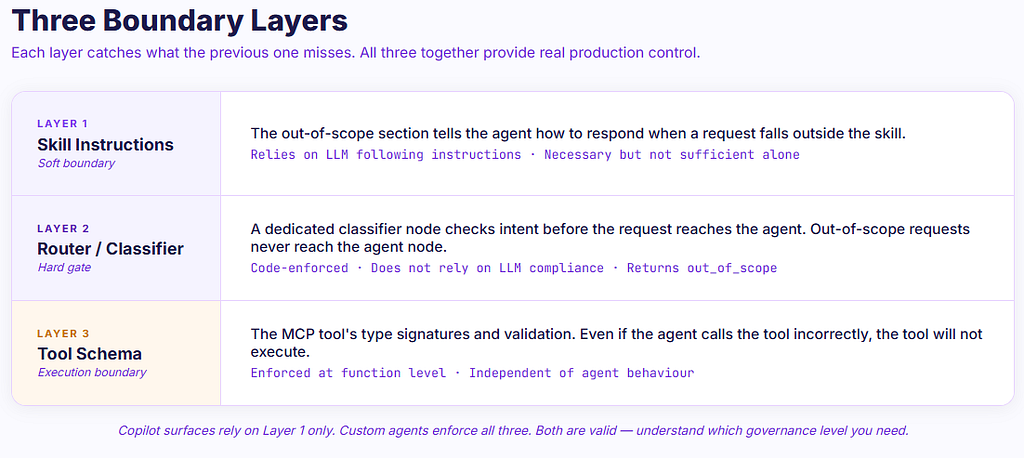
This distinction matters for setting boundaries. The skill is where you define what the agent will and will not do. For production systems, three layers together provide real control:
Layer 1 — Skill instructions (soft boundary) The out-of-scope section tells the agent how to respond when a request does not match. The agent self-governs — relies on the LLM following instructions.
Layer 2 — Router node (hard gate) A classifier node that checks intent before the request reaches the agent. Out-of-scope requests never reach the agent node. Code-enforced — does not rely on LLM compliance.
Layer 3 — Tool schema (execution boundary) The MCP tool’s type signatures and validation. Even if the agent tries to call a tool incorrectly, the tool will not execute.
This Works Across Frameworks
The skill + MCP pattern is framework-agnostic. The skill is a text file loaded as a system prompt. The MCP tool is an HTTP endpoint. Any framework that supports system prompts and tool calling supports both.
Framework Skill loads as Tools bind via Notes LangGraph System message in agent node llm.bind_tools() or ToolNode Full agent loop with routing Claude API system= parameter mcp_servers=[] parameter Direct MCP — no bind_tools needed CrewAI Agent backstory or system_template @tool decorator or MCP adapter Multi-agent orchestration AutoGen system_message on AssistantAgent register_for_llm() Conversational multi-agent LlamaIndex SystemPrompt in agent runner FunctionTool or MCP adapter Good for RAG + agent hybrid Semantic Kernel KernelPlugin instructions HTTP connector for MCP Strong enterprise .NET support GitHub Copilot .github/copilot-instructions.md mcp.json in .vscode/ IDE-native, instructions as guidance Copilot Studio Agent Instructions field MCP server URL via wizard Low-code, no deployment required
The only thing changing between frameworks is syntax. The skill.md file does not change. The MCP server does not change. This portability is the practical payoff of keeping them separate.
Claude API example — skill and MCP together directly:
import anthropic
client = anthropic.Anthropic()
with open("skills/incident_triage.md") as f:
    skill_md = f.read()
response = client.beta.messages.create(
model="claude-sonnet-4-20250514",
max_tokens=1024,
system=skill_md,
mcp_servers=[{
"type": "url",
"url": "https://your-mcp-server/mcp",
"name": "ops-tools"
}],
messages=[{
"role": "user",
"content": "Database CPU at 98% on prod-db-01, started 14 minutes ago"
}]
)
With MCP, there is no bind_tools() call. The agent connects to the MCP server and discovers available tools automatically through the protocol. The skill still governs which of those tools to use and when.
Scaling to Multiple Skills — and the Hallucination Risk
A single skill per agent is straightforward. The challenge comes when you have many skills and need the agent to select the right one for a given request.
Loading all skills into the system prompt does not scale. Context windows fill up and the agent gets confused by competing instructions.
The alternative — letting the agent freely select its own skill — introduces a different risk that most guides do not address directly.
If the agent selects the wrong skill, it will reason using incorrect instructions, potentially call the wrong tool, and return a wrong result confidently. No error is thrown. The agent simply did the wrong thing.
If no skill matches and there is no fallback, the agent will attempt to be helpful and invent behaviour not covered by any skill. This is where hallucination risk is highest.
Three Approaches by Scale
Scale Approach How it works Risk Under 20 skills Hardcode skill name per node Each graph node knows exactly which skill it owns Lowest — no selection at runtime 20–100 skills Constrained classifier node A dedicated node returns one skill name from a fixed list Low — constrained output reduces error 100+ skills Semantic search with confidence threshold Embedding search, falls back to out_of_scope below threshold Medium — requires threshold tuning
The Registry Pattern — Each Node Knows Its Own Skill
def incident_agent_node(state: AgentState):
    # Node knows its skill name — content comes from registry
    skill_md = registry.get_skill("incident_triage")
    messages = [{"role": "system", "content": skill_md}] + state["messages"]
    response = llm_with_tools.invoke(messages)
    return {"messages": [response]}
The registry starts simple — a local file lookup:
# registry.py — starts simple, evolves later
import pathlib
def get_skill(name: str) -> str:
    return pathlib.Path(f"skills/{name}.md").read_text()
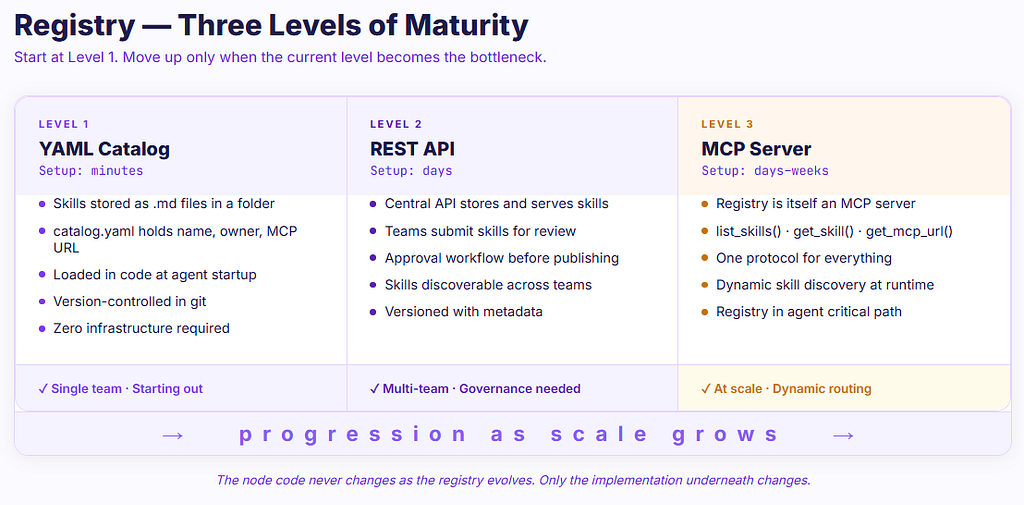
As the platform matures, the registry evolves into a REST API, then into an MCP server. The node code never changes. Only the registry implementation underneath changes.
The Constrained Classifier
def classifier_node(state: AgentState):
    user_input = state["messages"][-1]["content"]
    prompt = f"""
Classify this request into exactly one skill.
Return only the skill name — nothing else.
Skills:
- incident_triage: infrastructure alerts, CPU/memory/disk, service health
- deployment_ops: deployments, rollbacks, releases
- access_request: user permissions, account provisioning
- out_of_scope: anything not matching the above
Request: {user_input}
"""
    result = llm.invoke(prompt)
    selected = result.content.strip()
    valid = ["incident_triage", "deployment_ops", "access_request", "out_of_scope"]
    return {"selected_skill": selected if selected in valid else "out_of_scope"}
The out_of_scope path is not optional. Every classifier must have a defined fallback.
Where to Store Skills — Four Options
Approach Description Pros Cons Best for Filesystem skills/ folder, loaded in code Zero infrastructure, git-versioned Not discoverable across teams Single team, early stage REST API Central API stores and serves skills Discoverable, governance workflow Another service to operate Multi-team, governance needed MCP Server Registry is itself an MCP server One protocol for everything Registry in critical path At scale, dynamic routing Git + CI Monorepo, CI validates and publishes Familiar workflow, PR-based review Not queryable at runtime Platform teams
Registry Maturity — Three Levels
Level 1: YAML Level 2: REST API Level 3: MCP Server Setup Minutes Days Days to weeks Governance Manual Approval workflow Approval workflow Dynamic discovery No Partial Yes Protocol consistency Mixed Mixed Unified Dependency risk Low Medium Registry in critical path Best for Starting out Multi-team At scale
Start at Level 1. Move to Level 2 when governance becomes a bottleneck. Move to Level 3 only when agents genuinely need runtime skill discovery.
Skill Quality Is the Real Risk
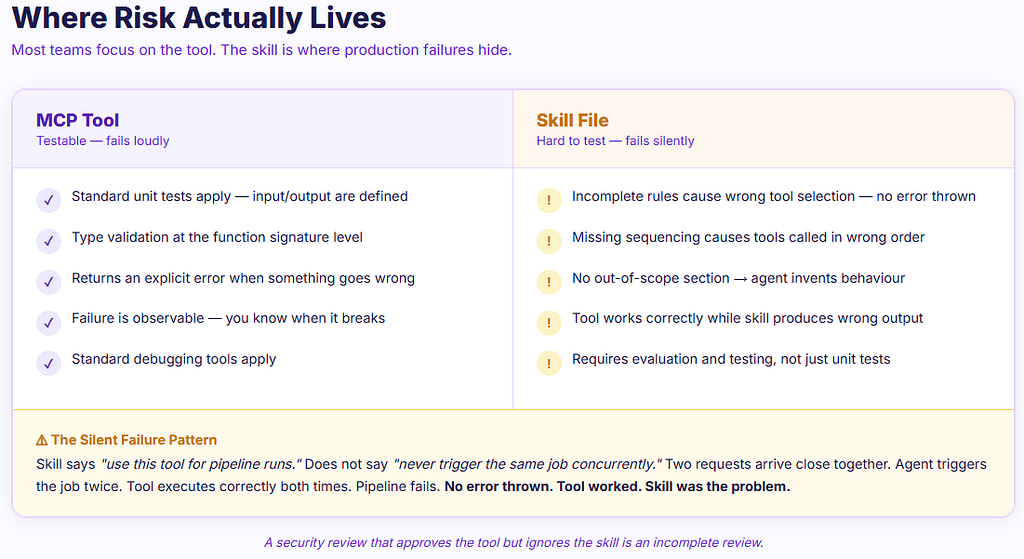
The MCP tool either works or it does not. That is testable. You can write unit tests, validate inputs and outputs, and know when it fails.
The skill file is harder. If the instructions are incomplete or ambiguous, the agent will misuse the tool even when the tool itself is functioning correctly — and no error will be thrown.
A real failure pattern:
A skill says: “Use this tool for pipeline runs.”
It does not say: “Never trigger the same job concurrently.”
Two requests arrive close together. The agent triggers the job twice. The tool executes correctly both times. The pipeline fails. No error thrown. The tool worked. The skill was incomplete.
Skill Quality Checklist
Check Question Scope Is the purpose clear in one sentence? Triggers Are the when-to-use conditions specific enough? Tool guidance Does the skill say which tool to call for which condition? Sequencing Are multi-step tool sequences explicitly ordered? Rules Are there explicit constraints on what the agent must never do? Out of scope Is there a clear out-of-scope section with a suggested response? Edge cases Are common edge cases covered — duplicates, errors, missing data? Output format Does the skill define what a correct response looks like?
A security review that approves the tool but ignores the skill is an incomplete review. The skill is where agent behaviour lives.
Skills and MCP in the Copilot Ecosystem
One of the most compelling aspects of this pattern is how naturally it extends beyond custom agents into the tools most teams already use day to day.
Both GitHub Copilot and Microsoft Copilot Studio support MCP natively. This means the same skill file and the same MCP server that powers a custom LangGraph agent can be connected to either Copilot surface with minimal additional setup.
GitHub Copilot in VS Code:
Place your skill content in .github/copilot-instructions.md and configure the MCP server in .vscode/mcp.json. Switch to Agent mode in the Copilot Chat panel and the agent follows the skill instructions while calling your MCP tools.
{
  "servers": {
    "your-mcp-server": {
      "type": "http",
      "url": "https://your-mcp-server-url",
      "headers": {
        "Authorization": "Bearer YOUR_TOKEN"
      }
    }
  }
}
Microsoft Copilot Studio:
Create an agent, paste the skill content into the Instructions field, and add the MCP server URL through the MCP onboarding wizard. No code required. The same governed capability is now available to any user through the Copilot interface.
One important distinction: in custom agents built with frameworks like LangGraph or the Claude API, you control the full stack — skill, router, tool schema, and execution boundary. In Copilot surfaces, the skill acts as guidance rather than hard enforcement. The LLM follows the instructions but cannot be prevented from answering outside of scope the way a code-level router can.
This is not a reason to avoid Copilot surfaces — it is a reason to understand what governance layer you are relying on. For many enterprise use cases, instruction-based guidance is sufficient. For use cases requiring strict scope enforcement, audit trails, or complex multi-step tool sequencing, a custom agent gives you the control you need.
The practical takeaway: start with whichever surface your team already uses. The skill file and MCP server work in both places. You are not locked into one approach, and you are not rebuilding anything when you add a new surface.
Where We Are Heading — A Maturity View
It is worth being honest about where this pattern is today versus where it is going.
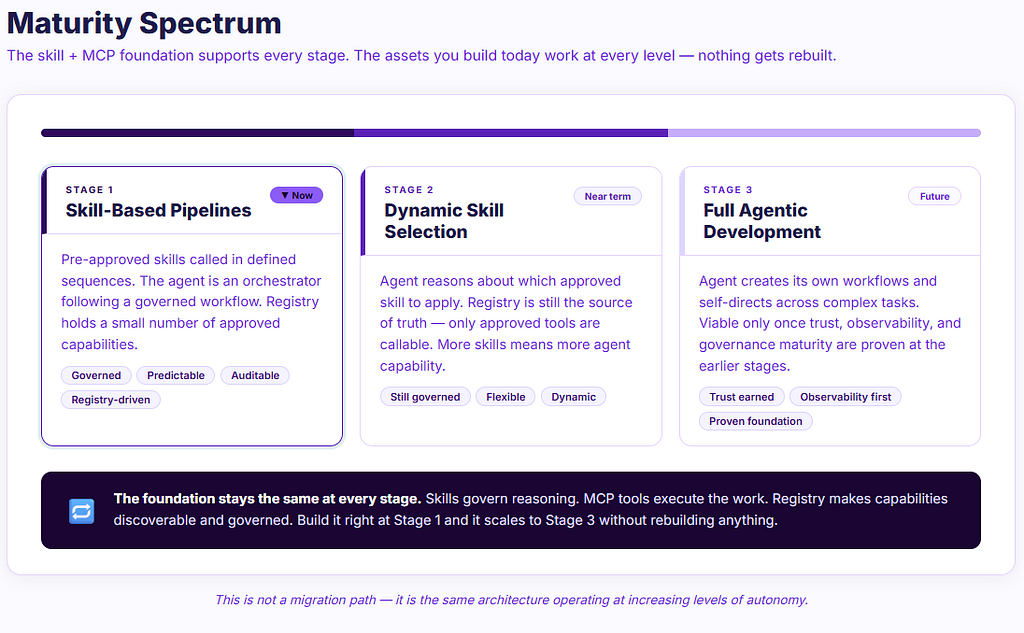
Now — Skill-based pipelines
Most teams adopting this pattern start with pre-approved skills called in defined sequences. The agent is an orchestrator executing a governed workflow. This is the most predictable and auditable starting point. The skill registry holds a small number of approved capabilities. The agent follows them without deviation.
Near term — Dynamic skill selection
As the registry grows and agents become more capable, the agent begins reasoning about which approved skill to apply to a given request. The registry is still the source of truth and only approved tools are callable — but the agent exercises more judgment. This is where the classifier patterns described earlier become important.
Future — Full agentic autonomy
The agent creates its own workflows, generates new approaches, and self-directs across complex multi-step tasks. This becomes viable only once trust, observability, and governance maturity are established at the earlier stages. It is not a starting point — it is an earned destination.
The pattern described in this post — skills as governed instructions, MCP as the standard execution protocol, registry as the discovery and approval layer — is the foundation that makes this progression safe. The assets you build at Stage 1 are compatible with Stage 3. Nothing needs to be rebuilt. The governance layer grows with the capability.
Why This Separation Is Worth the Effort
Reusability. A capability built once as an MCP tool is callable from any agent, any framework, and any Copilot surface. No rebuilding when a new platform is introduced.
Governance. When skills and tools are registered in a central catalog, every capability becomes visible and auditable before it enters production. Reviews happen at the registration point, not after.
Migration path. When you move from locally-bound tools to a central registry, the skill files do not change. The node code does not change. Only the registry implementation underneath changes.
Phase 1 — Skills as local files, tools as Python functions
           ↓  node code stays the same  ↓
Phase 2 — Skills in central registry (REST), tools as MCP servers
           ↓  node code stays the same  ↓
Phase 3 — Registry as MCP server, dynamic skill discovery at runtime
Skills Published via MCP — The Full Circle
There is a natural endpoint to this pattern that is worth naming explicitly.
In the registry maturity model described earlier, Level 3 is the registry as an MCP server. When you reach that level, the skill itself can be published as an MCP tool — not just the capability it governs.
@mcp.tool()
def get_skill(name: str) -> str:
    """Get skill instructions for a given capability name.
    Returns the full skill markdown content to use as a system prompt.
    """
    return pathlib.Path(f"skills/{name}.md").read_text()
The agent calls get_skill() on the registry at runtime, receives the skill content, loads it as its system prompt, then calls the capability MCP tools governed by those instructions — all through the same protocol.
Agent → get_skill("incident_triage")  on registry MCP
      → receives skill.md content
      → loads as system prompt
      → calls capability tools governed by that skill
What this changes in practice: there are no skill files to manage per IDE or agent. No copying content into instruction fields. No files going out of sync. The registry is the single source of truth and every agent — custom or Copilot — gets the latest approved version automatically on every call.
The skill, which started as a Markdown file on someone’s laptop, becomes a governed, versioned, discoverable enterprise asset — callable by any agent through the same standard that connects everything else. That is the full circle.
Starting Points
Start with one skill per agent node. Each node hardcodes only the skill name, loading content from a local file.
Write the out-of-scope section before anything else. An agent without clear boundaries will attempt to answer anything.
Keep each skill focused on one capability. Combining capabilities creates ambiguity the agent resolves inconsistently.
Register every skill in a catalog from the beginning — even a simple YAML file. The catalog is how you avoid building the same capability twice.
Review skill instructions with the same rigour as code. A tool that passes all tests with an incomplete skill will produce wrong outputs in production.
References
- Anthropic Agent Skills — Open Standard
- Model Context Protocol — Official Specification
- Anthropic MCP Introduction
- FastMCP — Python MCP Server Library
- LangGraph Documentation
- Microsoft Copilot Studio MCP Support
- GitHub Copilot MCP Support
The patterns described here are based on current industry practice as of mid-2026. The agentic AI space is moving quickly — framework APIs, registry patterns, and skill standards will continue to evolve. The intent of this post is to share learning and spark discussion, not to define a final approach.
Skills and MCP: How to Build Agent Capabilities That Actually Scale was originally published in Level Up Coding on Medium, where people are continuing the conversation by highlighting and responding to this story.
This content originally appeared on Level Up Coding - Medium and was authored by Manjunath Venkobarao

Manjunath Venkobarao | Sciencx (2026-06-26T20:25:50+00:00) Skills and MCP: How to Build Agent Capabilities That Actually Scale. Retrieved from https://www.scien.cx/2026/06/26/skills-and-mcp-how-to-build-agent-capabilities-that-actually-scale/
Please log in to upload a file.
There are no updates yet.
Click the Upload button above to add an update.