
This content originally appeared on Level Up Coding - Medium and was authored by Sanjay Nelagadde
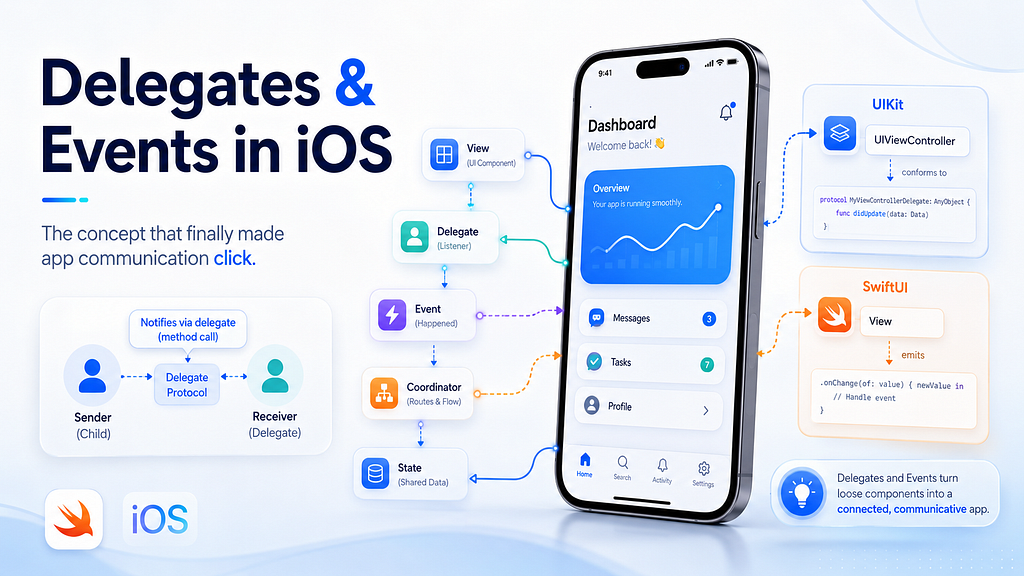
When I first started learning iOS development, delegates confused me more than I expected. The code itself did not look too hard. You create a protocol, add a delegate property, set it somewhere else, and call a method when something happens. But for a long time, I did not fully understand why this pattern existed or when I should use it instead of closures, NotificationCenter, SwiftUI state, or just calling another object directly.
That is one of the reasons I have been writing more iOS articles recently. I use these articles to track the issues I personally faced while building apps, especially the concepts that seemed simple at first but became more important as the app grew. I like documenting these lessons because if I struggled with something, there is a good chance someone else will run into the same confusion too. Hopefully, by sharing the mistakes and patterns that helped me, other developers can avoid repeating the same issues and get to the “aha” moment faster.
In some of my previous articles, I wrote about practical iOS topics from a similar angle. In SwiftUI State in iOS: A Practical Guide, I talked about how state drives the UI and why understanding state makes SwiftUI much easier to reason about. In MVVM in SwiftUI: Build an iOS App That Stays Organized as It Grows, I focused on keeping code organized when an app starts becoming more than just a few screens. I also wrote about trying Apple VisionKit and building a simple document scanner in SwiftUI, which was a good reminder that even in SwiftUI, many Apple frameworks still rely heavily on delegate-based APIs.
This article is about delegates and events in iOS. More importantly, it is about how objects communicate with each other without everything becoming tightly coupled and messy.
The Real Problem Delegates Solve
Before talking about delegates, it helps to understand the problem they are solving. Imagine we have a screen that displays a list of notes. When the user taps a note, we want to open the detail screen. The easiest way is to make the list screen directly call the detail screen.
final class NotesListViewController: UIViewController {

    private let detailViewController = NoteDetailViewController()

    func userDidTapNote(_ note: Note) {
        detailViewController.show(note)
    }
}
This works, and honestly, in a very small app it might feel completely fine. But the problem is that NotesListViewControllernow knows too much. It knows who handles the selected note, how the next screen works, and what should happen after the tap. That is okay when the app has two screens, but it starts becoming painful when the app grows.
What if tapping a note sometimes opens a detail screen, sometimes triggers an edit flow, and sometimes just informs a parent coordinator? What if this list component should be reused somewhere else? What if we want to track analytics when a note is selected, but we do not want the list view controller to know anything about analytics? This is where delegates become useful because they allow an object to say, “Something happened here,” without needing to know exactly who is handling it or what happens next.
A delegate is basically a way for one object to communicate events to another object through a clearly defined contract. In Swift, that contract is usually a protocol.
struct Note {
    let id: Int
    let title: String
}

protocol NotesListViewControllerDelegate: AnyObject {
    func notesListViewController(
        _ controller: NotesListViewController,
        didSelect note: Note
    )
}
Now the list screen can expose a delegate property.
final class NotesListViewController: UIViewController {

    weak var delegate: NotesListViewControllerDelegate?

    private let notes: [Note] = [
        Note(id: 1, title: "SwiftUI State"),
        Note(id: 2, title: "MVVM"),
        Note(id: 3, title: "Delegates and Events")
    ]

    func userDidTapNote(at index: Int) {
        let selectedNote = notes[index]

        delegate?.notesListViewController(
            self,
            didSelect: selectedNote
        )
    }
}
The important part here is that NotesListViewController does not decide what happens after the note is selected. It simply reports the event. Another object can become the delegate and decide what to do.
final class NotesCoordinator: NotesListViewControllerDelegate {

    func notesListViewController(
        _ controller: NotesListViewController,
        didSelect note: Note
    ) {
        print("User selected note: \(note.title)")

        // Open detail screen
        // Track analytics
        // Update app state
        // Start another flow
    }
}
This is the part that finally made delegates click for me. A delegate is not just extra syntax. It is a way to keep one object reusable and focused while letting another object handle the decision-making.
Why Delegates Are Usually Weak
One thing you will see a lot in delegate-based code is this:
weak var delegate: NotesListViewControllerDelegate?
At first, this can feel like one of those Swift details that people mention without explaining properly. But it matters because delegates often point back to an object that already owns the original object. For example, a parent view controller may own a child view controller, and then the child view controller may use the parent as its delegate.
final class ParentViewController: UIViewController {

    private let notesListViewController = NotesListViewController()

    override func viewDidLoad() {
        super.viewDidLoad()

        notesListViewController.delegate = self
    }
}

extension ParentViewController: NotesListViewControllerDelegate {

    func notesListViewController(
        _ controller: NotesListViewController,
        didSelect note: Note
    ) {
        print("Selected note: \(note.title)")
    }
}
If the parent strongly owns the child, and the child strongly owns the parent through the delegate, both objects can keep each other alive. That is called a retain cycle. To avoid this, delegate references are usually weak.
For a delegate to be weak, the protocol needs to be limited to class types. That is why we write AnyObject in the protocol declaration.
protocol NotesListViewControllerDelegate: AnyObject {
    func notesListViewController(
        _ controller: NotesListViewController,
        didSelect note: Note
    )
}
This is a small detail, but it is one of those details that becomes very important in real apps. If a view controller is not getting released from memory, a strong delegate reference is one of the first things I would check.
A Practical UIKit Example
Let’s use a more realistic example. Imagine we are building a reusable rating view. It shows buttons from 1 to 5, and when the user selects a rating, the parent screen needs to know. The rating view itself should not save the rating, call an API, show an alert, or navigate anywhere. Its job is only to display the buttons and report what the user selected.
First, we define the delegate protocol.
protocol RatingViewDelegate: AnyObject {
    func ratingView(_ ratingView: RatingView, didSelectRating rating: Int)
}
Now we can create the custom view.
import UIKit

final class RatingView: UIView {

    weak var delegate: RatingViewDelegate?

    private let stackView = UIStackView()

    override init(frame: CGRect) {
        super.init(frame: frame)
        setupView()
        setupButtons()
    }

    required init?(coder: NSCoder) {
        super.init(coder: coder)
        setupView()
        setupButtons()
    }

    private func setupView() {
        stackView.axis = .horizontal
        stackView.spacing = 8
        stackView.distribution = .fillEqually

        addSubview(stackView)
        stackView.translatesAutoresizingMaskIntoConstraints = false

        NSLayoutConstraint.activate([
            stackView.leadingAnchor.constraint(equalTo: leadingAnchor),
            stackView.trailingAnchor.constraint(equalTo: trailingAnchor),
            stackView.topAnchor.constraint(equalTo: topAnchor),
            stackView.bottomAnchor.constraint(equalTo: bottomAnchor)
        ])
    }

    private func setupButtons() {
        for rating in 1...5 {
            let button = UIButton(type: .system)
            button.setTitle("\(rating)", for: .normal)
            button.tag = rating

            button.addTarget(
                self,
                action: #selector(ratingButtonTapped(_:)),
                for: .touchUpInside
            )

            stackView.addArrangedSubview(button)
        }
    }

    @objc private func ratingButtonTapped(_ sender: UIButton) {
        let rating = sender.tag
        delegate?.ratingView(self, didSelectRating: rating)
    }
}
Then a view controller can use this rating view and decide what should happen when the rating is selected.
final class ReviewViewController: UIViewController {

    private let ratingView = RatingView()

    override func viewDidLoad() {
        super.viewDidLoad()

        view.backgroundColor = .systemBackground
        ratingView.delegate = self

        view.addSubview(ratingView)
        ratingView.translatesAutoresizingMaskIntoConstraints = false

        NSLayoutConstraint.activate([
            ratingView.centerXAnchor.constraint(equalTo: view.centerXAnchor),
            ratingView.centerYAnchor.constraint(equalTo: view.centerYAnchor),
            ratingView.widthAnchor.constraint(equalToConstant: 250),
            ratingView.heightAnchor.constraint(equalToConstant: 44)
        ])
    }
}

extension ReviewViewController: RatingViewDelegate {

    func ratingView(_ ratingView: RatingView, didSelectRating rating: Int) {
        print("Selected rating: \(rating)")

        // Save rating
        // Update UI
        // Send event to ViewModel
        // Track analytics
    }
}
This is a clean separation of responsibility. The RatingView only knows that a rating was tapped. The ReviewViewControllerdecides what that rating means in the context of the screen. This is the kind of separation that feels unnecessary in tiny examples, but becomes very valuable when you are building real screens that keep changing over time.
Delegates and Events Are Related, But Not Exactly the Same
An event is simply something that happened. A button was tapped. A text field changed. A scroll view moved. A network request finished. A document scanner completed scanning. A Bluetooth device disconnected. iOS apps are basically a long chain of events being handled in different ways.
Delegates are one way to handle events, but they are not the only way. UIKit and Swift give us several patterns, and this is where things can get confusing. You might see target-action for button taps, delegates for table views, closures for small callbacks, NotificationCenter for broadcasts, Combine publishers for streams, and SwiftUI modifiers like .onAppear and .onChange.
// Target-action
button.addTarget(
    self,
    action: #selector(buttonTapped),
    for: .touchUpInside
)

// Delegate
tableView.delegate = self

// Closure callback
view.onRetryTapped = { [weak self] in
    self?.reloadData()
}

// NotificationCenter
NotificationCenter.default.post(
    name: .userDidLogout,
    object: nil
)

// SwiftUI event modifier
.onAppear {
    loadData()
}
The trick is not to memorize every pattern as a separate thing. The better mental model is to ask: who needs to know that this happened, and how closely related are these objects? Once you answer that, the right pattern usually becomes easier to choose.
Target-Action Is Great for Simple UI Events
Target-action is very common in UIKit, especially with controls like UIButton, UISwitch, UISlider, and UITextField. If a user taps a button, you usually do not need a delegate protocol just for that one tap. Target-action is simple and direct.
final class LoginViewController: UIViewController {

    private let loginButton = UIButton(type: .system)

    override func viewDidLoad() {
        super.viewDidLoad()

        loginButton.setTitle("Login", for: .normal)

        loginButton.addTarget(
            self,
            action: #selector(loginButtonTapped),
            for: .touchUpInside
        )
    }

    @objc private func loginButtonTapped() {
        print("Login button tapped")
    }
}
This is perfect for simple UI interactions. The button sends an event, and the view controller handles it. You will commonly see events like .touchUpInside, .editingChanged, .valueChanged, and .primaryActionTriggered.
textField.addTarget(
    self,
    action: #selector(textDidChange(_:)),
    for: .editingChanged
)

switchControl.addTarget(
    self,
    action: #selector(switchValueChanged(_:)),
    for: .valueChanged
)
My rule is simple: if it is a direct UIKit control event, target-action is usually fine. I only start thinking about delegates or closures when I am building a custom component or when the communication becomes more structured.
Delegates Are Better for Structured Communication
Delegates are especially useful when one object needs to communicate multiple related events or decisions to another object. This is why UITableViewDelegate, UITableViewDataSource, UITextFieldDelegate, UIScrollViewDelegate, and many Apple framework APIs use delegates.
Take UITableView as an example. A table view does not only need to say “a row was tapped.” It may also need to ask how many rows exist, what each cell should look like, how tall a row should be, whether a row can be edited, and what should happen when a row is selected.
final class NotesViewController: UIViewController {

    private let tableView = UITableView()
    private let notes = ["SwiftUI State", "MVVM", "Delegates"]

    override func viewDidLoad() {
        super.viewDidLoad()

        tableView.dataSource = self
        tableView.delegate = self
    }
}

extension NotesViewController: UITableViewDataSource {

    func tableView(
        _ tableView: UITableView,
        numberOfRowsInSection section: Int
    ) -> Int {
        notes.count
    }

    func tableView(
        _ tableView: UITableView,
        cellForRowAt indexPath: IndexPath
    ) -> UITableViewCell {
        let cell = UITableViewCell(style: .default, reuseIdentifier: nil)
        cell.textLabel?.text = notes[indexPath.row]
        return cell
    }
}

extension NotesViewController: UITableViewDelegate {

    func tableView(
        _ tableView: UITableView,
        didSelectRowAt indexPath: IndexPath
    ) {
        print("Selected note: \(notes[indexPath.row])")
    }
}
This is where delegates shine. The table view has a clear relationship with the object that manages it. The delegate and data source define that relationship in a structured way. This is much cleaner than giving the table view many random closures for every possible behavior.
UITextFieldDelegate is another good example because the text field sometimes needs to ask questions before doing something.
final class ProfileViewController: UIViewController {

    private let nameTextField = UITextField()

    override func viewDidLoad() {
        super.viewDidLoad()

        nameTextField.delegate = self
    }
}

extension ProfileViewController: UITextFieldDelegate {

    func textFieldShouldReturn(_ textField: UITextField) -> Bool {
        textField.resignFirstResponder()
        return true
    }

    func textFieldDidEndEditing(_ textField: UITextField) {
        print("User entered name: \(textField.text ?? "")")
    }
}
This is not just an event callback. The text field is asking the delegate how it should behave. That is another reason delegates are useful: they are not only for reporting events, but also for letting another object customize behavior.
Closures Are Great for Small Custom Events
While delegates are useful, I do not think every custom view needs a delegate. Sometimes a closure is simpler and more readable. For example, imagine we have an empty state view with a retry button. If the only thing the view needs to report is “retry was tapped,” a closure works nicely.
final class EmptyStateView: UIView {

    var onRetryTapped: (() -> Void)?

    private let retryButton = UIButton(type: .system)

    override init(frame: CGRect) {
        super.init(frame: frame)
        setupButton()
    }

    required init?(coder: NSCoder) {
        super.init(coder: coder)
        setupButton()
    }

    private func setupButton() {
        retryButton.setTitle("Try Again", for: .normal)

        retryButton.addTarget(
            self,
            action: #selector(retryButtonTapped),
            for: .touchUpInside
        )

        addSubview(retryButton)
    }

    @objc private func retryButtonTapped() {
        onRetryTapped?()
    }
}
Then the view controller can handle the callback like this:
final class ErrorViewController: UIViewController {

    private let emptyStateView = EmptyStateView()

    override func viewDidLoad() {
        super.viewDidLoad()

        emptyStateView.onRetryTapped = { [weak self] in
            self?.reloadData()
        }
    }

    private func reloadData() {
        print("Reloading data...")
    }
}
The important thing with closures is memory management. If a view owns a closure, and that closure strongly captures the view controller, you can accidentally create a retain cycle. That is why you often see [weak self] inside UIKit callbacks.
emptyStateView.onRetryTapped = { [weak self] in
    self?.reloadData()
}
My personal rule is that closures are great when there are one or two simple events. If the custom view starts exposing many callbacks, I usually move to a delegate because the API becomes easier to organize and understand.
NotificationCenter Is for Broadcast Events
NotificationCenter is another event pattern, but I try to use it carefully. It is useful when multiple unrelated parts of the app need to know about the same event. A common example is logout. When the user logs out, the profile screen may need to reset, the root screen may need to return to login, cached data may need to clear, and other parts of the app may need to react.
First, define a notification name.
extension Notification.Name {
    static let userDidLogout = Notification.Name("userDidLogout")
}
Then post the event when logout happens.
final class SessionManager {

    func logout() {
        // Clear tokens
        // Reset user session
        // Remove cached data

        NotificationCenter.default.post(
            name: .userDidLogout,
            object: nil
        )
    }
}
Any object that cares about logout can listen for it.
final class HomeViewController: UIViewController {

    override func viewDidLoad() {
        super.viewDidLoad()

        NotificationCenter.default.addObserver(
            self,
            selector: #selector(handleLogout),
            name: .userDidLogout,
            object: nil
        )
    }

    @objc private func handleLogout() {
        print("User logged out. Return to login screen.")
    }

    deinit {
        NotificationCenter.default.removeObserver(self)
    }
}
This is powerful, but it can also make the app harder to trace if overused. With delegates, you can usually see the relationship clearly. With notifications, the event is broadcast, and any object can listen from anywhere. That is useful for app-wide events, but I would not use it for every button tap or small component callback.
SwiftUI Handles Events Differently
In SwiftUI, we usually do not write delegates for basic view interactions. SwiftUI gives us event-style modifiers and closures instead. A button tap is just a closure.
struct LoginView: View {

    var body: some View {
        Button("Login") {
            print("Login tapped")
        }
    }
}
Text changes can be handled with .onChange.
struct SearchView: View {

    @State private var searchText = ""

    var body: some View {
        TextField("Search", text: $searchText)
            .onChange(of: searchText) { oldValue, newValue in
                print("Search changed to: \(newValue)")
            }
    }
}
View lifecycle events can be handled with .onAppear and .onDisappear.
struct ProfileView: View {

    var body: some View {
        Text("Profile")
            .onAppear {
                print("Profile appeared")
            }
            .onDisappear {
                print("Profile disappeared")
            }
    }
}
This connects nicely with the SwiftUI state idea. In UIKit, we often think, “When this event happens, update this label or push this screen.” In SwiftUI, we usually think, “When this event happens, update the state, and the UI will reflect that state.”
struct LoginFormView: View {

    @State private var email = ""
    @State private var password = ""
    @State private var errorMessage: String?

    var body: some View {
        VStack(spacing: 12) {
            TextField("Email", text: $email)
                .textFieldStyle(.roundedBorder)

            SecureField("Password", text: $password)
                .textFieldStyle(.roundedBorder)

            Button("Login") {
                login()
            }

            if let errorMessage {
                Text(errorMessage)
                    .foregroundStyle(.red)
            }
        }
        .padding()
    }

    private func login() {
        guard !email.isEmpty else {
            errorMessage = "Email is required"
            return
        }

        guard !password.isEmpty else {
            errorMessage = "Password is required"
            return
        }

        errorMessage = nil
        print("Perform login")
    }
}
Here, the button tap is the event, and errorMessage is the state. Once the state changes, SwiftUI updates the UI. This is why understanding events and state together is so helpful.
Bridging UIKit Delegates Into SwiftUI
Even if you are mainly writing SwiftUI, delegates still matter because many Apple frameworks are built around them. UIImagePickerController, VNDocumentCameraViewController, CLLocationManager, CBCentralManager, WKWebView, and many other APIs use delegates. This is exactly why delegates came back into the picture when I was working with VisionKit.
When you wrap UIKit inside SwiftUI, you usually use UIViewControllerRepresentable or UIViewRepresentable. Since UIKit expects a delegate object, SwiftUI gives us a Coordinator to bridge that delegate communication back into SwiftUI.
Here is an example using UIImagePickerController.
import SwiftUI
import UIKit

struct ImagePicker: UIViewControllerRepresentable {

    @Binding var selectedImage: UIImage?
    @Environment(\.dismiss) private var dismiss

    func makeUIViewController(context: Context) -> UIImagePickerController {
        let picker = UIImagePickerController()
        picker.delegate = context.coordinator
        picker.sourceType = .photoLibrary
        return picker
    }

    func updateUIViewController(
        _ uiViewController: UIImagePickerController,
        context: Context
    ) {
        // No update needed for this example
    }

    func makeCoordinator() -> Coordinator {
        Coordinator(self)
    }

    final class Coordinator: NSObject,
                             UIImagePickerControllerDelegate,
                             UINavigationControllerDelegate {

        private let parent: ImagePicker

        init(_ parent: ImagePicker) {
            self.parent = parent
        }

        func imagePickerController(
            _ picker: UIImagePickerController,
            didFinishPickingMediaWithInfo info: [UIImagePickerController.InfoKey : Any]
        ) {
            if let image = info[.originalImage] as? UIImage {
                parent.selectedImage = image
            }

            parent.dismiss()
        }

        func imagePickerControllerDidCancel(_ picker: UIImagePickerController) {
            parent.dismiss()
        }
    }
}
Now the SwiftUI view can use the image picker with a binding.
struct ProfilePhotoView: View {

    @State private var selectedImage: UIImage?
    @State private var isShowingImagePicker = false

    var body: some View {
        VStack(spacing: 16) {
            if let selectedImage {
                Image(uiImage: selectedImage)
                    .resizable()
                    .scaledToFit()
                    .frame(height: 200)
            } else {
                Text("No image selected")
            }

            Button("Choose Photo") {
                isShowingImagePicker = true
            }
        }
        .sheet(isPresented: $isShowingImagePicker) {
            ImagePicker(selectedImage: $selectedImage)
        }
    }
}
This pattern is very common. UIKit reports events through a delegate. The coordinator receives those delegate events. Then the coordinator updates SwiftUI state through a binding. Once I understood this flow, wrapping UIKit controllers in SwiftUI became much less mysterious.
Delegate vs Closure: A Practical Decision
Let’s say we are building a reusable login form view in UIKit. The form has an email field, password field, login button, and forgot password button. We could expose two closures like this.
final class LoginFormView: UIView {

    var onLoginTapped: ((_ email: String, _ password: String) -> Void)?
    var onForgotPasswordTapped: (() -> Void)?

    private let emailTextField = UITextField()
    private let passwordTextField = UITextField()
    private let loginButton = UIButton(type: .system)
    private let forgotPasswordButton = UIButton(type: .system)

    override init(frame: CGRect) {
        super.init(frame: frame)
        setupActions()
    }

    required init?(coder: NSCoder) {
        super.init(coder: coder)
        setupActions()
    }

    private func setupActions() {
        loginButton.addTarget(
            self,
            action: #selector(loginButtonTapped),
            for: .touchUpInside
        )

        forgotPasswordButton.addTarget(
            self,
            action: #selector(forgotPasswordButtonTapped),
            for: .touchUpInside
        )
    }

    @objc private func loginButtonTapped() {
        onLoginTapped?(
            emailTextField.text ?? "",
            passwordTextField.text ?? ""
        )
    }

    @objc private func forgotPasswordButtonTapped() {
        onForgotPasswordTapped?()
    }
}
This is perfectly fine for a small component. But if the form starts growing with more related behavior, a delegate can make the API feel cleaner.
protocol LoginFormViewDelegate: AnyObject {
    func loginFormView(
        _ view: LoginFormView,
        didTapLoginWithEmail email: String,
        password: String
    )

    func loginFormViewDidTapForgotPassword(_ view: LoginFormView)
}
Then the form view can communicate through the delegate.
final class LoginFormView: UIView {

    weak var delegate: LoginFormViewDelegate?

    private let emailTextField = UITextField()
    private let passwordTextField = UITextField()
    private let loginButton = UIButton(type: .system)
    private let forgotPasswordButton = UIButton(type: .system)

    override init(frame: CGRect) {
        super.init(frame: frame)
        setupActions()
    }

    required init?(coder: NSCoder) {
        super.init(coder: coder)
        setupActions()
    }

    private func setupActions() {
        loginButton.addTarget(
            self,
            action: #selector(loginButtonTapped),
            for: .touchUpInside
        )

        forgotPasswordButton.addTarget(
            self,
            action: #selector(forgotPasswordButtonTapped),
            for: .touchUpInside
        )
    }

    @objc private func loginButtonTapped() {
        delegate?.loginFormView(
            self,
            didTapLoginWithEmail: emailTextField.text ?? "",
            password: passwordTextField.text ?? ""
        )
    }

    @objc private func forgotPasswordButtonTapped() {
        delegate?.loginFormViewDidTapForgotPassword(self)
    }
}
And the view controller handles the behavior.
final class LoginViewController: UIViewController {

    private let loginFormView = LoginFormView()
    private let viewModel = LoginViewModel()

    override func viewDidLoad() {
        super.viewDidLoad()

        loginFormView.delegate = self
    }
}

extension LoginViewController: LoginFormViewDelegate {

    func loginFormView(
        _ view: LoginFormView,
        didTapLoginWithEmail email: String,
        password: String
    ) {
        Task {
            do {
                try await viewModel.login(email: email, password: password)
                print("Navigate to home")
            } catch {
                print("Show error: \(error)")
            }
        }
    }

    func loginFormViewDidTapForgotPassword(_ view: LoginFormView) {
        print("Navigate to forgot password")
    }
}
The view model can stay focused on business logic.
final class LoginViewModel {

    func login(email: String, password: String) async throws {
        guard !email.isEmpty else {
            throw LoginError.missingEmail
        }

        guard !password.isEmpty else {
            throw LoginError.missingPassword
        }

        // Call login API here
    }
}

enum LoginError: Error {
    case missingEmail
    case missingPassword
}
This connects directly with MVVM. The view reports the event, the view controller receives it, and the view model handles the logic. The login form does not need to know about networking, navigation, alerts, or authentication rules. That separation is what keeps the code easier to change later.
Naming Delegate Methods Clearly
One thing I appreciate more now is good delegate method naming. Apple’s APIs usually follow a pattern that makes the method read almost like a sentence.
func tableView(
    _ tableView: UITableView,
    didSelectRowAt indexPath: IndexPath
)
That method name tells us which object triggered the event, what happened, and what extra information is being passed. I try to follow the same style in my own code.
func scannerViewController(
    _ controller: ScannerViewController,
    didFinishScanning pages: [UIImage]
)

func scannerViewControllerDidCancel(
    _ controller: ScannerViewController
)

func loginFormView(
    _ view: LoginFormView,
    didTapLoginWithEmail email: String,
    password: String
)
This may look verbose, but it helps a lot when the codebase grows. A vague method like login() or done() may look cleaner today, but six months later you may not remember who called it, why it was called, or what context it belongs to. Clear delegate names make the code easier to scan and easier to debug.
Common Mistakes I Try to Avoid Now
The first mistake is forgetting to set the delegate. This is such a simple mistake, but it can waste a lot of time because the app compiles and runs, but nothing happens when the event is triggered.
loginFormView.delegate = self
The second mistake is forgetting to make the delegate weak. This can cause memory leaks, especially when a child object points back to its parent. If the delegate is a class-based relationship, I usually expect to see weak.
weak var delegate: LoginFormViewDelegate?
The third mistake is using delegates for everything. Not every event needs a protocol. If it is a simple button tap inside a view controller, target-action is enough. If it is one small custom callback, a closure may be cleaner. If it is a SwiftUI interaction, state and closures are usually the natural choice.
The fourth mistake is letting a view do too much. A custom view should usually report user actions, not decide the entire app flow. For example, I would avoid putting API calls, navigation, analytics, and alert handling directly inside a reusable form view.
final class LoginFormView: UIView {

    @objc private func loginButtonTapped() {
        // This is too much responsibility for a reusable view.
        // Validate input
        // Call API
        // Navigate to home screen
        // Show alert
        // Track analytics
    }
}
A cleaner approach is to let the view report the event and let another layer decide what to do.
@objc private func loginButtonTapped() {
    delegate?.loginFormView(
        self,
        didTapLoginWithEmail: emailTextField.text ?? "",
        password: passwordTextField.text ?? ""
    )
}
This is a small shift in thinking, but it makes components much easier to reuse.
The Mental Model I Use Now
The easiest way I think about delegates and events is this: something happens in one object, and another object needs to know about it. That is really the core idea. The pattern you choose depends on the relationship between those objects.
If it is a simple UIKit control event, I use target-action. If it is one small custom callback, I usually use a closure. If it is a structured relationship with multiple related events, I use a delegate. If many unrelated parts of the app need to know about the same thing, I consider NotificationCenter. If I am in SwiftUI, I usually think in terms of closures, bindings, state, and modifiers like .onAppear, .onChange, and .task.
The question that helps me most is: “Who needs to know this happened?” If only the parent view needs to know, a closure or delegate may be enough. If the object needs to ask its owner multiple things, a delegate is probably better. If the whole app needs to react, a broadcast-style event may make sense.
Final Thoughts
Delegates can feel like an older iOS concept, especially when working with SwiftUI, async/await, and modern closure-based APIs. But they are still everywhere in iOS development. UIKit uses them heavily. Many Apple frameworks use them. SwiftUI wrappers often need coordinators because the UIKit controller underneath still communicates through delegates.
For me, the concept became much easier once I stopped thinking of delegates as just boilerplate. A delegate is simply a way for an object to say, “Something happened here, and I want someone else to decide what to do.” That is a powerful idea because it keeps objects focused, reusable, and less tightly connected.
I am continuing to write these iOS articles as a way to document the concepts and issues I run into while building apps. Some topics look simple in sample code, but they become much more meaningful when you start building real features. Delegates and events are exactly that kind of topic.
If this article helped you, please clap for it and follow me for more practical iOS development articles. It really helps and also motivates me to keep sharing what I learn while building.
Delegates and Events in iOS: The Concept That Finally Made App Communication Click for Me was originally published in Level Up Coding on Medium, where people are continuing the conversation by highlighting and responding to this story.
This content originally appeared on Level Up Coding - Medium and was authored by Sanjay Nelagadde

Sanjay Nelagadde | Sciencx (2026-06-29T19:47:13+00:00) Delegates and Events in iOS: The Concept That Finally Made App Communication Click for Me. Retrieved from https://www.scien.cx/2026/06/29/delegates-and-events-in-ios-the-concept-that-finally-made-app-communication-click-for-me/
Please log in to upload a file.
There are no updates yet.
Click the Upload button above to add an update.