
This content originally appeared on Level Up Coding - Medium and was authored by Nikos Maroulis
When tools like Claude Code, Aider, Codex, Antigravity, Devin and more started popping up, my initial reaction as an AI engineer wasn’t just “Wow, this is cool” (which it is), it was “How does this actually work under the hood, and where does it fall apart?”
If you’ve run agentic coding loops on cloud models, you know they are incredibly powerful. You also know they are token-eating monsters. A simple multi-file refactor can easily burn through your daily Anthropic API limits and cost you a premium in credit.
The obvious holy grail is to run these loops locally using free, open-weight 7B or 8B parameter models. But how do you bridge the gap between a massive frontier model like Claude Opus 4.8 and a compact local 4B or 8B model running on your laptop?
Instead of just reading system prompts, I decided the best way to learn was hands-on: by building my own terminal-based coding assistant.
Enter ProtoAgent.
To be absolutely honest: ProtoAgent is not yet a polished, industry-grade product ready to replace your daily coding CLI tool or editor extensions. It is an active, raw, curiosity-driven project I am building to explore the limits of local models.
ProtoAgent is a laboratory for exploring what local coding models can and cannot do.
It is powered by ProtoLink, a robust, production-oriented Python framework for Agent-to-Agent (A2A) communication that I’ve been developing and writing about and it serves as the perfect lab environment for testing how coding agents operate.
ProtoLink is actually an agentic framework for python that i’ve been building for the same reason, to examine how libraries like LangChain etc. operate under the hood. If you’re interested in that, in an earlier article, I used ProtoLink to build an autonomous agent mesh. I later showed how to prototype a small “Claude Code”-style system using Coordinator, Brain, and Hands agents.
ProtoAgent takes those experiments further.
The central lesson has been surprisingly consistent:
Making small models useful is less about giving them more power and more about removing unnecessary choices.
Here is what building ProtoAgent taught me about context overload, deterministic repository retrieval, Rust-to-Python communication, and human-in-the-loop execution.
The Stack: Decoupling the Brain from the Face
I wanted a snappy terminal UI, but I also wanted the flexibility to iterate on the AI logic without recompiling my code every five minutes. I ended up with a hybrid architecture:
The ProtoAgent monorepo.
📂 protoagent/
┣ 📂 core/ ← The Brain: ProtoLink multi-agent orchestration (🐍 Python)
┣ 📂 cli/ ← The Terminal Face: Snappy TUI & approvals wrapper (🦀 Rust)
┗ 📂 acp/ ← The Editor Face: ACP server for IDE integration
Rust owns the terminal experience: rendering, keyboard input, project selection, progress indicators, context meters, and approval dialogs.
Python owns the agent logic: model configuration, prompts, repository context, conversation state, agent routing, and tool policies.
The two are connected through PyO3, allowing the Rust binary to invoke the Python core directly. Long-running Python calls execute on a blocking worker so that the asynchronous Rust interface remains responsive.
ProtoLink then runs the local agent mesh, using a registry and local task transports to connect the individual agents.
This separation gives me a fast interface without sacrificing python’s flexibility for experimenting with models and orchestration.
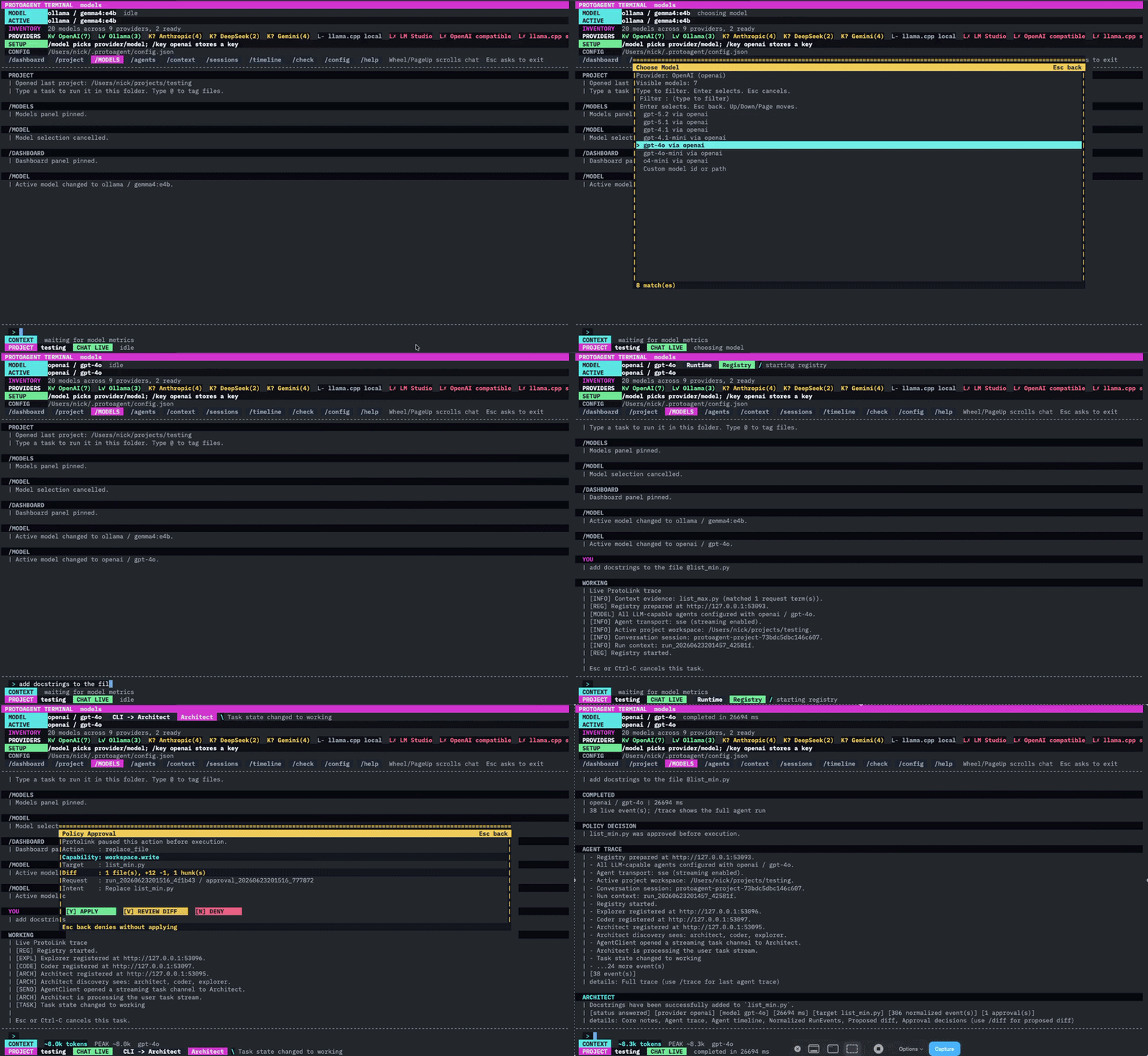
Now let’s go to the purpose of this article, the lessons learned…
Lesson 1: The “God Prompt” is a Trap for Small Models
When you build a coding assistant for a frontier model, the temptation is to write a massive system prompt, throw 20 tools at it (file reading, writing, grep, terminal execution), and let the model figure out the flow.
Compact local models often degrade quickly under that load.
If you try this with a local 7B or 8B model (like Qwen 3 Coder, Gemma 4 e4b, Llama 3), it crashes instantly. Small models suffer from context collapse when overwhelmed by complex XML tags, tool schemas, and multi-step instructions. They will hallucinate tool arguments, enter infinite exploration loops, or simply forget what you asked them to do.
To solve this, I relied on ProtoLink’s Agent-to-Agent (A2A) specification. Instead of a single “God Agent”, I broke the workflow down into a strict three-node topology:
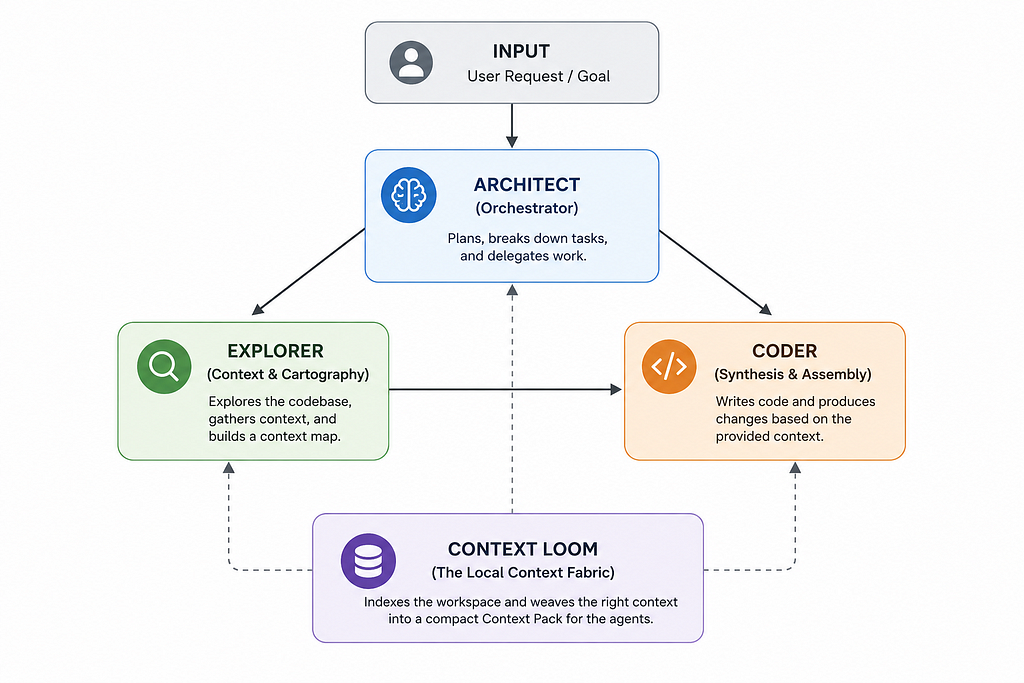
- The Architect (Orchestrator): The user-facing coordinator. It parses user intent, breaks down the task and delegates tasks to the other agents. It has no tools to touch the filesystem.
- The Explorer (Cartographer): A read-only agent. It has access to search, regex matching, directory listing, and file-reading tools. Its only job is to scan the project and compile a dense Markdown Context Map.
- The Coder (Synthesis Engine): A hyper-focused model and deliberately narrow. It doesn’t know how to search or explore. It is handed the Explorer’s Context Map and the target task, and its only tool is to output clean file modifications. The Coder’s context and attention is focused on synthesis rather than navigation and tool selection.
What I learned: By stripping file-searching complexity from the Coder, 100% of its parameter weight is dedicated to writing code. If you want small models to succeed, you must strip away their choices.
Small models succeed through constraint, not maximal autonomy. If you want a small model to behave reliably, reduce the number of decisions it must make at each step.
Lesson 2: Deterministic Context beats LLM Search
When I started, I thought, ”I’ll let the Explorer agent query the directory structure to find where the auth logic lives”, so the first version of the architecture relied heavily on Explorer.
When a user asked about authentication, Explorer would search the repository, inspect directories, read candidate files, revise its search, and eventually produce a Context Map.
That worked, but it was slow.
Therefore this was a mistake. Watching a local 7B model run 5 consecutive tool calls just to find a file path is painful and slow. At local speeds (e.g. 20–30 tokens/sec), 5 tool roundtrips can take 40 seconds of pure waiting before the model even starts writing code! By the time it begins solving the task, much of the latency and context budget has already been spent on repository navigation.
I realized that the model shouldn’t be searching the filesystem at all. A database should. So I built Context Loom, a deterministic SQLite-backed indexer.
Before the agents run, Context Loom indexes your project’s files, imports, symbols, and Markdown headings. The Context Loom, a local SQLite-backed repository smart indexer.
Before the agents run, Context Loom indexes project files and records information such as:
- File paths and language hints
- Symbols
- Imports
- Markdown headings
- Content fingerprints
- Git working-tree state
When you type a query, it uses a simple token-matching scoring algorithm to score files, so context Loom extracts query terms and scores indexed files using transparent rules.:
For example:
- Explicitly tagged path: +40
- Filename or path mentioned in the request: +24
- File currently modified in Git: +8
- Query term found in the path: +8
- Symbol match: +7
- Markdown heading match: +5
- Import match: +4
- Content match: +2
It packages the top results into a compact Context Pack containing relevant code snippets and a human-readable Evidence Ledger explaining why they were selected.
User request
↓
Context Loom builds the initial evidence pack
↓
Architect plans the task
↓
Explorer verifies or expands evidence when needed
↓
Coder produces an approval-gated modification
This resolves an important tension in the three-agent design.
Explorer still has search tools, but it is no longer expected to rediscover the repository from scratch on every run. Context Loom handles the predictable first pass; Explorer handles ambiguity.
In my testing, this has been substantially faster and more reliable than allowing a compact model to wander through the filesystem. More importantly, the process is inspectable. The user can see which files were selected and why.
What I learned: Pre-weaving context deterministically is a lot faster and more reliable in my testing than asking a local model to find its own way around a repository.
For small models, context selection should be deterministic by default and agent-driven only when uncertainty remains.
Lesson 3: File-Based IPC is Surprisingly Awesome
One of the trickiest parts of embedding Python in Rust via PyO3 is that Python runs synchronously inside a spawned thread. If the Python thread is busy waiting for a local LLM response, it blocks.
That call may remain busy for seconds or minutes while a local model generates a response or several agents coordinate. Meanwhile, the terminal must continue to:
- Display live progress
- Update context-usage metrics
- Render approval requests
- Accept cancellation
- Remain responsive to keyboard input
How do you show real-time progress events or support cancelling a run if the user hits Esc?
I considered sockets and more elaborate RPC layers for this boundary, but the simplest solution worked remarkably well: short-lived local files.
I avoided complex socket protocols or gRPC layers by implementing a simple, file-based IPC:
- Rust creates a temporary JSONL progress path such as /tmp/protoagent-progress-<pid>-run.jsonl.
- The Python core appends normalized ProtoLink run events to that file.
- Rust polls for new events every 140 milliseconds while Python runs on a blocking worker.
- Approval requests and cancellation signals use separate JSON control files.
- Control-file writes are atomic, preventing Rust from reading partially written JSON.
- When the run finishes, the temporary files are removed.
When Coder requests a write, its action contains a unified diff. ProtoLink’s policy pauses execution and invokes the application approval handler.
Rust detects the request, suspends the spinner, renders the action and diff, and asks:
Authorize this ProtoLink action? [y/N]
The default is intentionally “no.”
Rust writes a correlated approval decision, Python receives it, and ProtoLink either executes or rejects the action.
A simplified version of the Rust loop looks like this:
let mut task = tokio::task::spawn_blocking(move || {
    call_process_prompt_with_progress(
        prompt,
        workspace,
        session_id,
        progress_path,
    )
});

let json_result = loop {
    tokio::select! {
        result = &mut task => {
            progress_events.extend(progress_file.read_new());
            break result??;
        }

        _ = tokio::time::sleep(Duration::from_millis(140)) => {
            progress_events.extend(progress_file.read_new());

            if let Some(approval) =
                progress_file.take_approval_request()
            {
                let approved = pb.suspend(|| {
                    render_runtime_approval(&approval);
                    render_diff(&approval.diff);

                    Confirm::new(
                        "Authorize this ProtoLink action?"
                    )
                    .with_default(false)
                    .prompt()
                })?;

                progress_file.decide(&approval, approved)?;
            }

            pb.set_message(
                latest_progress_message(&progress_events)
            );
        }
    }
};
This file channel is specifically the Rust-to-Python progress and control bridge. ProtoLink’s agents still communicate through their own local transports (SSE by default) in the current implementation.
What I learned: You don’t need complex communication architectures for local developer tooling. Simple, file-based synchronization is incredibly robust and easy to debug. Therefore, local files are an excellent control surface when the messages are small, temporary, inspectable, and written atomically. They are not the answer to every distributed-systems problem. For one CLI coordinating with one embedded runtime, however, they are pleasantly boring, and boring infrastructure is often good infrastructure.
The Hard Engineering Problems You Only Discover by Building It
When you are designing these systems, you read papers about agent topologies and context architectures. But when you start coding, the real showstoppers are much more down-to-earth:
Architecture diagrams make agent systems look elegant. The real problems are often much less glamorous.
1. The VRAM vs. Context Size Memory Sloshing
When using local LLM backends like Ollama or LM Studio, you have to configure the context length (num_ctx).
If the window is too small, the backend may reject large prompts, truncate useful information, or leave too little room for conversation history and generated code. If you leave it at the default (often 2,048 tokens), your agent will run out of space and crash or drop context immediately.
If it is too large, the KV cache consumes substantially more memory. Depending on the model, quantization, backend, and hardware, this can cause memory pressure or CPU offloading that dramatically reduces generation speed. Therefore If you set it to a massive value (like 32,000 tokens) on a standard 16GB RAM laptop, the Key-Value (KV) cache will balloon, overflow your GPU’s VRAM, and silently drop back to CPU offloading. Suddenly, your generation speed tanks from a snappy 40 tokens/sec to an agonizing 1.5 tokens/sec. In my experiments, an overly ambitious context setting could turn interactive generation into something painfully slow. The exact threshold is hardware-specific, but the underlying trade-off is universal: a model supporting a large theoretical context window does not mean your machine can run that window efficiently.
Finding that balance by capping your context packs to 8k or 16k to keep inference running purely in GPU VRAM is critical.
ProtoAgent therefore treats context as an explicit budget.
For Ollama, the configured window is passed as num_ctx. The same value is recorded in the model’s metrics profile, allowing the terminal to display how much of the available context is being used. Context Loom also bounds the number and size of included snippets rather than filling every available token.
The best local context window is not the largest one the model advertises. It is the largest one your hardware can sustain without destroying interactivity.
2. The Pydantic Shield (Dealing with Bad JSON formatting)
Compact models frequently produce almost-correct structured output.
They may wrap JSON in Markdown fences, add a conversational preamble, use an older action shape, omit a required field, or provide an argument with the wrong type.
Without a defensive runtime, one malformed response can derail the entire loop. ProtoLink handles this in layers:
- It attempts to parse the response as JSON.
- If the model added surrounding text, it extracts the enclosed JSON object.
- It applies a small number of unambiguous action-shape repairs.
- It validates the result against typed Pydantic action models.
- If validation fails, it returns concise field-level diagnostics so the model can correct the specific mistake.
The goal is not to guess what arbitrary broken JSON was supposed to mean. Overly aggressive repair would be dangerous. The goal is to tolerate harmless formatting noise while preserving a strict runtime contract.
Be lenient about presentation, but strict about meaning.
3. Session State: Keeping the Conversation Alive
Coding conversations are rarely single-turn. A user may first request a refactor, then say:
Now add a unit test for that module.
That follow-up only works if the model receives the relevant conversation state.
ProtoAgent separates two kinds of history.
The Rust CLI stores a project-level session ledger in:
~/.protoagent/sessions.json
This is the human-facing timeline. It records prompts, answer previews, models, timings, approvals, and run events for the terminal UI.
The actual model-facing conversation state lives in ProtoLink’s per-agent SQLite storage:
~/.protoagent/conversations.sqlite
Architect, Explorer, and Coder have isolated conversation namespaces, but they share the same stable project session identifier. When a project session resumes, ProtoAgent checks each agent’s history against the configured model context window. If the stored history exceeds its budget, the Python core uses ProtoLink’s history compaction before the next inference.
This distinction matters:
A timeline displayed by the UI is not automatically memory available to the model.
Keeping those responsibilities explicit prevents the interface’s session history and the model’s conversation history from silently drifting apart.
The Honest Verdict
Building ProtoAgent has been one of the most useful hands-on lessons I have had in agent engineering.
We are not at the point where a local 7B model can build an entire application from scratch while you go watch a movie. They still hallucinate imports, struggle with complex cross-file abstractions, misunderstand tool schemas and require careful hand-holding.
But local agentic coding is not science fiction either. It is an engineering problem involving:
- Clear role boundaries
- Small, explicit tool surfaces
- Deterministic context selection
- Typed runtime contracts
- Context-budget management
- Persistent conversation state
- Human approval before side effects
The model is only one component.
Much of the quality comes from the system surrounding it and what context the model sees, which choices it is allowed to make, how its output is validated, and where a human can interrupt the process before it does something silly.
That is the most important thing ProtoAgent has taught me so far.
If you want to look at the code, play with the prompt topologies, contribute or check out the underlying ProtoLink core, everything is open source:
👉 protoagent repo: https://github.com/nMaroulis/protoagent
👉 protolink repo: https://github.com/nMaroulis/protolink
Feel free to spin it up, break it and let me know what you find!
Building My Own Local “Claude Code”: What I Learned Demystifying Agentic Coding under the Hood was originally published in Level Up Coding on Medium, where people are continuing the conversation by highlighting and responding to this story.
This content originally appeared on Level Up Coding - Medium and was authored by Nikos Maroulis

Nikos Maroulis | Sciencx (2026-06-24T16:38:11+00:00) Building My Own Local “Claude Code”: What I Learned Demystifying Agentic Coding under the Hood. Retrieved from https://www.scien.cx/2026/06/24/building-my-own-local-claude-code-what-i-learned-demystifying-agentic-coding-under-the-hood/
Please log in to upload a file.
There are no updates yet.
Click the Upload button above to add an update.